How to create Tet photos using AI helps solve worries about time and preparation conditions when the Lunar New Year is near. Instead of jostling at crowded photo spots, you can sit at home and create spring-filled photos with the support of technology. Let’s learn about this interesting process with AnonyViet.
| Join the channel Telegram belong to AnonyViet 👉 Link 👈 |
Preparation steps before starting
Before starting the technical operations, the most important factor to have a beautiful and realistic AI photo is your input photo. Chief Gemini Google’s ChatGPT and OpenAI’s ChatGPT are both highly rated for their image processing capabilities, but they need good data to work.
In order for AI to recognize and reproduce faces most accurately, you should choose a straight-face portrait photo. The clearer the image, the better lighting, and the unobscured facial features will help the final result look more natural and artistic.
Instructions on how to create Tet photos using AI
Step 1: You access Gemini’s website address (gemini.google.com/app) and click the “Log in” in the right corner of the screen to access with your Gmail account (skip this step if your browser has automatically logged in).
Step 2: At Gemini’s main interface, find the plus symbol (“+”), select “Upload files” and select the prepared portrait photo in the device.
Step 3: Click on the “Tools” located at the bottom, select the feature “Create images”, then paste the description command (prompt) into the chat frame for AI to start processing.

Sample commands help create Tet photos for women
Below are optimized commands (prompts) in Vietnamese so you can copy and use immediately.
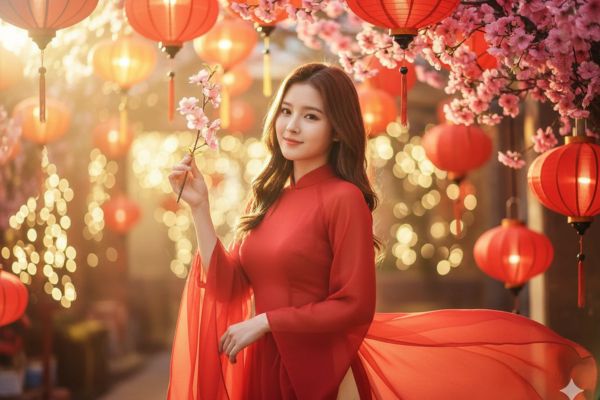
Fairy tale style with lanterns and peach blossoms:
“Tạo cho tôi một bức chân dung gương mặt trung thực như mẫu. Thiếu nữ khoác áo dài voan sắc đỏ, đứng giữa không gian tràn ngập lồng đèn và hoa xuân, bàn tay nâng nhẹ một nhánh đào nhỏ. Ánh nắng chiếu xuyên qua những chiếc đèn, tạo hiệu ứng flare dịu, ánh sáng mờ ảo và bokeh lấp lánh. Bảng màu đỏ – cam – vàng chủ đạo, phong vị Tết huyền ảo, chất điện ảnh lãng mạn, mang cảm xúc tươi vui.”
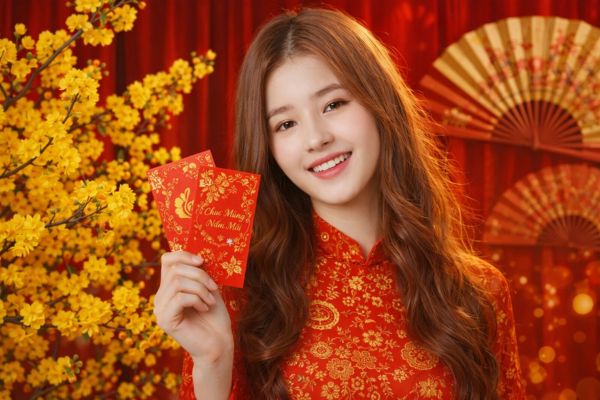
Style of holding a lucky money envelope with apricot flowers:
“Hãy dựng cho tôi một bức chân dung gương mặt giống hệt mẫu gốc. Cô thiếu nữ diện áo dài hoa văn truyền thống, đứng cạnh cành mai vàng đang khoe sắc, tay cầm phong bao đỏ, nụ cười tỏa sáng. Phía sau là phông nền rèm đỏ cùng quạt giấy trang trí Tết. Ánh sáng cân bằng, gam màu đỏ – vàng nổi bật, phong cách ảnh Tết cao cấp mang tính thương mại, sắc sảo và rực rỡ.”
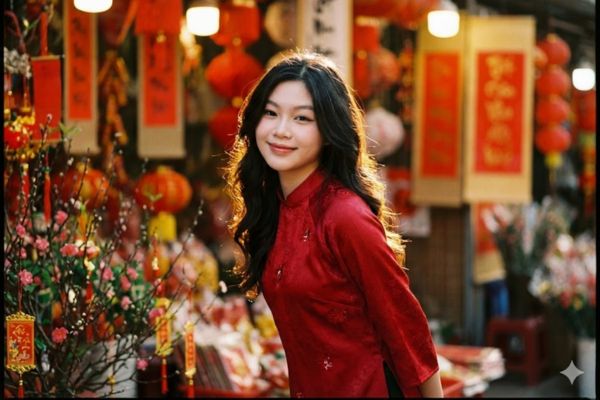
Classic street cinema style:
“Hãy tạo cho tôi một bức chân dung gương mặt y hệt mẫu gốc. Cô thiếu nữ diện áo dài đỏ, đứng tạo dáng hơi khom người, ánh nhìn hướng về ống kính, mái tóc uốn lượn nhẹ. Không gian là quầy Tết truyền thống với những chiếc lồng đèn đỏ treo cao. Nguồn sáng ngược dịu, viền sáng ôm trọn mái tóc, phông nền xóa mờ sâu, tông màu phim cổ điển, cảm xúc êm ái, phong cách điện ảnh chân thật.”
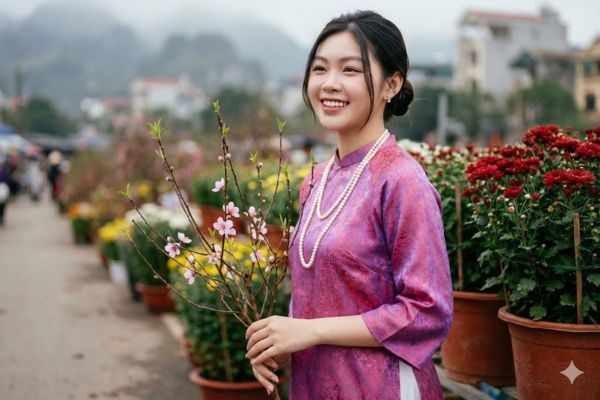
Authentic style at the flower market:
Hãy dựng cho tôi một bức chân dung gương mặt giống hệt mẫu. Ảnh chụp ngoài trời cực kỳ chân thực tại chợ hoa Tết Việt Nam. Một phụ nữ trẻ người Việt với làn da sáng mịn, lớp trang điểm nhẹ tự nhiên, mỉm cười lộ hàm răng, góc máy nghiêng ba phần tư hướng về bên phải.

Mái tóc búi thấp gọn gàng, vài lọn tóc mềm khẽ bay, đeo đôi bông tai nhỏ tinh tế. Cô khoác áo dài truyền thống Việt Nam bằng lụa gấm sắc hồng tím nổi bật với độ óng nhẹ, kết hợp quần dài màu trắng. Trên cổ là sợi dây chuyền ngọc trai hai vòng thả xuống trước ngực.

Bàn tay trái cầm một nhánh đào nhỏ gồm cành nâu mảnh, vài bông hoa hồng nhạt cùng những chồi lá xanh tươi. Cô đứng cạnh các chậu hoa đỏ rực trong những bình đất nung lớn ở bên phải khung hình; phía sau là lối đi với nhiều chậu hoa khác.

Hậu cảnh được xóa mờ mạnh với hiệu ứng bokeh mềm mại: những tòa nhà xa và dãy núi phủ sương dưới bầu trời u ám. Ánh sáng ban ngày dịu nhẹ, màu sắc điện ảnh trầm êm, lấy nét sắc vào gương mặt và trang phục, độ sâu trường ảnh nông, nhiếp ảnh chuyên nghiệp, chi tiết cao, kết cấu da chân thực, không làm mịn hay chỉnh sửa
Sample command to create elegant Tet photos for men
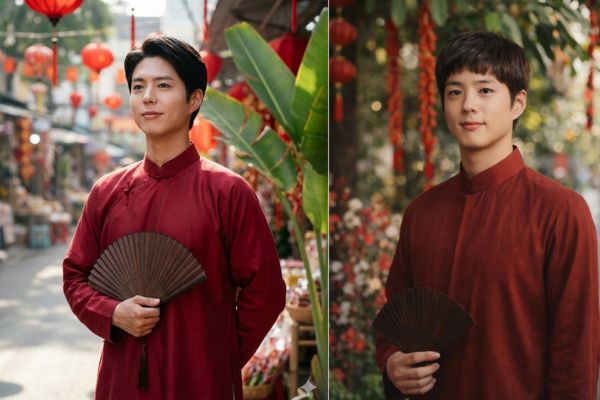
Not only women, men can also apply the method of creating Tet photos using AI to have masculine and traditional ao dai photos.
Masculine style at Tet market:
Dùng đúng gương mặt nam từ ảnh tham chiếu, bảo toàn tỷ lệ khuôn diện, ánh nhìn trầm tĩnh và sắc da tự nhiên. Khung dọc 4:5, chụp ba phần tư cơ thể trong cùng bối cảnh chợ Tết Á Đông ngoài trời với dây treo đỏ và tán lá lớn phía sau, hậu cảnh có chiều sâu, không gian vắng người.

Nguồn sáng tự nhiên hắt từ bên hông, không tạo bóng gắt, giữ rõ màu da và mái tóc. Hiệu ứng bokeh làm nhòe nền. Trang phục là áo dài nam truyền thống tông đỏ trầm hoặc đỏ son, cổ đứng, dáng suông, chất lụa mờ, đứng phom, không ánh nhựa.

Đạo cụ là quạt gỗ sẫm hoặc món trang trí Tết nhỏ cầm nhẹ trước thân, bảng màu đỏ – trắng – xanh lá hài hòa, sang trọng và không khí lễ xuân. Biểu cảm mỉm cười rất nhẹ hoặc điềm đạm, ánh mắt lệch về phía nguồn sáng. Ánh sáng điện ảnh tự nhiên. Tư thế đứng thư thái, vai thả, cổ thẳng, một tay giữ đạo cụ, phong thái lịch thiệp
Frequently Asked Questions (Q&A)
1. Is there a fee for using ChatGPT and Gemini to create images?
Currently, both tools have free versions for users to experience. However, paid versions (like ChatGPT Plus or Gemini Advanced) will often provide faster and higher quality image creation.
2. How can I make the face in the AI photo look exactly like my real photo?
To achieve the highest similarity, you need to provide a front-facing, clear, unobstructed input photo. In addition, in the command (prompt), always start with the request: “Create me a face image exactly like the original” or “Preserve facial proportions and identifying features”.
3. Can I use AI-generated photos for large-format wall prints?
The quality of AI-generated photos is usually good enough for social media posting or small-format printing. If you want to print large format wall hangings, you may need to use other AI tools to upgrade the resolution (upscale) to make the photo sharper before printing.
Conclude
The application of technology in life is becoming more and more interesting, and How to create Tet photos using AI is a clear proof of that. With just a little creativity and patience with the commands, you can own a unique set of spring vacation photos without spending too much effort. Hopefully with the detailed instructions above, you will create beautiful photos to welcome the new year brilliantly.