How to create Seedance 2.0 videos for free is a keyword that many people search for in Vietnam like “What is Seedance 2.0”, “how to make a 12s AI transformation video”, “AI face transplant like Douyin”, or “download Douyin videos without logo”. The reason is very simple: the 12-second cinematic transformation trend is exploding on TikTok/Reels/Shorts. It looks complicated but actually you can do it with just Douyin + Jimeng AI (即梦AI)then download the clean version to repost.
📢 Join the channel Telegram belong to AnonyViet
Update new articles, cool tools and IT tips fastest
In this article, AnonyViet will guide you create Seedance 2.0 videos for free Follow the process that is working stably: install Douyin, register an account, link Jimeng AI, create facial data, choose Seedance 2 template, export video and finally download no watermark via VMedia.
How to create a free Seedance 2.0 video: Prepare before doing
To operate smoothly (prevent OTP errors, prevent app crashes, prevent “template not showing”), you should prepare a few basic things in advance: some Vietnamese phones are using OTP, stable network (WiFi priority), and enough light when recording facial data. If you are using an iPhone, the App Store roaming step is the most important. If you use Android, you can install directly from Douyin/Jimeng’s official source to avoid the APK being edited.
If you want to read more about Seedance 2.0 overview (mechanisms, templates, free limits…), you can check out this article: Instructions for using Seedance 2.0.
Instructions on how to create free Seedance 2.0 videos (12s AI transformation)
Below is the full process, just follow it step by step to create a video. I write in a “hands-on” style, true to AnonyViet’s style: less colorful, focusing on common mistakes and how to handle them.
Step 1: Install the Douyin application
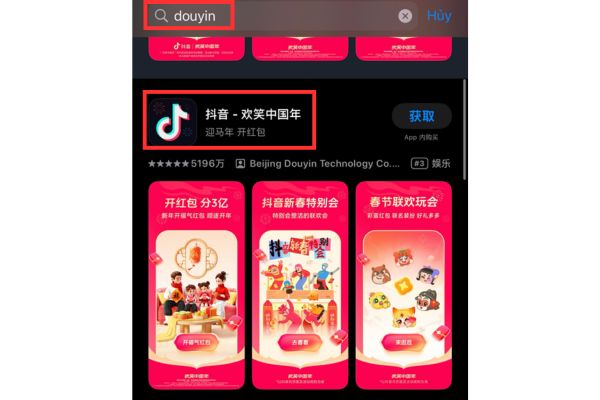
Douyin is the Chinese domestic version of TikTok, so App Store Vietnam is usually not displayed. If you use an iPhone, you need to change the App Store region “Mainland China” then search for keywords Douyin to download. For Android, you can search on a compatible app store or download the APK from Douyin’s official source to install it manually (priority is given to official sources to avoid apps being tagged with ads/rights stolen).
Step 2: Register a Douyin account with a Vietnamese phone number (+84)
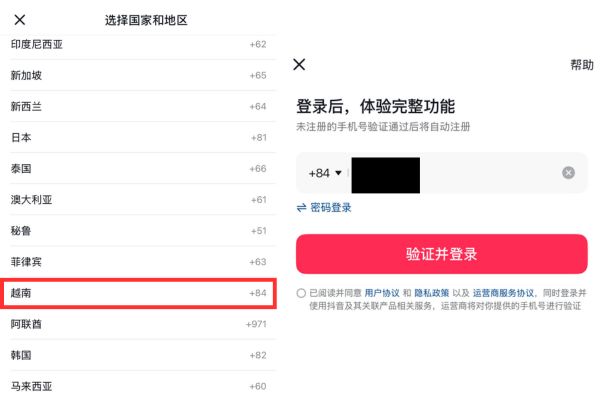
Open Douyin, select the area code +84 and enter phone number to receive OTP. In Vietnam, there is a rather “weird” but common situation: OTP code sometimes comes to Zalo (if your number is linked to Zalo) instead of SMS. So when waiting for OTP, you should open both SMS and Zalo messages to check.
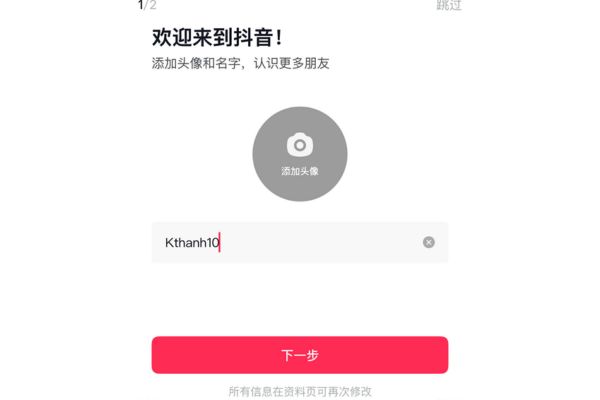
After authentication, you fill in basic information such as username, gender, age to complete the profile. You should give a “reasonable” name and information to avoid being suspected by the system as a spam account (some new registration machines are too “virtual” and easily require additional verification).
Step 3: Download Jimeng AI (即梦AI) and login link with Douyin
You access Jimeng home page and click download application 即梦AI about the machine. Sometimes the download link may be temporarily “frozen” due to the coordination system. If you encounter an error message, you just need to wait a few minutes and then log back in.
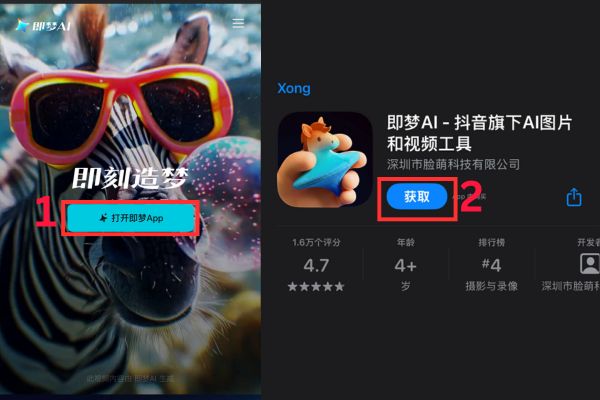
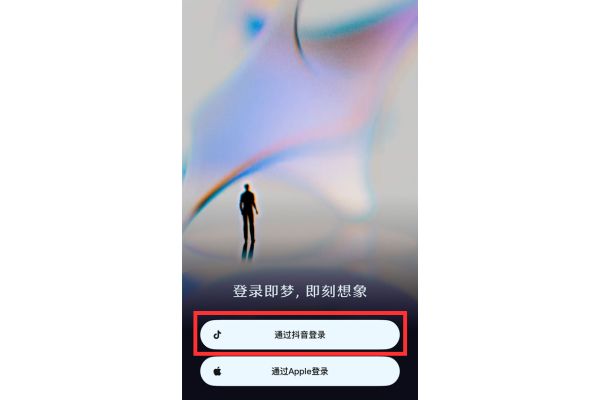
After installation, open Jimeng AI and select Log in with Douyin account just created for synchronization. This is the “key” step in how to create Seedance 2.0 videos for free because many templates/credit systems will follow Douyin accounts.
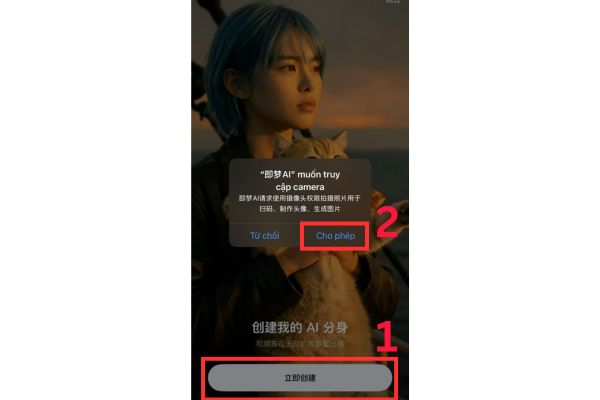
Step 4: Create sample face data for AI to learn
You record a facial video of approx 10 secondsfollow the instructions to rotate left/right, look up/down. Tips to get “less fake” results are: stand in a well-lit place, not backlit, don’t wear sunglasses, don’t cover your forehead with your hair, and limit shaking. The clearer the facial data, the better the graft will be, with less lip deviation and tilt angle distortion.
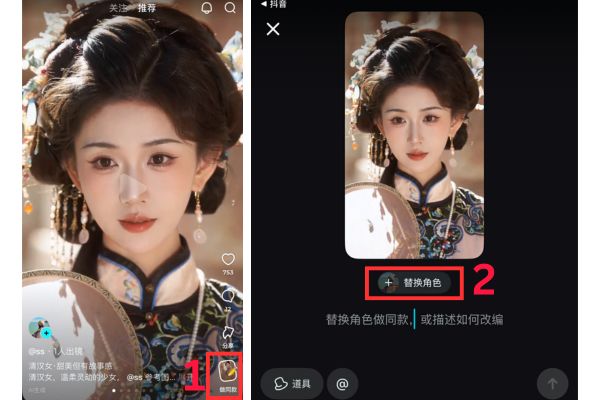
Step 5: Choose the Seedance template and create a 12s transformation video
In Jimeng AI, you choose a hot video template (template), then click the icon pen for editing. Next press plus sign (+)choose the correct profile of your face for AI to match and reconstruct the video. If the computer is weakly configured, the rendering may take a little longer, but most of the time it will still run fine if the network and memory are free enough.
Step 6: Post the video to Douyin and copy the link
When the video is finished creating, go to the draft section and click post videos (choose public mode). Once the video appears on your profile, click Share and choose Copy link (Copy Link). This link is used to download the watermark-free original in the next step.
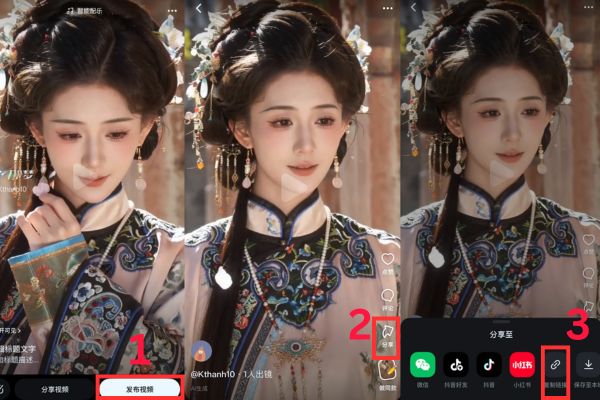
Step 7: Download Seedance 2.0 video without logo via VMedia
You access the website VMedia.Airegister/log in, then go to Applications and select “Seedance 2 – Download”. If you want to go straight to the tool, you can open the direct link here: HERE.
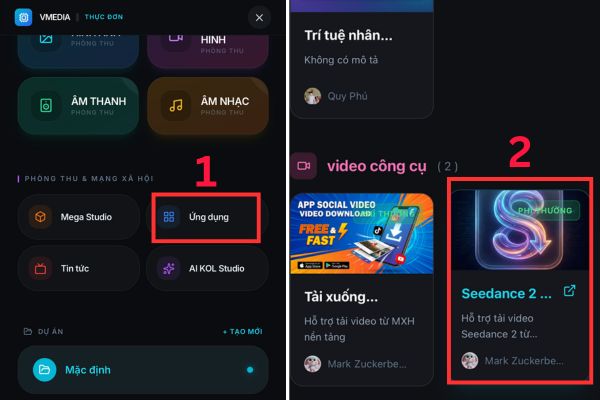
Finally, paste the Douyin video link you just copied into the blank box to download the clean video copy. Usually the tool will keep the best quality according to the posted version, while removing the default watermark/logo.
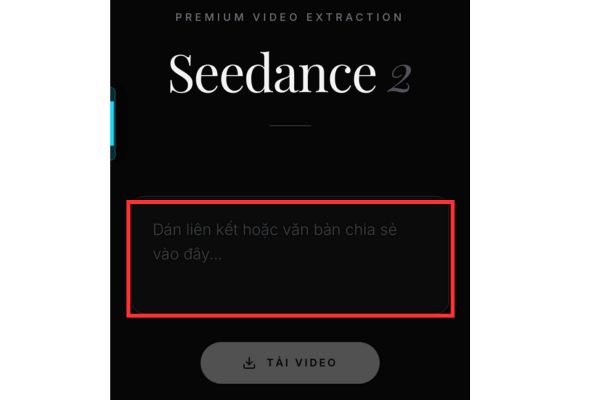
Optimal tips to make videos “look like real people” and trend more easily
If you do it once and see “the face is a bit fake” or “the scene transitions don’t match”, don’t rush to conclude that the AI is bad. Quality depends a lot on face data and templates. You can return to the face data with better lighting, keep the face in the center of the frame and follow the instructions correctly. When choosing a template, priority should be given to models with moderate movement, little shaking, and little face covering (mask, flying hair, covering hands). Once done, post it on TikTok/Shorts, you just need to add a short, trendy caption like “12 second transformation”, “AI transformation”, along with a few enough hashtags, avoid stuffing too much.
Small note: Downloading “no logo” videos may be related to platform/tool terms. You should use it for personal purposes, create legal content, avoid illegally reuploading other people’s content or using it to impersonate/mislead.
Frequently Asked Questions (Q&A)
1) Why can’t I find Douyin on the Vietnam App Store?
Douyin is an application serving the Chinese domestic market. Therefore, you often have to switch Apple ID/App Store regions Mainland China Only then can you find and download it.
2) What if I don’t receive the OTP code when registering for Douyin?
OTP sent to Vietnam sometimes flickers. Please check both SMS confused Zalo (if the phone number has a Zalo link). In addition, trying again at a different time frame or changing to another network (WiFi/4G) can also improve the code reception rate.
3) Are videos downloaded from VMedia of high quality?
Normally VMedia will take the exact quality of the video you posted to Douyin/Jimeng and remove the watermark. However, the final quality still depends on the template and your original video export settings.
Conclusion
So you have understood the whole process how to create Seedance 2.0 videos for free according to the “right post” style: Douyin to post and get the link, Jimeng AI to match the face + render the Seedance template, then download the clean version to post on the platform you want. If you get used to it, each video only takes a few minutes, the rest is choosing a template and adjusting the vibe.
Based on your instructions Bui Quang Thai