Word is a powerful application, but the configuration interface is not very intuitive. You can easily change the font in Word, but every time you create a new document the font returns to the default font. So, in this article, I will show you how to change the default font in Microsoft Word.
📢 Join the channel Telegram belong to AnonyViet
Update new articles, cool tools and IT tips fastest
How to change the default font in Word
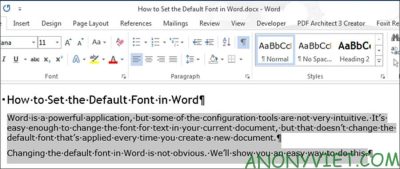
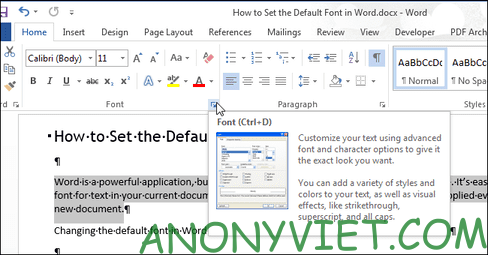
Open or create a new Word document. Select the text and click the arrow button next to “Font” in the “Font” section of the “Home” tab.
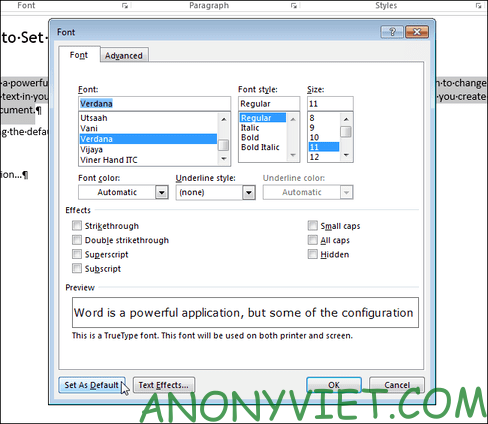
On the “Font” dialog box, select the font you want to set as default in the “Font” list and click the “Set As Default” button.
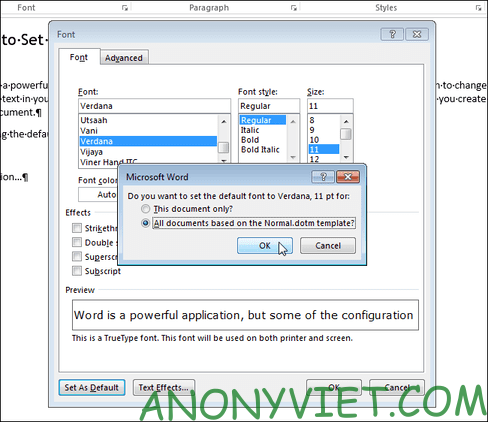
A dialog box will ask whether you should set the default font for the current document only or for all other documents. Select “All documents based on the Normal.dotm template” and click “OK”.
NOTE: The new default font is only saved to the template currently in use. Existing documents will not be changed the next time they are opened.
For documents in Vietnam, you should follow the parameters: Times new Roman and font size 13 or 14, so that you don’t have to edit too much when writing the document later.
If you have a custom template applied to the current document, the default font will be saved in that template and not in another template. The easiest way to change the default font in another template is to create a new document and then follow the steps in this article.
So you have successfully changed the default font in Microsoft Word. Now, you don’t need to change the font anymore. All you need to do is open Word and work without worrying about fonts anymore. Additionally, you can also attach viruses to word files here.
Frequently asked questions
Can I change the default font for all my Word documents?
Maybe. After selecting the desired font, select “All documents based on the Normal.dotm template” in the confirmation dialog box to apply to all new documents based on the standard template.
If I already have multiple Word documents, will changing the default font affect them?
Are not. The change only affects new Word documents created after the change. Existing documents will retain the old font.
Where is the default font saved?
The default font is saved in the template being used, usually Normal.dotm. If you use a custom template, the font will be saved in that template.