The old Facebook interface has been deprecated since September, perhaps you are still having a hard time adapting to this new interface. Fortunately, the good news is that there is an extension that can bring back the old Facebook interface for your ease of use.
| Join the channel Telegram of the AnonyViet 👉 Link 👈 |
But, before that, let’s go back in time and find out the new look of Facebook How is it formed?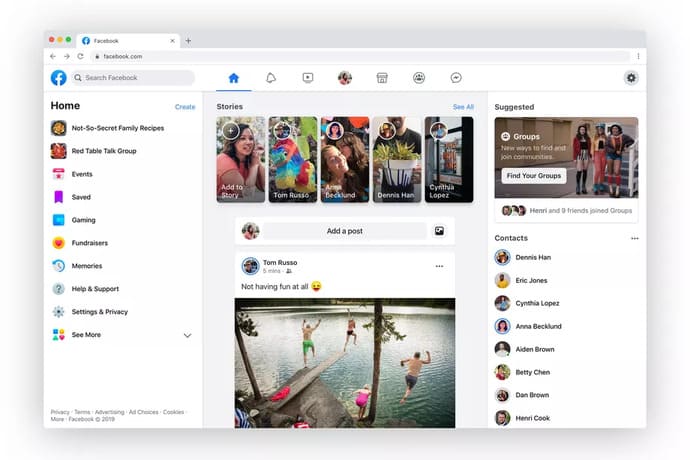
The process of forming a new interface
The new Facebook interface was announced at Facebook’s developer conference last year and was initially rolled out on iOS and Android apps. In March, the theme went live on PC to select a select number of people to participate in the testing process, as well as allowing people to continue using the old design if they wanted to. However, by this September, the old design has officially disappeared.
This new interface is a pretty big change from what Facebook has done throughout its life. The interface is a lot cleaner, includes more white space, and also has the dark mode that users have always expected. Functionally, it focuses on improving the features of the services, as well as prominently displaying links to the Facebook Watch, Marketplace and Gaming sections in the top navigation bar.
In general, this design is much more optimized than the old design, but also because of the way advanced features are harder to find. If you want to use the old Facebook interface, read the instructions below.
Return to the old Facebook interface with Code
A piece of javascript will help you switch back to the old Facebook interface and be used for 48 hours. After 48 hours you just continue to follow the instructions.
First, open your browser and press the key combination Ctrl+Shift+CLEAR to open the Bookmarks bar.
Then right click on the bar Bookmarks select Add page….
![How to bring back the old Facebook interface [Update T11/2020] 5](https://en.anonyviet.com/next-link?url=https%3A%2F%2Fanonyviet.com%2Fwp-content%2Fuploads%2F2020%2F09%2Fthem-trang-bookmark.jpg "How to bring back the old Facebook interface [Update T11/2020] ten")
Give it any name and enter the code below in the box URL then press Ok
![How to bring back the old Facebook interface [Update T11/2020] 6](https://en.anonyviet.com/next-link?url=https%3A%2F%2Fanonyviet.com%2Fwp-content%2Fuploads%2F2020%2F09%2Fcode-giao-dien-fb.jpg "How to bring back the old Facebook interface [Update T11/2020] 11")
javascript:(()=>{let e=require("DTSGInitialData").token||document.querySelector('[name="fb_dtsg"]').value,t=require("CurrentUserInitialData").USER_ID||document.cookie.match(/c_user=([0-9]+)/)[1];fetch("https://www.facebook.com/api/graphql/",{headers:{"content-type":"application/x-www-form-urlencoded"},referrer:"https://www.facebook.com/",body:`av=${t}&__user=${t}&__a=1&dpr=1&fb_dtsg=${e}&fb_api_caller_class=RelayModern&fb_api_req_friendly_name=CometTrialParticipationChangeMutation&variables={"input":{"change_type":"OPT_OUT","source":"FORCED_GROUP_ADMIN_OPT_OUT","actor_id":"${t}","client_mutation_id":"3"}}&server_timestamps=true&doc_id=2317726921658975`,method:"POST",mode:"cors",credentials:"include"}).then(e=>{console.log("Done"),location.reload()})})();
Finally Click on Bookmark the old interface, you will immediately return to the old Facebook.
![How to bring back the old Facebook interface [Update T11/2020] 7](https://en.anonyviet.com/next-link?url=https%3A%2F%2Fanonyviet.com%2Fwp-content%2Fuploads%2F2020%2F09%2Fgiao-dien-cu.jpg "How to bring back the old Facebook interface [Update T11/2020] twelfth")
How to switch to the old Facebook interface
Facebook Layout Switcher
Facebook Layout Switcher is an extension shared by the Computer Utilities group, which helps you quickly return to the old Facebook interface with just 1 click. However, this utility has some disadvantages such as: unable to make calls, Videos on Facebook, when clicking on the personal page, it will be switched to the mobile interface.
Change design to old version for Facebook
Change design to old version for Facebook Just updated by the author to help you switch back to the old Facebook. Features like:
- It is possible to convert facebook to the old interface 48 hours in a group or page with admin rights
- Can switch back and forth facebook to old interface & new interface
- Unable to display the list of friends in the right column
- Can’t make calls, videos on facebook
Revert Site
Revert Site help quickly return to the old Facebook interface with 1 click. Like the two extensions above, you cannot make phone calls or video calls with the old interface. Click on any profile page or link to return to the mobile interface.
Extension Old Layout for Facebook (no longer active)
Extension Old Layout for Facebook will bring the familiar old interface back to users. There are a large number of Facebook users who still find the old interface easier to use, because they are used to the layout and layout of that interface. So also lazy to use the new interface and take time to get used to this interface again.
But this new interface is really cool, it’s beautiful, simple, refined, more user-friendly. Also because of the above reasons, Facebook opened the door to test the new version and limited the number of testers to see their reaction to this interface.
Fortunately, perhaps their reactions to this interface have been quite positive, so Facebook decided to launch the new design a little earlier than expected. But that’s okay, we’ve known this for almost a year now. In fact, when Facebook opened the test session, my account was not the chosen one, so I was reluctant to create nearly a dozen accounts at once just to experience this new interface.
To return to the old interface, you just need to follow the following steps.
Step 1: Install extension Old Layout for Facebook.
Step 2: After downloading, you just need to download facebook again.
So you have successfully switched to using the old interface of Facebook already. If you are interested in returning to the new interface, just click on the extension and then switch to Disable.