• Home
  • News
  • Software
  • Knowledge
  • MMO
  • Tips
  • Security
  • Network
  • Office
AnonyViet - English Version
  • Home
  • News
  • Software
  • Knowledge
  • MMO
  • Tips
  • Security
  • Network
  • Office
No Result
View All Result
  • Home
  • News
  • Software
  • Knowledge
  • MMO
  • Tips
  • Security
  • Network
  • Office
No Result
View All Result
AnonyViet - English Version
No Result
View All Result

How to Automatically Forward Emails in Gmail

AnonyViet by AnonyViet
January 26, 2023
in Tips
0

If you regularly forward emails to your other gmail account, why not automate these actions? Use the filter feature in Gmailyou can automatically forward certain emails as they arrive in your mailbox.

Join the channel Telegram of the AnonyViet 👉 Link 👈

How to Automatically Forward Emails in Gmail

Unlike forwarding an individual email in Gmail, creating a filter for automation requires you to connect that forwarding email address. If you’re all set, then you should follow the steps below.

Open Filter Setup

You can open Filter Setup in Gmail easily in one of three ways. Use whichever is easiest or most convenient.

Click the gear icon to enter Settings, then tap “See All Settings”. Select the “Filters and Blocked Addresses” tab and click “Create a New Filter”.

How to automatically forward Email in Gmail 16

If you have just set up a forwarding address in the Forwarding and POP/IMAP tab, you can also find it by going to “Create a New Filter”.

How to automatically forward Email in Gmail 17

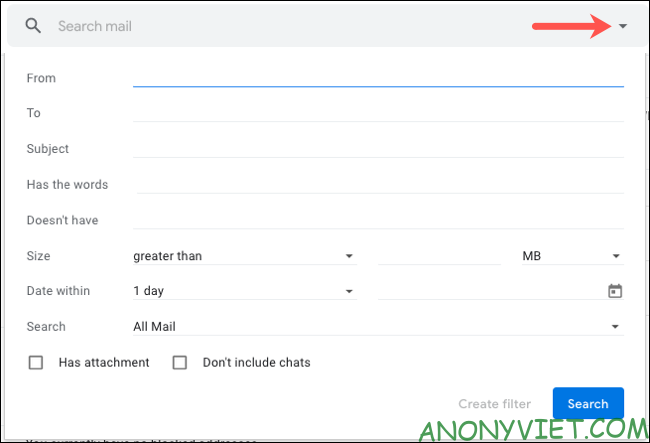
However, you can also use the Search box at the top of Gmail. Click the arrow to the right of the search box. This combines email search with filter creation.
How to automatically forward Email in Gmail 18

Enter filter condition

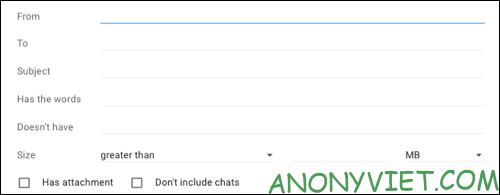
You will see the most common entries where you can enter the conditions you want. These include From, To, Subject, Has the Words, Doesn’t Have the Words, and Size. You can also choose whether emails contain attachments and include chats.
How to automatically forward Email in Gmail 19

Fill in the fields to identify the email you want to forward. Here are some examples to help you better understand how to do this.

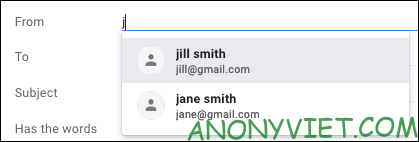
Maybe this Gmail account is for work, but you often receive personal emails. You can enter email addresses for friends and family members in the From field. Then forward the messages to your personal account.
How to automatically forward Email in Gmail 20

If you are planning an event and want to forward all emails related to that event to another email address. Type the words you want into Has the Words or Doesn’t Have if they appear in the body of the email. You can also use the Subject field if you want.
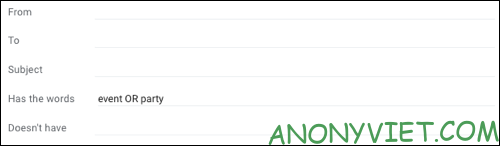
How to automatically forward Email in Gmail 21

When you have entered all the conditions you want, click “Create Filter”.
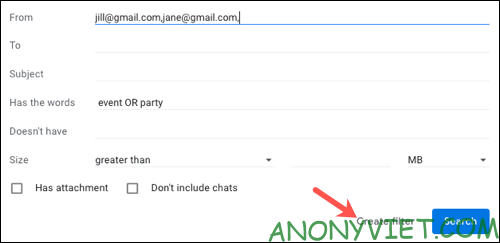
How to automatically forward Email in Gmail 22

Choose action for filter

Next, you’ll choose actions for the email based on the conditions you just entered. Tick ​​“Forward It To” and select a forwarding email address.
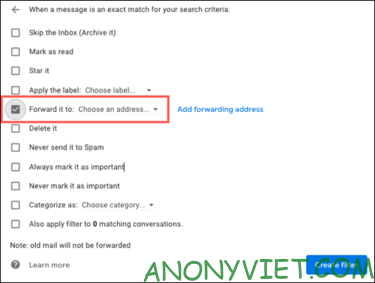
How to automatically forward Email in Gmail 23

You can also select more actions if you want. For example, mark an email as read or delete it. Once you’ve made your selection, select “Create Filter”.
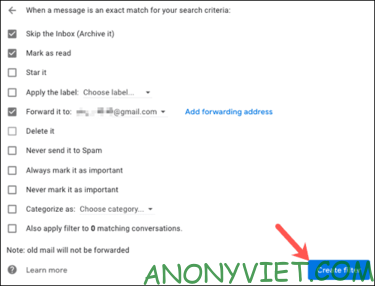
How to automatically forward Email in Gmail 24

Note: After you create a filter, it will only forward new emails sent to your Gmail inbox. If you want the emails you’ve received forwarded, you’ll have to do it yourself.

Edit filters or stop email forwarding

You can edit or delete a filter you create in Gmail at any time. Click the gear icon to enter Settings, then tap “See All Settings”. Select the Filters and Blocked Addresses tab to see a list of your current filters.
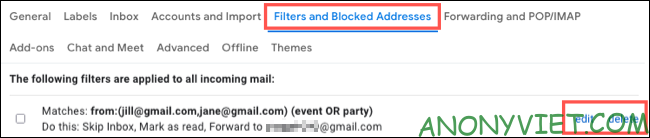
How to automatically forward Email in Gmail 25

To change, tap “Edit” to the right of the filter. After adjusting, select “Update Filter”.
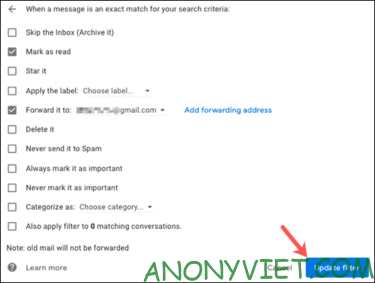
How to automatically forward Email in Gmail 26

To stop using and remove a filter, click “Delete” to the right of the filter. Then confirm by pressing “OK”.
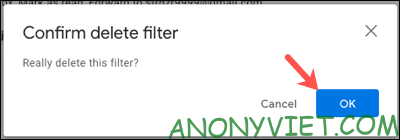
How to automatically forward Email in Gmail 27

In addition, you can also use Ghunt to find other people’s information when you know gmail here.


The article achieved: 5/5 – (100 votes)

Tags: AutomaticallyemailsGmail
Previous Post

How to create free Cisco Windows VPS 3 days without VISA

Next Post

Should you buy a MacBook Pro 2021 for gaming?

AnonyViet

AnonyViet

Related Posts

How to change the default font on Windows 10
Tips

How to change the default font on Windows 10

April 13, 2026
5 tips for using a Browser to replace an App (helps save RAM, time and money)
Tips

5 tips for using a Browser to replace an App (helps save RAM, time and money)

April 13, 2026
How to make funny MeMe photos without Photoshop within 10 seconds
Tips

How to make funny MeMe photos without Photoshop within 10 seconds

April 11, 2026
How to quickly design your own Logo without Photoshop
Tips

How to quickly design your own Logo without Photoshop

April 10, 2026
How to convert Website into App on Windows
Tips

How to convert Website into App on Windows

April 9, 2026
Instructions for getting 3 months of Adobe Express Pro for free
Tips

Instructions for getting 3 months of Adobe Express Pro for free

April 9, 2026
Next Post
Should you buy a MacBook Pro 2021 for gaming?

Should you buy a MacBook Pro 2021 for gaming?

0 0 votes
Article Rating
Subscribe
Login
Notify of
guest

guest

0 Comments
Oldest
Newest Most Voted
Inline Feedbacks
View all comments

Recent News

How to avoid Adblock detection on Youtube with 4 good tips

How to avoid Adblock detection on Youtube with 4 good tips

April 17, 2026
How to transfer ChatGPT data to Claude is extremely simple

How to transfer ChatGPT data to Claude is extremely simple

April 16, 2026
How to authenticate the owner’s SIM on VNeID from April 15

How to authenticate the owner’s SIM on VNeID from April 15

April 15, 2026
Speak Cells: Excel tool to read spreadsheets by voice very well

Speak Cells: Excel tool to read spreadsheets by voice very well

April 15, 2026
How to avoid Adblock detection on Youtube with 4 good tips

How to avoid Adblock detection on Youtube with 4 good tips

April 17, 2026
How to transfer ChatGPT data to Claude is extremely simple

How to transfer ChatGPT data to Claude is extremely simple

April 16, 2026
How to authenticate the owner’s SIM on VNeID from April 15

How to authenticate the owner’s SIM on VNeID from April 15

April 15, 2026
AnonyViet - English Version

AnonyViet

AnonyViet is a website share knowledge that you have never learned in school!

We are ready to welcome your comments, as well as your articles sent to AnonyViet.

Follow Us

Contact:

Email: anonyviet.com[@]gmail.com

Main Website: https://anonyviet.com

Recent News

How to avoid Adblock detection on Youtube with 4 good tips

How to avoid Adblock detection on Youtube with 4 good tips

April 17, 2026
How to transfer ChatGPT data to Claude is extremely simple

How to transfer ChatGPT data to Claude is extremely simple

April 16, 2026
No Result
View All Result
  • Home
  • News
  • Software
  • Knowledge
  • MMO
  • Tips
  • Security
  • Network
  • Office

wpDiscuz
0
0
Would love your thoughts, please comment.x
()
x
| Reply