• Home
  • News
  • Software
  • Knowledge
  • MMO
  • Tips
  • Security
  • Network
  • Office
AnonyViet - English Version
  • Home
  • News
  • Software
  • Knowledge
  • MMO
  • Tips
  • Security
  • Network
  • Office
No Result
View All Result
  • Home
  • News
  • Software
  • Knowledge
  • MMO
  • Tips
  • Security
  • Network
  • Office
No Result
View All Result
AnonyViet - English Version
No Result
View All Result

Guide to Identifying Fraudulent Bank Accounts Using nTrust

AnonyViet by AnonyViet
August 12, 2024
in Software
0

In the current era of rapidly developing digital technology, conducting online transactions, especially through e-banking, has become extremely popular and convenient. However, along with the benefits it brings, the risk of being scammed and appropriating assets is also increasing. One of the most common tricks of bad guys is to use fraudulent bank accounts to lure users to transfer money. So how can you identify fraudulent bank accounts to avoid falling into the trap of scammers?

Join the channel Telegram belong to AnonyViet 👉 Link 👈

Signs of fraudulent bank accounts

Before we get into the tools, let's take a look at some common signs of fraudulent bank accounts:

  • The account holder name does not match the seller or organization information you are transacting with.
  • The account number shows signs of abnormality, not following the bank's rules.
  • Incomplete contact information or false contact information provided.
  • Often use urgent reasons such as illness, accident, etc. to ask you to transfer money immediately.
  • Promises attractive, unrealistic benefits to entice you to transfer money quickly.
  • Send you fake links to banks or online payment websites.
  • Fake websites often have the same interface as the real website, but the URL address will be different.
  • Text messages, emails or notifications often contain many spelling and grammar errors, showing a lack of professionalism.

Signs of fraudulent bank accounts

See also: How check fine Cars, motorbikes online extremely useful

Use support tools to identify fraudulent bank accounts

Besides recognizing suspicious signs, you can also use some support tools to check fraudulent bank accounts more effectively.

Identify fraudulent accounts with nTrust app

Step 1: Go to CH Play or App Store on your phone > Download and install the nTrust app. You can also click on the link below to download the app faster. Once installed, open the app to check the website you suspect.
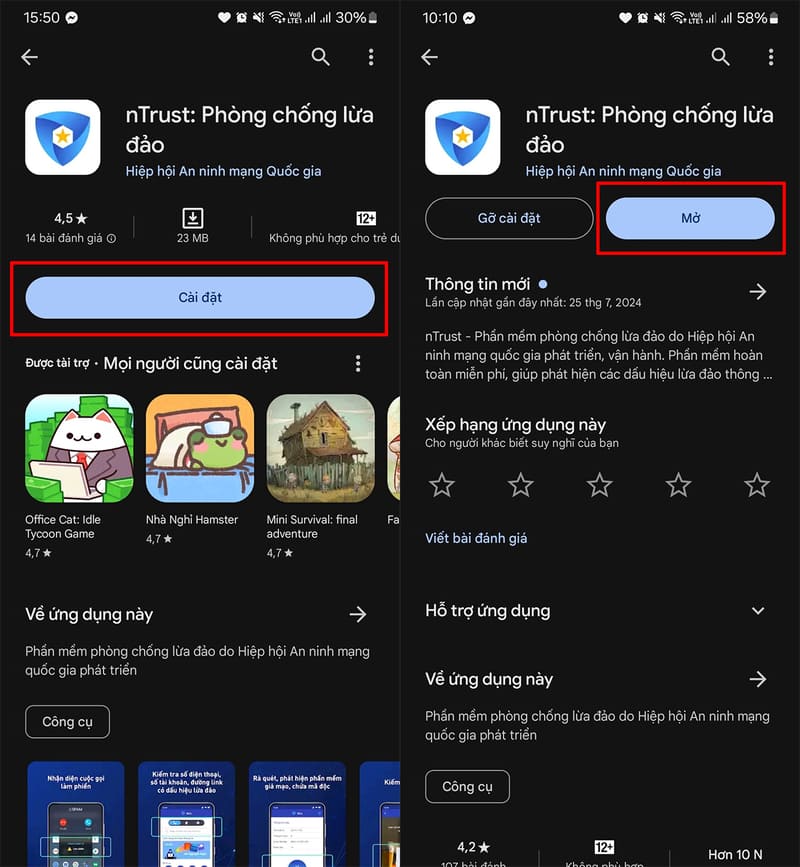
Identify fraudulent accounts with nTrust app

nTrust is an anti-phishing software developed and operated by the National Cyber ​​Security Association. This completely free application helps detect signs of fraud by checking phone numbers, website addresses, account numbers, scanning for malware and checking QR codes.

Step 2: Fill in your phone number and necessary information to register and use this anti-fraud software.
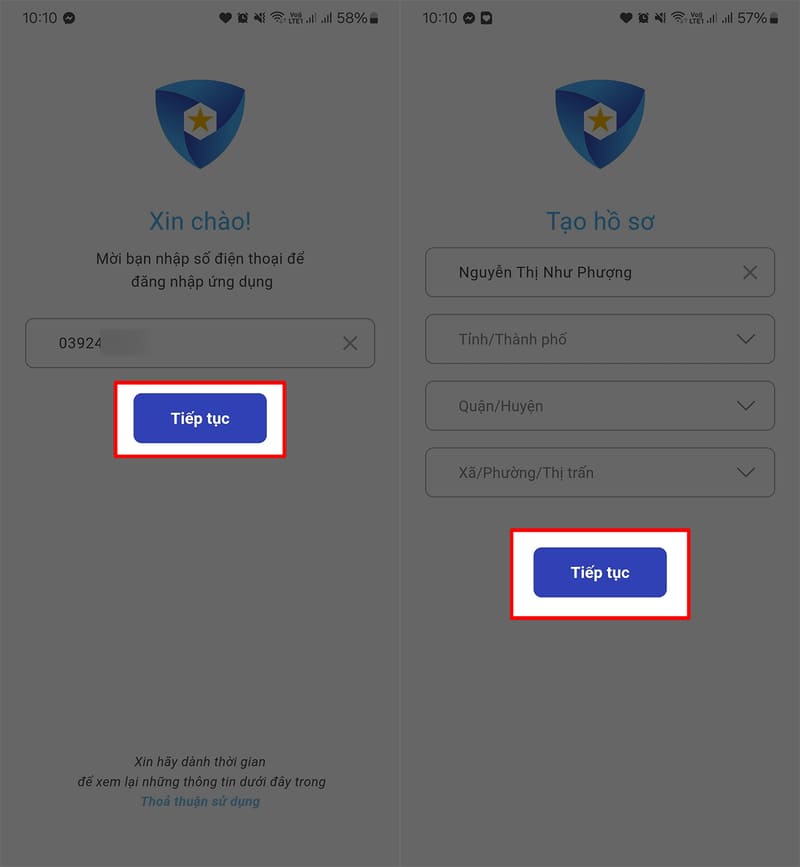
Fill in phone number and necessary information

Step 3: On the main interface of the software, click on “Check account number” > Enter the account number and select the bank you are suspicious of, then wait for the software to verify.
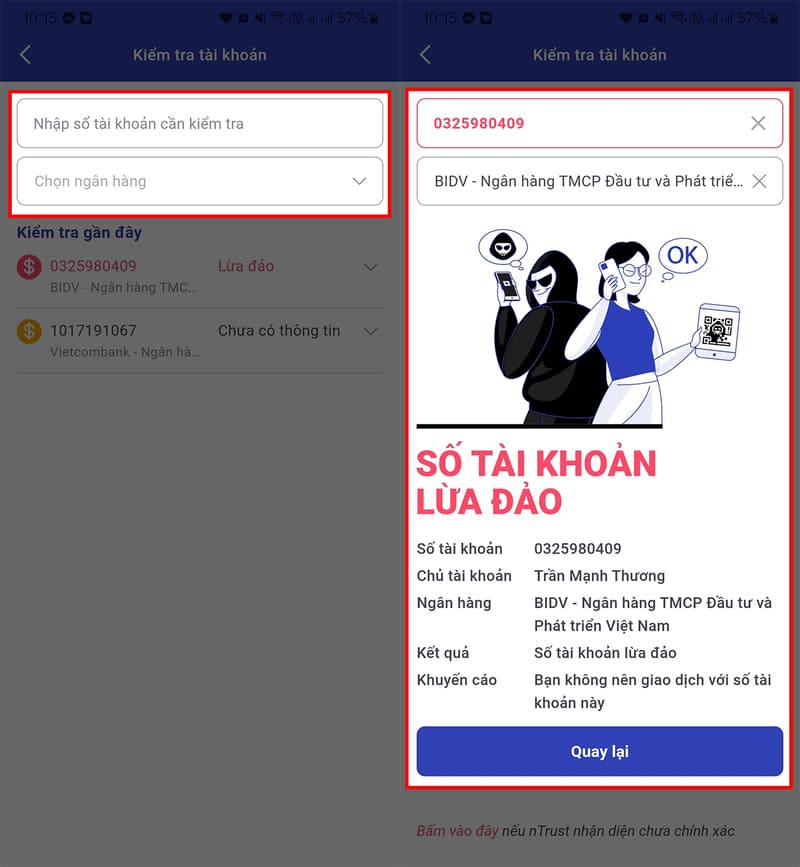
Click on the item "Check account number"
Click on “Check account number”

Identify fraudulent bank accounts using Network Trust

Step 1: Access the Network Trust page via the link HERE To check if a bank account is a scam account:

Step 2: On the home page interface, click on the three dashes icon, then select “Account Lookup”
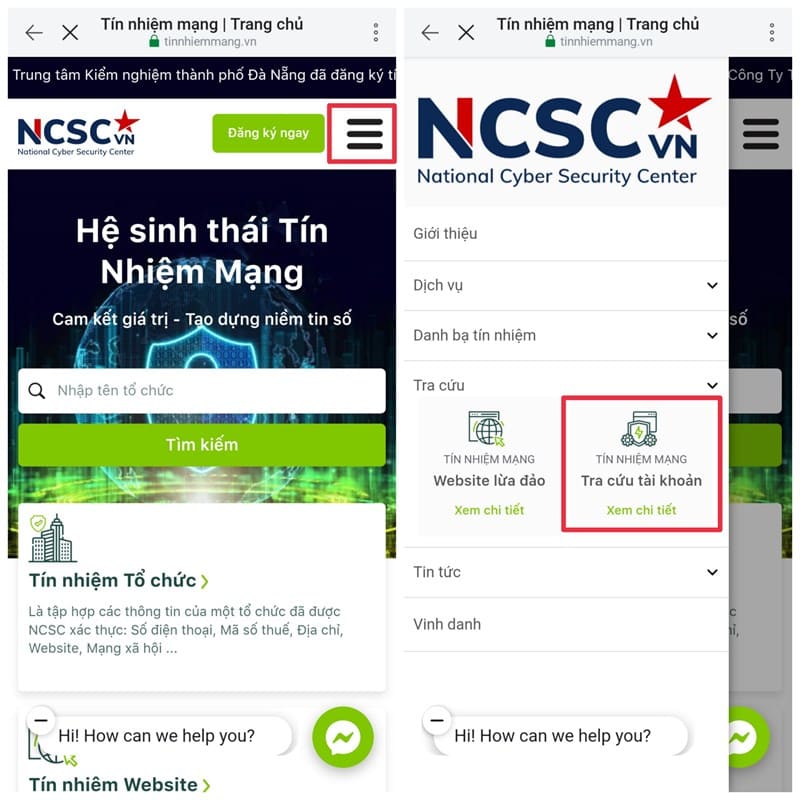
Select item "Account lookup"
Select “Account Lookup”

Step 3: Enter the account number of the person or organization you want to check. If the account is fraudulent, the results will appear immediately.
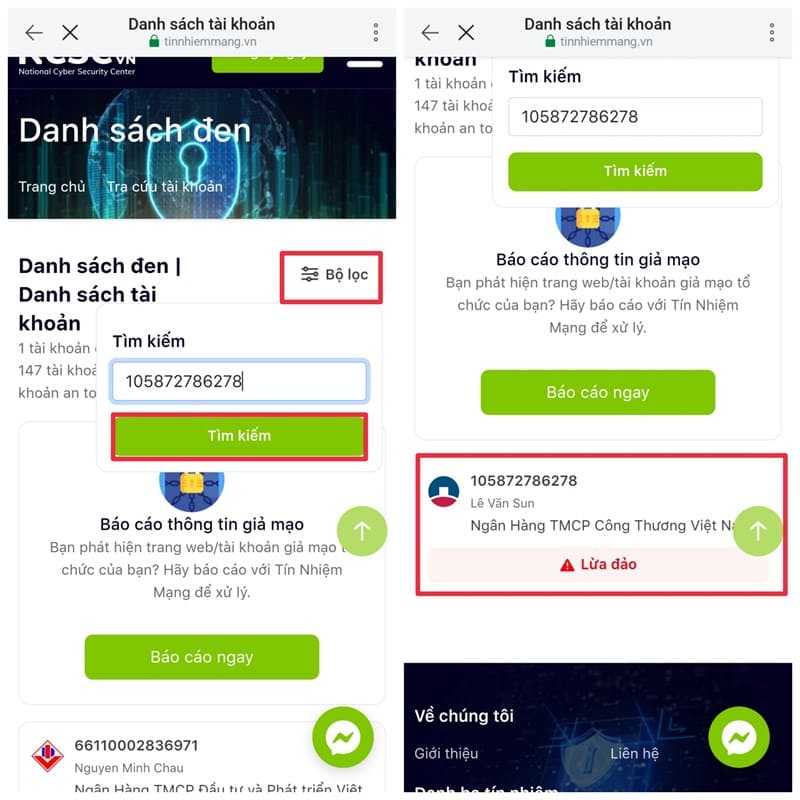
Enter the account number to check

Step 4: You can also report accounts that you believe are fake or fraudulent by entering your personal information in the “Reporter Information” section and the fraudulent account information in the “Fake Bank Account Information” section.
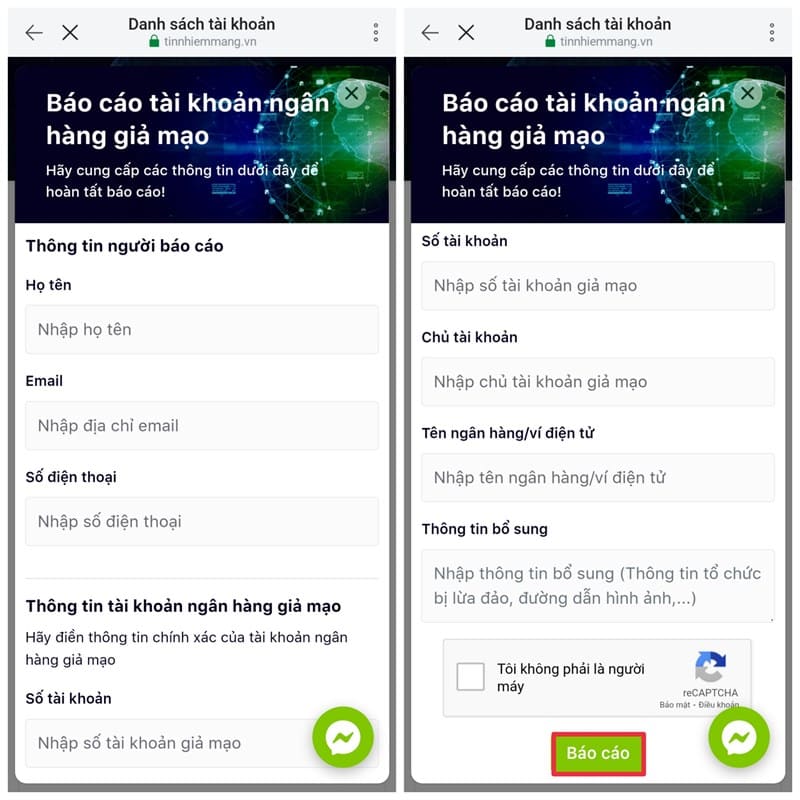
Report accounts you think are fake

See also: Instructions Create virtual Visa card on Viettel Money

Conclusion

Job identify fraudulent bank accounts is an important step to protect your assets in the digital age. By using simple methods such as looking up the Internet Trust website, using the nTrust application, or contacting the bank directly, you will feel more secure when making online transactions and stay away from unnecessary risks.


Tags: accountsbankfraudulentGuideIdentifyingnTrust
Previous Post

How to use Magic Media in Canva to draw

Next Post

How to automatically loop Youtube videos multiple times on your computer

AnonyViet

AnonyViet

Related Posts

Compare Poco X8 Pro and Poco X7 Pro: A new step for the “king” of mid-range performance
Software

Compare Poco X8 Pro and Poco X7 Pro: A new step for the “king” of mid-range performance

April 24, 2026
Top 5 apps to view good days 2026 for free on iOS and Android
Software

Top 5 apps to view good days 2026 for free on iOS and Android

April 23, 2026
Top 5+ utilities to install for Gmail to speed up work processing
Software

Top 5+ utilities to install for Gmail to speed up work processing

April 22, 2026
Decoding the problem of 4GB RAM and processing performance
Software

Decoding the problem of 4GB RAM and processing performance

April 21, 2026
4K Video Downloader Plus – Tool to download YouTube videos on macOS
Software

4K Video Downloader Plus – Tool to download YouTube videos on macOS

April 20, 2026
How to authenticate the owner’s SIM on VNeID from April 15
Software

How to authenticate the owner’s SIM on VNeID from April 15

April 15, 2026
Next Post
How to automatically loop Youtube videos multiple times on your computer

How to automatically loop Youtube videos multiple times on your computer

0 0 votes
Article Rating
Subscribe
Login
Notify of
guest

guest

0 Comments
Oldest
Newest Most Voted
Inline Feedbacks
View all comments

Recent News

Tips to completely turn off CAPTCHA codes on iPhone and Mac are super simple

Tips to completely turn off CAPTCHA codes on iPhone and Mac are super simple

April 25, 2026
Compare Poco X8 Pro and Poco X7 Pro: A new step for the “king” of mid-range performance

Compare Poco X8 Pro and Poco X7 Pro: A new step for the “king” of mid-range performance

April 24, 2026
How to compress online videos for free without losing quality

How to compress online videos for free without losing quality

April 24, 2026
Top 5 apps to view good days 2026 for free on iOS and Android

Top 5 apps to view good days 2026 for free on iOS and Android

April 23, 2026
Tips to completely turn off CAPTCHA codes on iPhone and Mac are super simple

Tips to completely turn off CAPTCHA codes on iPhone and Mac are super simple

April 25, 2026
Compare Poco X8 Pro and Poco X7 Pro: A new step for the “king” of mid-range performance

Compare Poco X8 Pro and Poco X7 Pro: A new step for the “king” of mid-range performance

April 24, 2026
How to compress online videos for free without losing quality

How to compress online videos for free without losing quality

April 24, 2026
AnonyViet - English Version

AnonyViet

AnonyViet is a website share knowledge that you have never learned in school!

We are ready to welcome your comments, as well as your articles sent to AnonyViet.

Follow Us

Contact:

Email: anonyviet.com[@]gmail.com

Main Website: https://anonyviet.com

Recent News

Tips to completely turn off CAPTCHA codes on iPhone and Mac are super simple

Tips to completely turn off CAPTCHA codes on iPhone and Mac are super simple

April 25, 2026
Compare Poco X8 Pro and Poco X7 Pro: A new step for the “king” of mid-range performance

Compare Poco X8 Pro and Poco X7 Pro: A new step for the “king” of mid-range performance

April 24, 2026
No Result
View All Result
  • Home
  • News
  • Software
  • Knowledge
  • MMO
  • Tips
  • Security
  • Network
  • Office

wpDiscuz
0
0
Would love your thoughts, please comment.x
()
x
| Reply