In this article, we will learn the difference between HTTP and HTTPS. Are these two protocols equally secure and which one should you prefer?
| Join the channel Telegram of the AnonyViet 👉 Link 👈 |

What is HTTP?
The full name of HTTP is Hypertext Transfer Protocol. In a word, HTTP is a communication protocol. It allows the transmission of meta-media documents such as HTML.
In other words, HTTP forms the basis for any form of data exchange through the World Wide Web. That’s why it’s an important part of the URL. Without HTTP, you cannot browse the web, send or receive data over the internet.
Advantages of HTTP:
- Flexible and extensible. Easily send, receive data and browse the web using HTTP
- Stateless, easy to cluster and avoid the interaction of different requests.
- Quick response. Communication over HTTP is almost instant unless your internet connection is unstable or slow.
Disadvantages of HTTP:
- The transmitted content is not encrypted, if the packet is captured, the hacker can see your password.
- If the identity is not verified, then hackers can easily disguise themselves as you.
- The integrity of the transmitted content could not be determined.
What is HTTPS?
HTTPS stands for Hypertext Transfer Protocol Secure. It is a web communication protocol whereby encrypted HTTPS data transmission takes place over a secure connection. HTTPS uses the SSL/TLS protocol to encrypt data sent or received over the internet.
In other words, there’s not much difference between HTTP and HTTPS in terms of functionality, just HTTPS with secure encryption. HTTPS is a secure version of HTTP, so it is suitable for transferring sensitive data such as login information and credit card numbers securely through the web.
Advantages of HTTPS:
- Authentication: HTTPS authenticates information through an SSL certificate to confirm a website’s real identity and allow users to identify accurate site information
- Encryption and data transmission: HTTPS encrypts and decrypts data using SSL encryption and secure sockets to ensure data safety in transit.
- Data integrity: Using the HTTPS protocol, you can prevent data content from being stolen and changed in transit, so you can receive real and reliable data.
- Improve SEO: Using HTTPS does not affect SEO but your website can get better rankings.
Disadvantages of HTTPS:
- The cost of SSL certificates is high and it is very complicated to deploy, update and maintain SSL certificates on the server (You can use Let’s Encrypt, ZeroSSL for free)
- HTTPS slows down website access due to repeated handshakes (protocol authentication)
- HTTPS involves security algorithms that consume CPU resources, which means websites require higher server configuration.
Upgrade from HTTP to HTTPS

Once you have identified the advantages and disadvantages of HTTP and HTTPS, you should also upgrade from HTTP to HTTPS. In addition, Google is working to ensure that everyone is using HTTPS to increase everyone’s online security. Here are detailed instructions on how to upgrade from HTTP to HTTPS.
Step 1: Buy an SSL certificate
The first step when upgrading from HTTP to HTTPS is to purchase an SSL certificate. After you install the certificate, it will enable the HTTPS protocol, allowing a secure connection between the server and the web browser. You also need to choose the right certificate based on your needs.
Those options include domain validation certificates, business/organizational validation certificates, and extended validation certificates. It is best to purchase an SSL certificate from your hosting company so that you can ensure that it is working properly and flawlessly.
Step 2: Install SSL certificate
Now that you have an SSL certificate, the next step is to install it on your web server. The process is even easier if you purchase an SSL certificate from your hosting company as they will install the SSL certificate on your behalf.
Step 3: Check your certificate
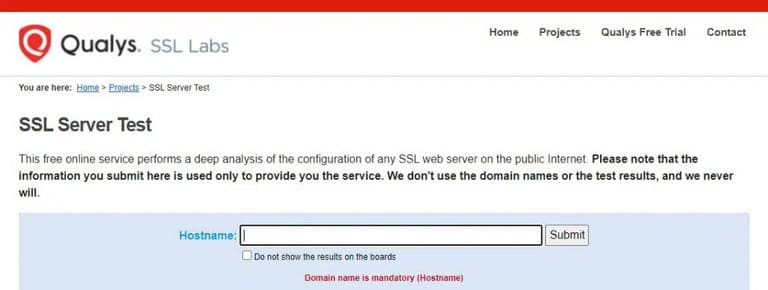
Once you’ve installed an SSL certificate on your web servers, you need to check that it’s working properly. You can check using online tools from reputable sources like SSL Labs Server Test.
You also need to check that the internal link has changed from HTTP to HTTPS before going live to make sure there are no errors.
Step 4: Set up 301 . redirects

You need to set up 301 redirects after installing the SSL certificate so that you can redirect all server traffic to the new and secure HTTPS. When you do that, visitors/customers to the HTTP site will be redirected to a more secure URL.
Safe surfing the Web

The fact that you only visit HTTPS sites or that you have upgraded from HTTP to HTTPS does not guarantee that you surf the web safely. You can still be a victim of attacks like phishing, mailware, scam… and your data content can still be stolen if you don’t strengthen your security and privacy.
Therefore, I recommend you to visit safe websites to ensure your own safety. If necessary, use security tools like VPN or proxy to protect your privacy and security while browsing the internet. In addition, you can also read this post for more security methods to keep you safer on the internet.