• Home
  • News
  • Software
  • Knowledge
  • MMO
  • Tips
  • Security
  • Network
  • Office
AnonyViet - English Version
  • Home
  • News
  • Software
  • Knowledge
  • MMO
  • Tips
  • Security
  • Network
  • Office
No Result
View All Result
  • Home
  • News
  • Software
  • Knowledge
  • MMO
  • Tips
  • Security
  • Network
  • Office
No Result
View All Result
AnonyViet - English Version
No Result
View All Result

Check statement from Vietnam Fatherland Front without downloading

AnonyViet by AnonyViet
September 13, 2024
in Tips
0

In the context of increasingly popular charitable activities, transparency of contribution information becomes extremely important. The Vietnam Fatherland Front (VFF) has publicly disclosed the statement of contributions to ensure transparency and publicity. However, looking up information on the statement file is quite complicated, especially when the file size is large.

Join the channel Telegram belong to AnonyViet 👉 Link 👈

To help users look up information quickly and conveniently, the tools check VAR statement MTTQ online has been born. This article will guide you in detail on how to use these tools to check your contribution information without having to download the statement file to your computer.

Instructions for Checking VAR of MTTQ Online Statement

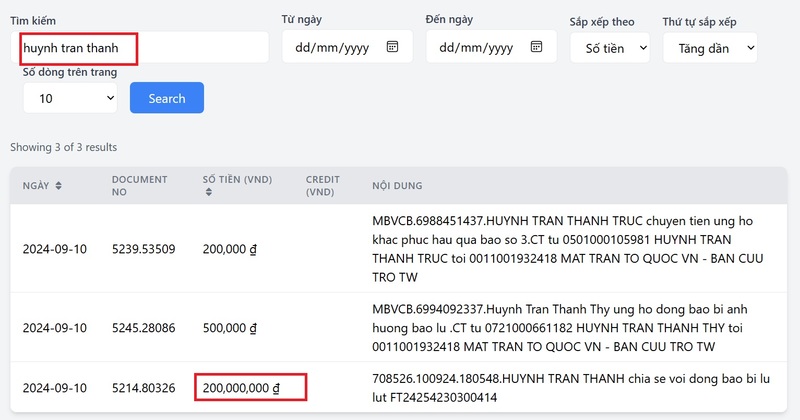
Step 1: Currently, there are some websites that check VAR statements of MTTQ online for free. You can access one of the following websites:

Note: These websites are developed by independent individuals/groups, not the official website of the Vietnam Fatherland Front.

Step 2: The interface of VAR check websites is usually quite simple and easy to use. You just need to enter some basic information to look up, including:

  • Remitter's Name: Enter the full name of the person who made the contribution.
  • Transfer content: Enter the content written on the transfer order (for example: Support Central Vietnam, Join hands to prevent the epidemic…).
  • Amount: Enter the exact amount contributed.
  • Transaction code: Enter the transaction code provided by the bank after a successful transfer.
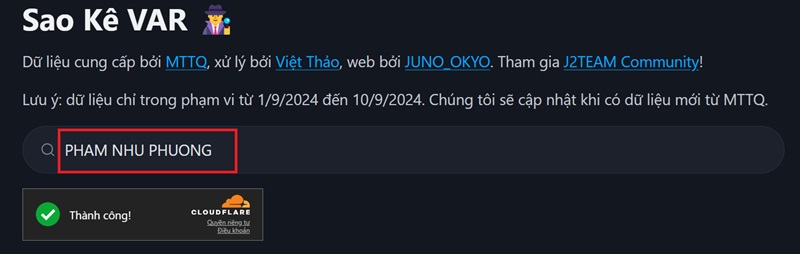
J2Team statement check tool
Enter the information you want to look up

Note:

  • You just need to enter one of the four information above to perform the lookup.
  • The file only saves transactions up to September 10, 2024 according to data from the statement of the Vietnam Fatherland Front.

Benefits of checking VAR MTTQ statement

Using the online MTTQ statement VAR check tool brings many benefits to users, including:

  • Save time by not having to download large statement files to your computer.
  • Simple interface, easy to understand, quick search operation.
  • Allows for quick and accurate verification of contribution information.
  • Help people easily monitor and check the use of charitable contributions.
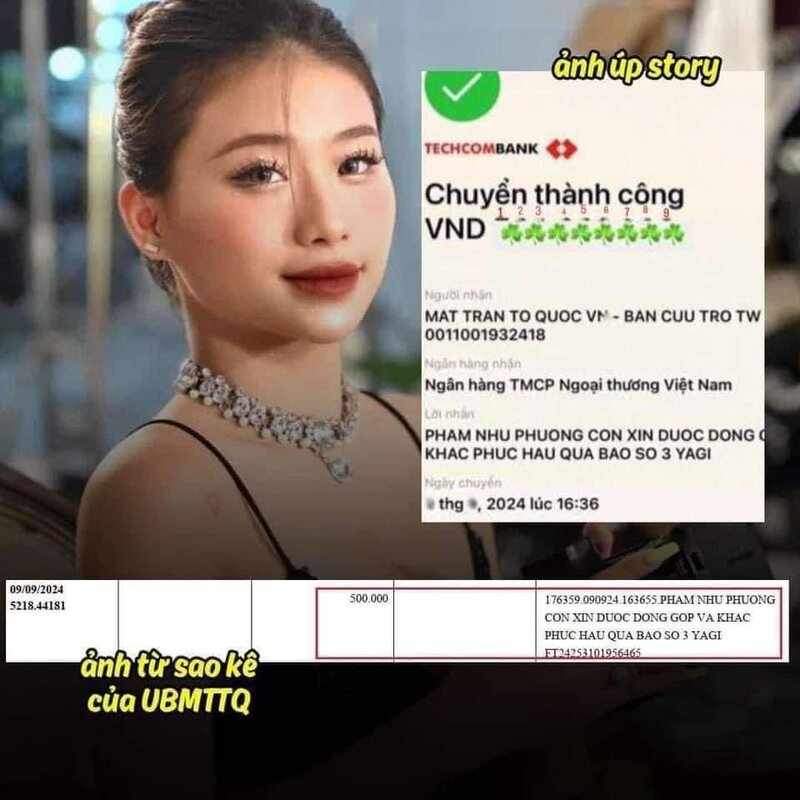
People can verify whether the information contributed is correct or 'fake'

See also: How to Recover Deleted Playlists on Spotify

Conclusion

Tools check VAR statement MTTQ online is a useful solution to help people look up contribution information quickly and conveniently. Using these tools contributes to improving transparency and efficiency in charitable activities. Wish you a happy check var!


Tags: checkDownloadingFatherlandFrontstatementVietnam
Previous Post

The simplest way to recover data when USB has a Format error

Next Post

How to change Desktop icon text color on Windows 11

AnonyViet

AnonyViet

Related Posts

New features of Windows 10 21H1 are coming soon
Tips

New features of Windows 10 21H1 are coming soon

March 16, 2026
How to convert normal music into 8D music with Audioalter
Tips

How to convert normal music into 8D music with Audioalter

March 14, 2026
How to prevent your family’s Security Camera from being hacked
Tips

How to prevent your family’s Security Camera from being hacked

March 13, 2026
Pixel Agents: Turn VS Code into a Pixel Art Office for AI
Tips

Pixel Agents: Turn VS Code into a Pixel Art Office for AI

March 12, 2026
English learning app Memrise is offering a lifetime discount of only 21,000 VND
Tips

English learning app Memrise is offering a lifetime discount of only 21,000 VND

March 11, 2026
Instructions for upgrading to Windows 10 Sun Valley (February 21)
Tips

Instructions for upgrading to Windows 10 Sun Valley (February 21)

March 11, 2026
Next Post
How to change Desktop icon text color on Windows 11

How to change Desktop icon text color on Windows 11

0 0 votes
Article Rating
Subscribe
Login
Notify of
guest

guest

0 Comments
Oldest
Newest Most Voted
Inline Feedbacks
View all comments

Recent News

How to install extension to remind office workers to drink water

How to install extension to remind office workers to drink water

March 17, 2026
Why are iPhones and MacBooks still the number 1 “weapons” of the technology world?

Why are iPhones and MacBooks still the number 1 “weapons” of the technology world?

March 16, 2026
New features of Windows 10 21H1 are coming soon

New features of Windows 10 21H1 are coming soon

March 16, 2026
Receive Advanced SystemCare 19 Pro key for free for 6 months

Receive Advanced SystemCare 19 Pro key for free for 6 months

March 16, 2026
How to install extension to remind office workers to drink water

How to install extension to remind office workers to drink water

March 17, 2026
Why are iPhones and MacBooks still the number 1 “weapons” of the technology world?

Why are iPhones and MacBooks still the number 1 “weapons” of the technology world?

March 16, 2026
New features of Windows 10 21H1 are coming soon

New features of Windows 10 21H1 are coming soon

March 16, 2026
AnonyViet - English Version

AnonyViet

AnonyViet is a website share knowledge that you have never learned in school!

We are ready to welcome your comments, as well as your articles sent to AnonyViet.

Follow Us

Contact:

Email: anonyviet.com[@]gmail.com

Main Website: https://anonyviet.com

Recent News

How to install extension to remind office workers to drink water

How to install extension to remind office workers to drink water

March 17, 2026
Why are iPhones and MacBooks still the number 1 “weapons” of the technology world?

Why are iPhones and MacBooks still the number 1 “weapons” of the technology world?

March 16, 2026
No Result
View All Result
  • Home
  • News
  • Software
  • Knowledge
  • MMO
  • Tips
  • Security
  • Network
  • Office

wpDiscuz
0
0
Would love your thoughts, please comment.x
()
x
| Reply