A string is a set of characters consisting of letters or letters and numbers. In everyday life, we encounter “strings” as often as the words in this article. String example:
| Join the channel Telegram of the AnonyViet 👉 Link 👈 |
"Đây là Website AnonyViet.com""Thứ 2 là ngày đầu tuần""1 2 3 5 anh đánh rơi nhịp nào không"
How to create a string in Python
In Python, strings are defined in parentheses or quotes or 3 single quotes:
Example of creating a string with parentheses:
s1 = 'Đây là Website AnonyViet.com'
Example of string definition using Quotes:
s2 = "Thứ 2 là ngày đầu tuần"
Example of string definition using 3 single quotes. With 3 ” ” you can write string on multiple lines.
s3 = '''Cộng hòa xã hội chủ nghĩa Việt Nam
Độc lập - Tự do - Hạnh phúc'''

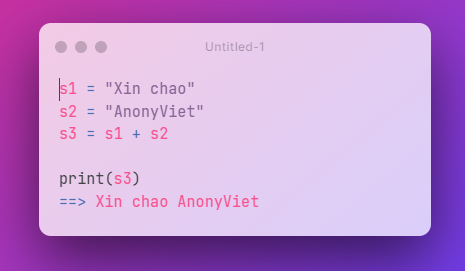
To concatenate strings, we use the operator +
Some String Functions in Python
| upper, lower | Handling uppercase and lowercase printing |
| rjust | Right alignment |
| ljust | Aligns the left |
| center | Center align |
| strip | Remove excess white space |
| startswith | Check if String must start with a character? |
| endswith | Check if a String ends in a character? |
| count | Count occurrences in String |
| find | Search for Substring |
| format | String Format |
| len() | Returns the number of characters in the string, using index to get the characters out: str[index] |
Exercise 1: Convert all lowercase letters to uppercase.
I will create a variable s1 with input input().
After turning s1 If there is a value entered from the keyboard, we will convert it to uppercase using the function upper(). Then the formula will be s1.upper(). Finally, use the command print() to print to the screen.

Similarly, the function lower() will convert uppercase to lowercase. Do the opposite yourself.
Exercise 2: Left align the string “AnonyViet” with 5 *
Note if the number of characters you want to insert is less than the original String, nothing will change.
By default the character will be a space, you can change to other characters like *,$,@ or any character on keyboard
I will create a variable s1 contains string AnonyViet.
We have AnonyViet there are 9 characters, so to insert the next character, the length must start from 10. So to add 5 * characters, we will have the length formula as 10+5 = 15.
Move to the left, we will use the function ljust(độ dài, ký tự)so to align the left margin with 10 * for the string s1 will s1.ljust(15,*) Finally, use the command print() to print to the screen.

Similarly, try your hand at right and center alignment in Python!
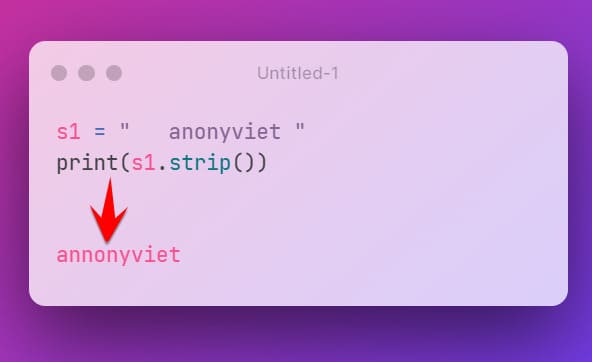
Exercise 3: Remove redundant spaces at the beginning and end of lines using
Python supports a string normalization function, which removes excess spaces at the beginning and end of a string. You can use the function strip() to do this.
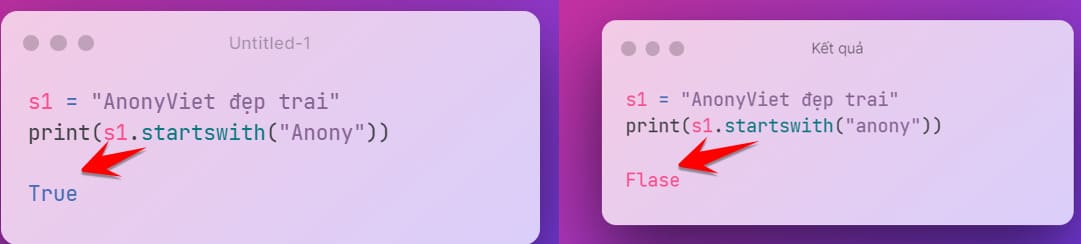
Exercise 3: Check if there is an Anony in the string “Handsome AnonyViet”?
Python has 2 functions startswith() and endswith() to check if there is a substring in an existing string? If yes return Trueotherwise return False
Note: These 2 functions are case sensitive.
Try the above post with the function endswith() Please.
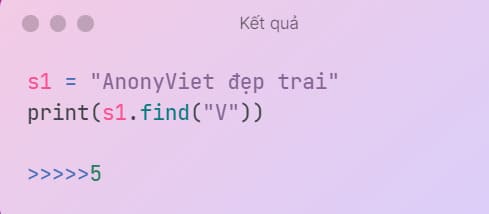
Exercise 4: Find the position of the letter V in the string “AnonyViet”
Python has a function find() Used to find the first position of a character in a string. Note: position in Python starts from 0 Please.
I have a chain s1 = "AnonyViet". To find the first position where the letter V appears, we use the command find("v"). Then use the command print() to print out the location.

So the result will be the first V position in the AnonyViet string: 5
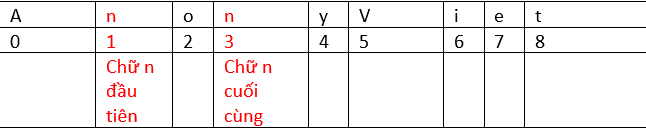
Exercise 4: Find the last position of the letter “n” in the string “AnonyViet”
In python we have the function rfind(), find the last position found. To solve this problem, do the following:
Create variable s1 containing string AnonyViet:
s1 = "AnonyViet"
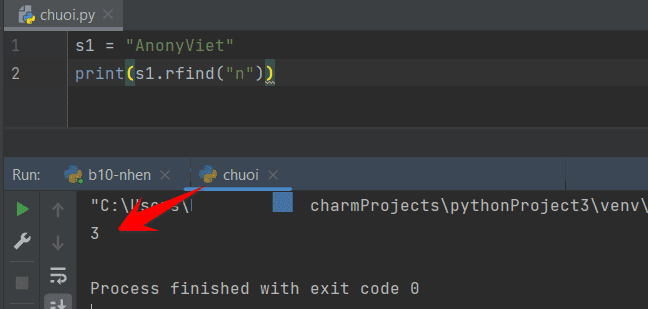
To print the last n in the string s1 we use the command print() combine s1.rfind("n").
The result is print(s1.rfind("n"))
Since Python calculates from position 0, the last n will be counted as 3
The case if there are no words in the string will return -1.
For example, you need to find the word X in the “AnonyViet” chain.
Since X does not appear in AnonyViet, the result will be returned -1.
Exercise 5: Calculate the number of occurrences of the word “no” in the string “AnonyViet”
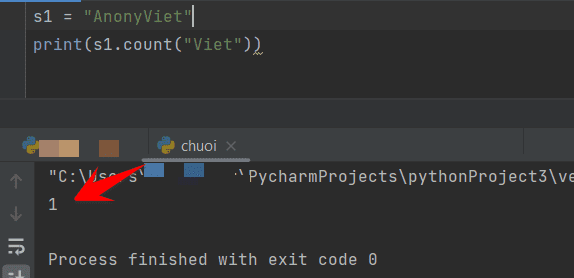
I have a function count() to count the number of occurrences of a substring in the parent string. We do the following:
s1 = "AnonyViet"
print(s1.count("no")
The result will be: first. Because the string appears once, the word no => AnonyViet
Exercise 6: Print the word Viet in the string “AnonyViet”
In python we can get substring using range from position A to position B according to the formula [A:B]
- After the : if nothing is taken the last position
- In front of the : if nothing is taken the first position
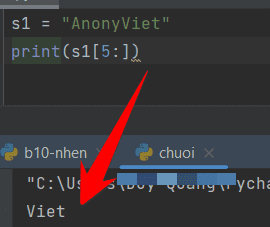
In the string “AnonyViet” we have a position from 0. To split the string you do the following:
s1 = "AnonyViet"
print(s1[5:]) #do the letter t in the last position up after the : we leave it blank.
Result: Write
The other two string splitting and string concatenation functions we will see in Chapter 4, will then use a loop to execute these two commands.