• Home
  • News
  • Software
  • Knowledge
  • MMO
  • Tips
  • Security
  • Network
  • Office
AnonyViet - English Version
  • Home
  • News
  • Software
  • Knowledge
  • MMO
  • Tips
  • Security
  • Network
  • Office
No Result
View All Result
  • Home
  • News
  • Software
  • Knowledge
  • MMO
  • Tips
  • Security
  • Network
  • Office
No Result
View All Result
AnonyViet - English Version
No Result
View All Result

Basic Linux network commands you need to know

AnonyViet by AnonyViet
January 25, 2023
in Network
0

Today I will introduce you to some basic network and file transfer commands in Linux.

Join the channel Telegram of the AnonyViet 👉 Link 👈

Basic Linux network commands you need to know

Basic Network Commands in Linux

ping command

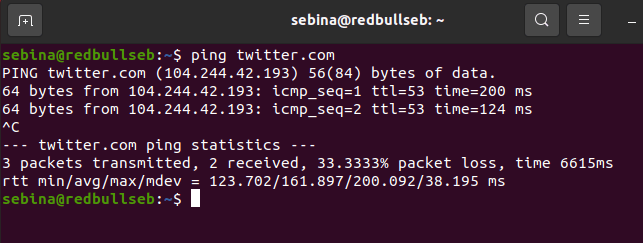
The ‘ping’ command stands for Packet Internet Groper. It is used to test the network connection between two computers and see if the server is reachable.

How does the ping command work? Well, the ‘ping’ command uses something called ICMP, which stands for Internet Control Message Protocol. It will send an ICMP echo request message to the IP address you provided. If the connection is successful, it will respond with an ICMP message. You will know the server is reachable if you get an ICMP response.
Basic Linux network commands you need to know 10

dig . command

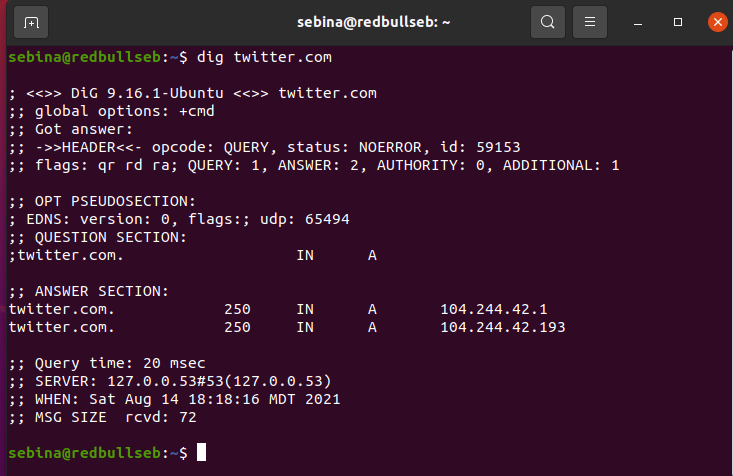
The ‘dig’ command can be used to view the DNS information of a website. It stands for “Domain Information Groper”. Besides the server name, you can also view information about the address of the server hosting and exchanging mail. Although anyone can use this command, it is mainly used by System Administrators.
Basic Linux network commands you need to know 11

Command whois

The ‘whois’ command is another basic command used to look up information. In this case, using whois will give you detailed information about the domain, such as owner information.

Basic Linux network commands you need to know 12

Command hostname

As the command name says, this command tells you hostname.

Basic Linux network commands you need to know

Command ip a

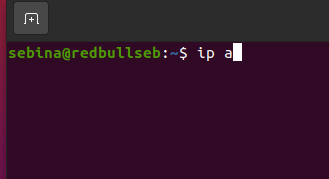
The ‘ip a’ command is used to find your IP address. Of course, knowing what your IP address is is very important. You can read this post to know what hackers can do if they know your ip address.

You can also use the IP command to view certain things. For example ‘ip link’, this command will display the information of the link class.
Basic network commands in Linux you need to know 14

command finger

The ‘finger’ command shows you the details of all logged in users. This is a great command for sysadmins as they can see things like exact login times and even user emails. To use this command you may need to install it with the command ‘sudo apt-get install finger’.
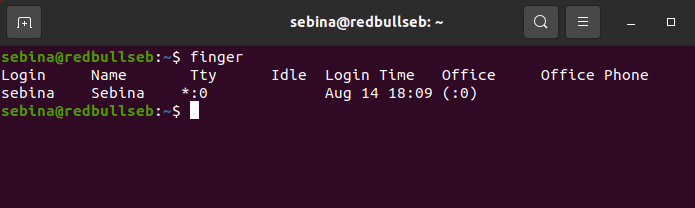
Basic Linux network commands you need to know 15

command netstat -a

Another useful command is ‘netstat’. In this case, I’m using ‘netstat -a’ to list all the ports that are listening.

A listening port is when your machine is ready to accept connections on that port. You can close and open the gates at any time.
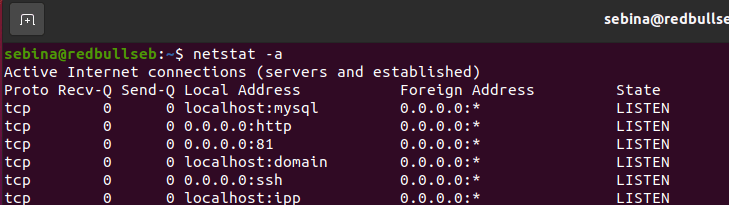
Basic Linux network commands you need to know 16

command traceroute

The ‘traceroute’ command shows the route a packet took to the server. If you look at the photo below you can see how many ‘jumps’ you have lost (hops) to get to the server you want. A hop occurs when a packet is passed from one network hardware to the next.

Basic Linux network commands you need to know 17

Basic File Transfer Commands in Linux

These are the most basic commands for beginners. In addition, there are many more commands that you can learn more about.

ftp . command

‘ftp’ stands for ‘file transfer protocol’. You can use this command, but this is an insecure way to transfer files because when you enter your username and password, it travels over the network as plain text.

sftp . command

‘sftp’ stands for ‘secure file transfer protocol’. Here’s how to safely transfer files. Using stfp will provide a higher level of protection.

command scp

‘scp’ copies files safely.

This order is considered obsolete by some people and companies. It still works, but using it or not is up to you.

rsync command

‘rsync’ is used to synchronize files and folders between two machines via a remote shell.

command ssh

‘ssh’ is used to securely login to the remote server. You can ‘ssh’ into a remote system using SSH keys or password authentication.

Technically, this is not a file transfer command but I believe it is very important when it comes to file transfers. Also you can also learn more about ssh here.


The article achieved: 5/5 – (100 votes)

Tags: BasiccommandsLinuxnetwork
Previous Post

How to automatically activate Python File when USB is plugged in

Next Post

How to use Microsoft Authenticator to manage Passwords of all Websites

AnonyViet

AnonyViet

Related Posts

What is Direct Connect AWS? Benefits when businesses use Direct Connect AWS
Network

What is Direct Connect AWS? Benefits when businesses use Direct Connect AWS

October 29, 2025
Namecheap offers 3 Domains for alt=
Network

Namecheap offers 3 Domains for $0

October 7, 2025
Proxy vượt Cloudflare là gì? Giải pháp hạn chế Captcha Cloudflare bằng Proxy dân cư
Network

Proxy vượt Cloudflare là gì? Giải pháp hạn chế Captcha Cloudflare bằng Proxy dân cư

October 1, 2025
Renova Cloud – The leading AWS management service in Vietnam today
Network

Renova Cloud – The leading AWS management service in Vietnam today

August 26, 2025
Guide to self -creation socket5 on Ubuntu
Network

Guide to self -creation socket5 on Ubuntu

May 28, 2025
How to create a separate mtproto proxy to use Telegram when blocked
Network

How to create a separate mtproto proxy to use Telegram when blocked

May 25, 2025
Next Post
How to use Microsoft Authenticator to manage Passwords of all Websites

How to use Microsoft Authenticator to manage Passwords of all Websites

0 0 votes
Article Rating
Subscribe
Login
Notify of
guest

guest

0 Comments
Oldest
Newest Most Voted
Inline Feedbacks
View all comments

Recent News

How to install Anh Hai’s Pho Shop on MacBook is super easy

How to install Anh Hai’s Pho Shop on MacBook is super easy

November 11, 2025
How to turn off ads on Yoosee app in just 1 minute

How to turn off ads on Yoosee app in just 1 minute

November 11, 2025
Windows 11 and MS Office 2021 lifetime license, genuine from  during Keysoff’s 11.11 sale

Windows 11 and MS Office 2021 lifetime license, genuine from $14 during Keysoff’s 11.11 sale

November 11, 2025
How to see your email account creation date

How to see your email account creation date

November 11, 2025
How to install Anh Hai’s Pho Shop on MacBook is super easy

How to install Anh Hai’s Pho Shop on MacBook is super easy

November 11, 2025
How to turn off ads on Yoosee app in just 1 minute

How to turn off ads on Yoosee app in just 1 minute

November 11, 2025
Windows 11 and MS Office 2021 lifetime license, genuine from  during Keysoff’s 11.11 sale

Windows 11 and MS Office 2021 lifetime license, genuine from $14 during Keysoff’s 11.11 sale

November 11, 2025
AnonyViet - English Version

AnonyViet

AnonyViet is a website share knowledge that you have never learned in school!

We are ready to welcome your comments, as well as your articles sent to AnonyViet.

Follow Us

Contact:

Email: anonyviet.com[@]gmail.com

Main Website: https://anonyviet.com

Recent News

How to install Anh Hai’s Pho Shop on MacBook is super easy

How to install Anh Hai’s Pho Shop on MacBook is super easy

November 11, 2025
How to turn off ads on Yoosee app in just 1 minute

How to turn off ads on Yoosee app in just 1 minute

November 11, 2025
  • Home
  • Home 2
  • Home 3
  • Home 4
  • Home 5
  • Home 6
  • Next Dest Page
  • Sample Page

new88 trang chủ shbet trang chủ f168 trang chủ qq88 nhà cái 78win

No Result
View All Result
  • Home
  • News
  • Software
  • Knowledge
  • MMO
  • Tips
  • Security
  • Network
  • Office

new88 trang chủ shbet trang chủ f168 trang chủ qq88 nhà cái 78win

wpDiscuz
0
0
Would love your thoughts, please comment.x
()
x
| Reply