• Home
  • News
  • Software
  • Knowledge
  • MMO
  • Tips
  • Security
  • Network
  • Office
AnonyViet - English Version
  • Home
  • News
  • Software
  • Knowledge
  • MMO
  • Tips
  • Security
  • Network
  • Office
No Result
View All Result
  • Home
  • News
  • Software
  • Knowledge
  • MMO
  • Tips
  • Security
  • Network
  • Office
No Result
View All Result
AnonyViet - English Version
No Result
View All Result

Hidden features on Windows 10 you may not know

AnonyViet by AnonyViet
February 5, 2023
in Tips
0

Windows 10 is an operating system launched and developed by Microsoft, first released on July 29, 2015 including versions: Windows 10 Home, Pro, Education,… With a beautifully improved interface , making it closer to the user. Accompanied by extremely interesting features that previous versions of windows did not have will bring a completely different experience.

Join the channel Telegram belong to AnonyViet 👉 Link 👈

Hidden features on Windows 10 you may not know

On Windows 10, there are still hidden features that are not known to many people. But these features are very useful when you use Windows. Let’s discover and use AnonyViet with AnonyViet:

1. Clean up your hard drive with Disk Cleanup

Disk Cleanup is a built-in utility on computers running Windows 10 operating system. This tool will help you clean up trash and optimize the computer after a long time of use. In particular, you can use Disk Cleanup to delete folders Windows.old in C drive.

Step 1: Press the Windows icon button in the left corner of the screen and type Disk Cleanup.

Here, select the drive to clean up in the Drives pane and click OK.
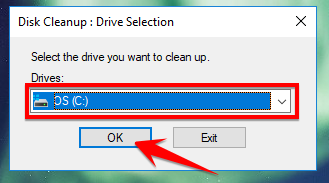
Select the drive in Disk Cleanup

Step 2: You select the file folders to clean and click Clean up system files. The scanning process will take place quickly or slowly depending on whether your computer has a lot of junk or not. After cleaning is complete, your computer will have quite a bit of hard drive space left.
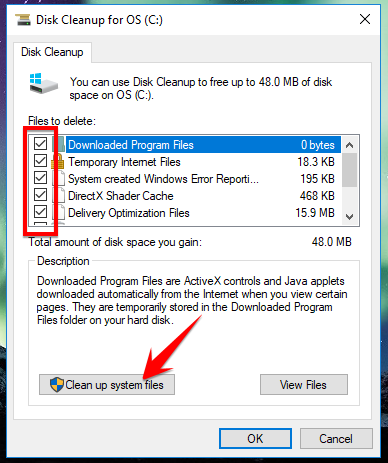
Select the file to delete and click cleanup

2. Create Notes on Desktop with Sticky Notes

Windows 10 has built-in features Create notes right on the desktop extremely convenient. Helps you save important things to do in the future or an event. Sticky Notes is a hidden feature that is not displayed on the Desktop. To use this feature, the first thing you need to do is type a keyword Sticky Notes in the Windows Start Menu.

You just double click on the yellow note and write content on it. You can also change the color, font, … to help the sticky in more beautiful.
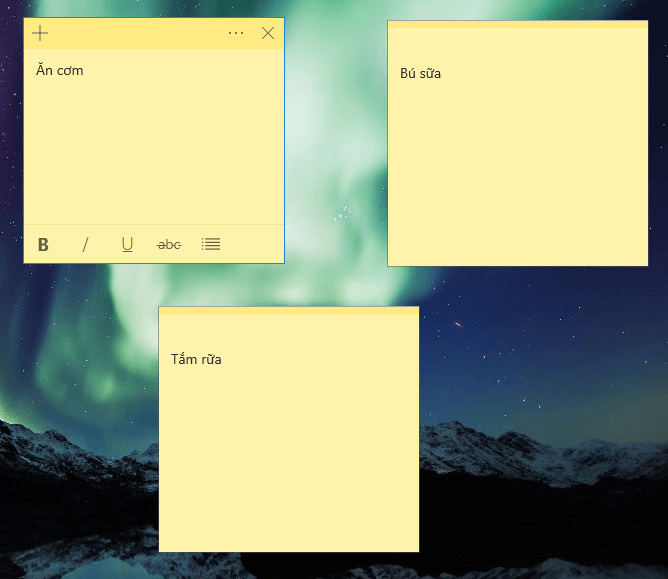
Sticky Notes

3. Activate Night light anti-eye strain mode

A hidden feature of Windows 10 that helps protect eyes. Basically, this feature will help reduce the amount of blue light emitted by the computer, thereby helping you feel less eye strain if used for a long time.

First, click on the Start button of the keyword U Night light => Enter.

Activate this mode by turning on Schedule night light or click Turn on now
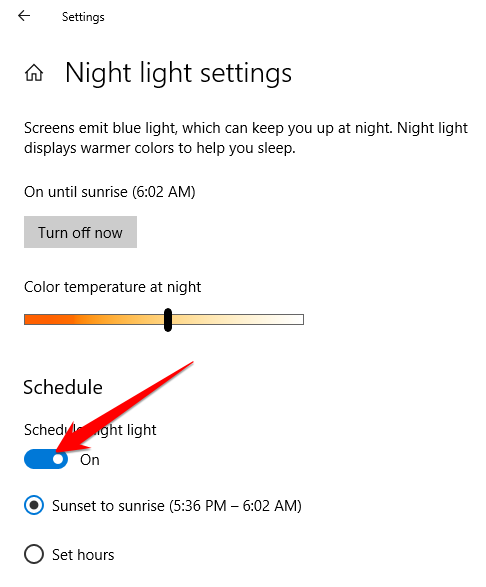
Night light settings

4. Type text yourself by voice

Speech is a feature that automatically recognizes speech and converts to text, which is extremely interesting and convenient for users.

Please enter Settings => Time & language => Speech.

Next, click on the words Speech, inking, & typing privacy settings right side of the screen.
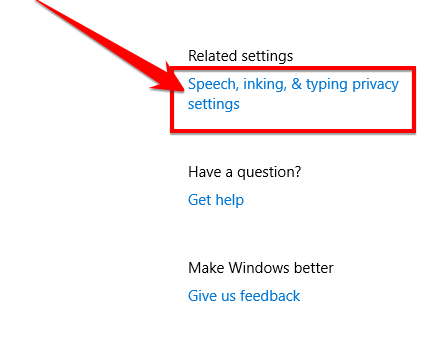
Speech settings

Activate Speech by clicking Turn on speech services and typing suggestions.
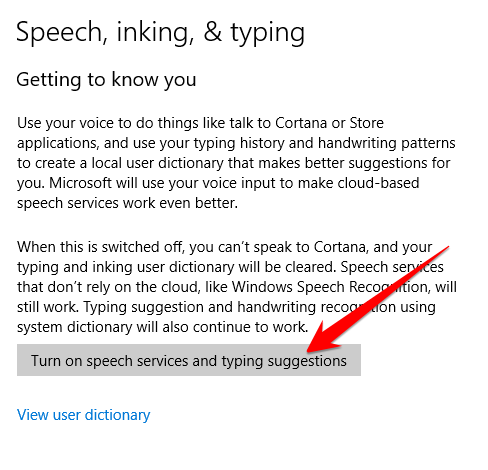
Enable Speech

Now to use this feature, press the combination WINDOWS + FAMILY and start reading (English).
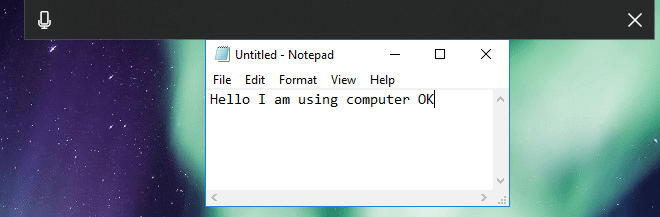
Test the Speech feature

5. Create more virtual Desktops

Virtual Desktop is a feature that allows you to create more desktops on the same machine. Helps improve your computer’s performance dramatically.

Virtual Desktop Quick Shortcuts:

  • Open Tabview : Windows + Tab (Swipe 3 up on the Touchpad)

Hidden features on Windows 10 you may not know

  • Create a new Desktop: Win + Ctrl + EASY
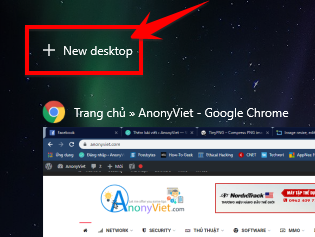
Create a new Desktop

  • Close current desktop: Win + Ctrl + F4
  • Switch between the virtual desktops you created on the right/left side Win + Ctrl + right/left arrow (Use 4 fingers to swipe right/left on the touchpad).
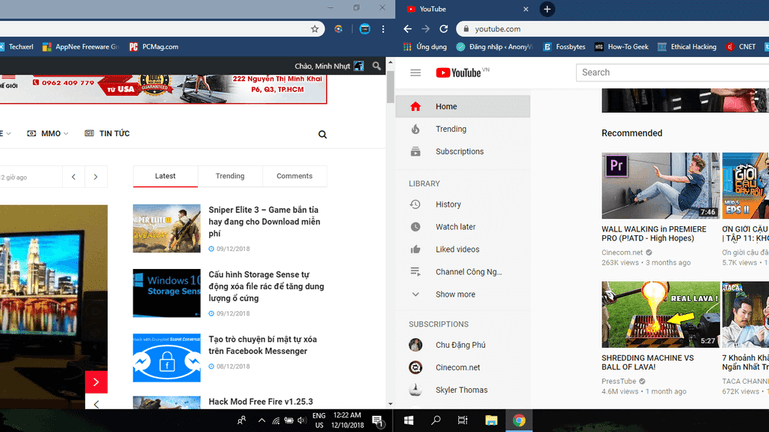
Switch between 2 Desktops Switch between 2 Desktops

Epilogue

So, AnonyViet has with you through 5 interesting hidden features built into Windows 10. If you know other features, please comment below the article to share with everyone!

N1412.

The article achieved: 5/5 – (100 votes)

Tags: featureshiddenWindows
Previous Post

Tool Get The Source Code Of Other People’s Websites

Next Post

Daemon Tools Virtual Disk Management Program.

AnonyViet

AnonyViet

Related Posts

Microsoft confirms leaked Windows 11 is real
Tips

Microsoft confirms leaked Windows 11 is real

July 22, 2026
HeroSMS là gì? Cách thuê số điện thoại ảo nhận SMS OTP online không cần SIM
Tips

HeroSMS là gì? Cách thuê số điện thoại ảo nhận SMS OTP online không cần SIM

July 22, 2026
How to download documents on 123doc for free
Tips

How to download documents on 123doc for free

July 21, 2026
Instructions for Logo Design in just a few clicks with Logaster
Tips

Instructions for Logo Design in just a few clicks with Logaster

July 20, 2026
3 coolest ways to turn off your computer
Tips

3 coolest ways to turn off your computer

July 19, 2026
Instructions for checking Windows copyright using Powershell to avoid penalties
Tips

Instructions for checking Windows copyright using Powershell to avoid penalties

July 19, 2026
Next Post
Daemon Tools Virtual Disk Management Program.

Daemon Tools Virtual Disk Management Program.

0 0 votes
Article Rating
Subscribe
Login
Notify of
guest

guest

0 Comments
Oldest
Newest Most Voted

Recent News

Instructions on how to get a certificate from Canva for free

Instructions on how to get a certificate from Canva for free

July 23, 2026
Microsoft confirms leaked Windows 11 is real

Microsoft confirms leaked Windows 11 is real

July 22, 2026
HeroSMS là gì? Cách thuê số điện thoại ảo nhận SMS OTP online không cần SIM

HeroSMS là gì? Cách thuê số điện thoại ảo nhận SMS OTP online không cần SIM

July 22, 2026
Little Sun Cloud Library: VTV’s audiobook application helps babies sleep well

Little Sun Cloud Library: VTV’s audiobook application helps babies sleep well

July 22, 2026
Instructions on how to get a certificate from Canva for free

Instructions on how to get a certificate from Canva for free

July 23, 2026
Microsoft confirms leaked Windows 11 is real

Microsoft confirms leaked Windows 11 is real

July 22, 2026
HeroSMS là gì? Cách thuê số điện thoại ảo nhận SMS OTP online không cần SIM

HeroSMS là gì? Cách thuê số điện thoại ảo nhận SMS OTP online không cần SIM

July 22, 2026
AnonyViet - English Version

AnonyViet

AnonyViet is a website share knowledge that you have never learned in school!

We are ready to welcome your comments, as well as your articles sent to AnonyViet.

Follow Us

Contact:

Email: anonyviet.com[@]gmail.com

Main Website: https://anonyviet.com

Recent News

Instructions on how to get a certificate from Canva for free

Instructions on how to get a certificate from Canva for free

July 23, 2026
Microsoft confirms leaked Windows 11 is real

Microsoft confirms leaked Windows 11 is real

July 22, 2026
  • Home
  • Home 2
  • Home 3
  • Home 4
  • Home 5
  • Home 6
  • Next Dest Page
  • Sample Page

say88 tỷ lệ kèo nhà cái kèo nhà cái 5 febet

No Result
View All Result
  • Home
  • News
  • Software
  • Knowledge
  • MMO
  • Tips
  • Security
  • Network
  • Office

say88 tỷ lệ kèo nhà cái kèo nhà cái 5 febet

wpDiscuz
0
0
Would love your thoughts, please comment.x
()
x
| Reply