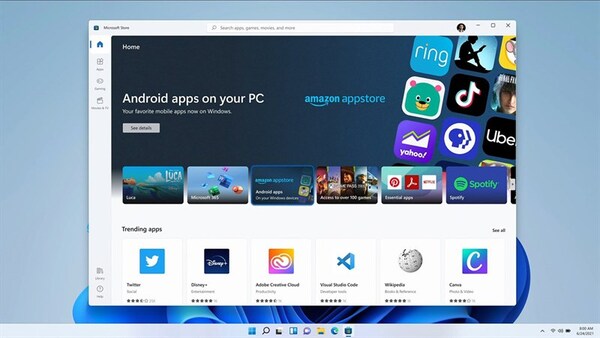
Android users have long had several options to download apps – the official app store (CHPlay) or the unofficial app store (Mod App Store), like ACMarket and HappyMod. Now there is a third option – an Android tool called Lucky Patcher, which helps you to edit the available applications (Mods) to your liking. For example, Viet Hoa, change configuration, Hack Game…. This is not an app store; it is a tool that helps you to Mod the apps you already have on your android device. The app is completely free, read on to learn about it.
| Join the channel Telegram of the AnonyViet 👉 Link 👈 |

Configuration Requirements for Lucky Patcher:
Lucky Patcher is a great Android tool, but you have to meet some minimum configuration requirements to use it:
- Android v2.33 Gingerbread or newer
- 2 GB of free RAM or more
- 8 GB of internal memory or more
- A rooted device – although the app works on non-rooted devices, you don’t get as many features as rooting
Download Lucky Patcher:
- Use the official link, Download app Lucky Patcher directly to your Android device
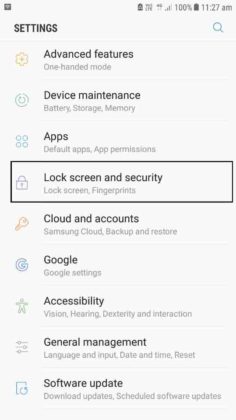
- DID open the app – first, open Setting
- Go Security (or Privacy, depending on your OS version) and enable Unknown Sources. If you miss this step, Lucky Patcher may not work.
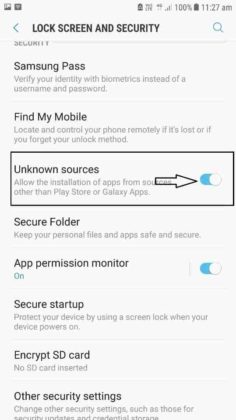
- Open folder Downloads your file and click on the file Lucky Patcher
- A message will appear asking if you want to install Lucky Patcher; press Yes.
- When you see Lucky Patcher on the home screen, the installation is complete and you can use the tool on your apps and games
What is Lucky Patcher?
This is an app to modify apps and Games on Android devices. You can use this app to remove restrictions, provide new features, bypass license verification, change app permissions, etc. Example: remove ads, Viet Hoa, Mod Game VIP …
One of the most popular features is the ability to remove ads from apps and games that we download from the official store. With Lucky Patcher you can get rid of them and go back to enjoying your app or game peacefully. It doesn’t take up much space on your device, no more than 10MB, but it’s a powerful app.
Lucky Patcher Features:

Lucky Patcher brings the following great features:
- Remove ads – remove ads from apps and games on the app store.
- Remove In-App Purchases – skip having to buy bonus points and in-app features and get everything for free.
- Modify Your Game – make sure you get all features, in-app rewards and in-app purchases for free, including unlimited gems, coins, lives etc. However, be aware and Lucky Patcher may need root access to do this.
- Change permissions – no longer feel bound to accept all the permissions the game asks for; change permissions.
Frequently Asked Questions:
Here are the most common questions we receive about Lucky Patcher and the answers to help you with your queries:
Will Lucky Patcher Harm My Device?
No. It can be an app modifier, but it can’t harm your device nor any data on it and it won’t affect other systems and apps on it either. your Android.
How does Lucky Patcher work?
When you install Lucky Patcher on your Android device, it will scan all other apps and games you have and make recommendations on the best changes to make. These include removing ads, changing app permissions, bypassing verification, and more.
Is Lucky Patcher Illegal?
No, Lucky Patcher is not illegal as it’s just an app that doesn’t need special permissions to work. However, some of the things the app does – such as bypassing verification – are technically illegal, so use it at your own risk.
Do I need to Root the Device?
No, Lucky Patcher will work on non-rooted devices. However, it works better on rooted devices because the changes it recommends are made automatically. On non-rooted devices you get less features and you have to make the changes manually.
What Games does Lucky Patcher work on?
Sadly there is no way to get Lucky Patcher to work on all Android apps and games, not only because there are so many apps and games among them, but they are all very different. The only real way to find out if it works for you is to install the tool and try it out. Lucky Patcher definitely supports below games:
- ROBOTS
- Zombie Scrapper
- Stick War: Legacy
- Tower Madness 2: 3D Defense
- Age of Wind 3
- Zombie Highway 2 etc.
Chrome Alerts Downloading Lucky Patcher Will Harm.
This application is not harmful. Whenever you try to download a third-party APK or app using Chrome, the browser will always tell you that it’s harmful. 90% of these reported applications are completely safe, so is Lucky Patcher.
Lucky Patcher is the latest in a series of apps aimed at helping Android users get more out of their devices. This free app helps you to modify the apps and games that you have installed. However, we must remind you that you use the app at your own risk, as these features are technically illegal. That hasn’t stopped millions of people from using it without any trouble, so give this app a try now.