• Home
  • News
  • Software
  • Knowledge
  • MMO
  • Tips
  • Security
  • Network
  • Office
AnonyViet - English Version
  • Home
  • News
  • Software
  • Knowledge
  • MMO
  • Tips
  • Security
  • Network
  • Office
No Result
View All Result
  • Home
  • News
  • Software
  • Knowledge
  • MMO
  • Tips
  • Security
  • Network
  • Office
No Result
View All Result
AnonyViet - English Version
No Result
View All Result

How to fix Google app error after new update on Android

AnonyViet by AnonyViet
January 27, 2023
in Software
0

After the latest update, the Google app crashed, and Podcasts, Lens kept crashing, while Google Assistant also cannot function. Users on Google Pixel, Samsung, and Motorola phones are all affected. This is the reason and how to fix the Google app error on Android that appeared today.

Join the channel Telegram of the AnonyViet 👉 Link 👈

How to fix Google app error after new update on Android

After updating the Google app to version 12.23.16.23, users find the app keeps crashing every few minutes without any indication. Since this app is also related to Lens, Discover on the left side of the home screen and Podcastsincidents similar to “keep closing “ app shutdown keeps happening, while some other users have problems with Android Auto. Meanwhile, Assistant is also affected by this issue and cannot work for users to give voice commands.

Google Apps 12.23 launched the stable version on June 21 after entering beta later than usual last week. It’s released on a Wednesday night against the normal schedule of Monday or Tuesday. Meaning, beta testers didn’t experience these issues before and weren’t affected today.

The Google 12.24 beta app just came out a few hours ago and some users said updating to this app would fix the problem. You can sign up for the Google app beta here (or via Play Store).

How to fix Google app errors on Android phones

1. Join the Google app beta program

Access this link and click “become a tester” or go to Play Store on your phone and scroll down until you see “Join the beta”. Then click “Join”.
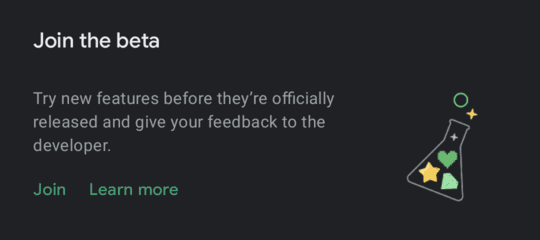
Join the Google app beta program

2. Get the new update of the Google app

Tap your avatar in Play Store > Manage apps & devices > See recent updates > Updates available > Check for updates. Click “Update“.
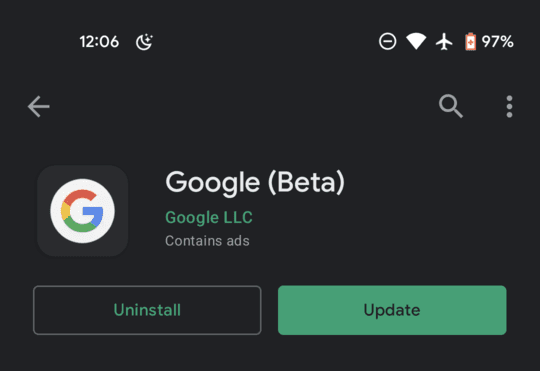
Get the new update of the Google app

Downloading the beta is the least risky solution. Otherwise you have to uninstall the faulty update and reinstall the first version of Google apps built into your phone

Settings > Apps & notifications > See all > Google > Uninstall updates

Note: the above process will require you to set up Google Assistant again on your phone and downloaded data in Podcasts will be deleted. If you choose this way, don’t update the Google app until the stable version is released as you will face the same problem again.

If you haven’t updated the Google app on Android yet, I suggest you hold off until the problem is fixed.


The article achieved: 5/5 – (100 votes)

Tags: AndroidApperrorfixGoogleUpdate
Previous Post

Top 10 web security vulnerabilities according to OWASP 2020 announcement

Next Post

DesignEvo: The best free logo maker website 2021

AnonyViet

AnonyViet

Related Posts

TruyenDrive: Turn Google Drive into a professional manga reader
Software

TruyenDrive: Turn Google Drive into a professional manga reader

May 31, 2026
How to extract text from photos using Zalo is super simple
Software

How to extract text from photos using Zalo is super simple

May 29, 2026
HONOR 600 in hand – High-end design, 200MP camera, not cheap price
Software

HONOR 600 in hand – High-end design, 200MP camera, not cheap price

May 28, 2026
Instructions for getting 4 months of Adobe copyright for free
Software

Instructions for getting 4 months of Adobe copyright for free

May 28, 2026
The truth about the 7,000 mAh battery on Xiaomi 17T Pro: What benefits do users get?
Software

The truth about the 7,000 mAh battery on Xiaomi 17T Pro: What benefits do users get?

May 28, 2026
Instructions on how to turn text into stickers on Gboard
Software

Instructions on how to turn text into stickers on Gboard

May 26, 2026
Next Post
DesignEvo: The best free logo maker website 2021

DesignEvo: The best free logo maker website 2021

0 0 votes
Article Rating
Subscribe
Login
Notify of
guest

guest

0 Comments
Oldest
Newest Most Voted
Inline Feedbacks
View all comments

Recent News

How to record reaction videos with Android phones, no app needed

How to record reaction videos with Android phones, no app needed

June 1, 2026
Instructions on how to get Google AI Pro 1 year for free for new accounts

Instructions on how to get Google AI Pro 1 year for free for new accounts

June 1, 2026
Top free AI tools to help write, test and optimize content

Top free AI tools to help write, test and optimize content

June 1, 2026
TruyenDrive: Turn Google Drive into a professional manga reader

TruyenDrive: Turn Google Drive into a professional manga reader

May 31, 2026
How to record reaction videos with Android phones, no app needed

How to record reaction videos with Android phones, no app needed

June 1, 2026
Instructions on how to get Google AI Pro 1 year for free for new accounts

Instructions on how to get Google AI Pro 1 year for free for new accounts

June 1, 2026
Top free AI tools to help write, test and optimize content

Top free AI tools to help write, test and optimize content

June 1, 2026
AnonyViet - English Version

AnonyViet

AnonyViet is a website share knowledge that you have never learned in school!

We are ready to welcome your comments, as well as your articles sent to AnonyViet.

Follow Us

Contact:

Email: anonyviet.com[@]gmail.com

Main Website: https://anonyviet.com

Recent News

How to record reaction videos with Android phones, no app needed

How to record reaction videos with Android phones, no app needed

June 1, 2026
Instructions on how to get Google AI Pro 1 year for free for new accounts

Instructions on how to get Google AI Pro 1 year for free for new accounts

June 1, 2026
No Result
View All Result
  • Home
  • News
  • Software
  • Knowledge
  • MMO
  • Tips
  • Security
  • Network
  • Office

wpDiscuz
0
0
Would love your thoughts, please comment.x
()
x
| Reply