• Home
  • News
  • Software
  • Knowledge
  • MMO
  • Tips
  • Security
  • Network
  • Office
AnonyViet - English Version
  • Home
  • News
  • Software
  • Knowledge
  • MMO
  • Tips
  • Security
  • Network
  • Office
No Result
View All Result
  • Home
  • News
  • Software
  • Knowledge
  • MMO
  • Tips
  • Security
  • Network
  • Office
No Result
View All Result
AnonyViet - English Version
No Result
View All Result

List of keyboard shortcuts on Windows 11 you need to know

AnonyViet by AnonyViet
January 27, 2023
in Tips
0

Some keyboard shortcuts on Windows 11 that you need to know to save time. There have been criticisms that Microsoft’s latest operating system, Windows 11 is not better than its predecessor, Windows 10, but this new generation of Windows has unique features that can increase the productivity and efficiency of the users. friend.

Join the channel Telegram of the AnonyViet 👉 Link 👈

List of keyboard shortcuts on Windows 11 you need to know

Keyboard shortcuts are the easiest and fastest way to access some of these features. Some of these new keyboard shortcuts replace older, defunct ones, such as the Windows + C key that now launches Teams thanks to Microsoft integration, which integrates Teams into Windows 11, while it was previously used to open support. Cortana AI manager.

Keyboard shortcuts on Windows 11 Function
Windows + A Open Quick Settings
Windows + FEMALE Open notification center and calendar
Windows + W Open Widgets
Windows + CZK Open Cast in Quick Settings
Windows + CLOUD Open Chat in Microsoft Teams
Windows + Ctrl + CORE Turn on color filter

These shortcuts will give you quick access to things like News and Interests and Widgets, where you can check any breaking news, weather reports, and more. Users can also perform searches using this panel, which saves you from having to open a browser window.

If you have frequently used options, such as Bluetooth, Airplane mode, or volume, opening Quick Access will let you quickly switch between the custom settings menu.

Color filters take a little more preparation, but if you want to use softer, warmer light in a dark environment, you can go to Start > Settings > Ease of Access > Color filters to enable other filters. together.

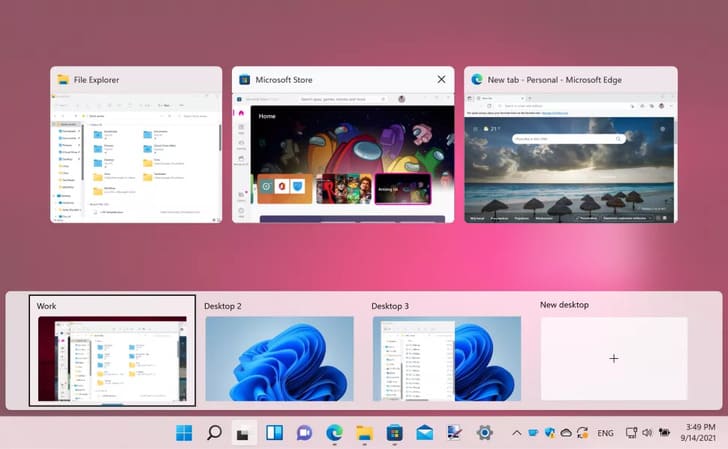
Shortcuts on Virtual Desktop
List of keyboard shortcuts on Windows 11 you need to know 4

Using an additional monitor on your computer is one of the best upgrades you can make to help improve productivity, but not everyone has the space or money to buy a second monitor.

Thankfully, Microsoft introduced Virtual Desktops as an alternative to multiple monitors in Windows 10, and this feature has been greatly improved in Windows 11.

Keyboard shortcuts on Windows 11 Function
Windows + Tab Open Task view
Windows + Ctrl + EASY Add Virtual Desktop
Windows + Ctrl + Right or Left arrow Switch between virtual desktops
Windows + Ctrl + F4 Close the virtual Desktop in use

You can add as many virtual Desktops as you want, and learning how to use these keyboard shortcuts will make switching between them even easier.

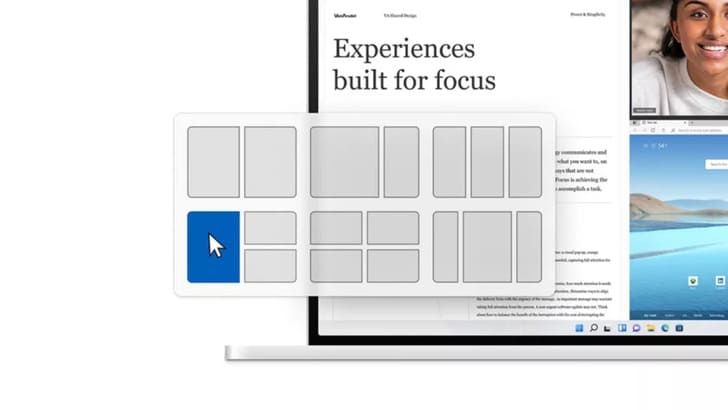
Snap Layouts Shortcuts
List of keyboard shortcuts on Windows 11 you need to know 5

If you want to improve productivity, Snap layouts is indispensable, it allows you to arrange multiple windows on the screen in different layouts.

If you often use multiple windows this is a particularly useful feature, and with these shortcuts you can still use your keyboard to navigate around instead of hovering.

Keyboard shortcuts on Windows 11 Function
Windows + Z Open Snap Layouts
Windows + Alt + up or down arrow Mount the selected window to the top or bottom half of the screen

In addition, you can also use WSATools to install apk files on Windows 11 here.

The article achieved: 5/5 – (100 votes)

Tags: KeyboardListshortcutsWindows
Previous Post

Parents should use Google Family Link to manage their children

Next Post

Why are SMS messages not private and secure?

AnonyViet

AnonyViet

Related Posts

Cách Đăng ký Nhận Code ChatGPT Business
Tips

Cách Đăng ký Nhận Code ChatGPT Business

November 2, 2026
Instructions for cleaning LG TV with Antigravity to help it run faster
Tips

Instructions for cleaning LG TV with Antigravity to help it run faster

October 30, 2026
Quét lỗ hổng bảo mật cho Vide Coding bằng Security Audit Skill
Tips

Quét lỗ hổng bảo mật cho Vide Coding bằng Security Audit Skill

October 27, 2026
Instructions for registering for OxionAI Pro for 1 year with many powerful AI models
Tips

Instructions for registering for OxionAI Pro for 1 year with many powerful AI models

October 24, 2026
How are Windows 11 Pro and Windows 10 Pro different?
Tips

How are Windows 11 Pro and Windows 10 Pro different?

October 23, 2026
Instructions for using CleanYourTV: Remove ads on Android TV, Google TV
Tips

Instructions for using CleanYourTV: Remove ads on Android TV, Google TV

October 23, 2026
Next Post
Why are SMS messages not private and secure?

Why are SMS messages not private and secure?

0 0 votes
Article Rating
Subscribe
Login
Notify of
guest

guest

0 Comments
Oldest
Newest Most Voted

Recent News

Instructions on how to buy super bargain 1k Bach Hoa Xanh products

Instructions on how to buy super bargain 1k Bach Hoa Xanh products

November 6, 2026
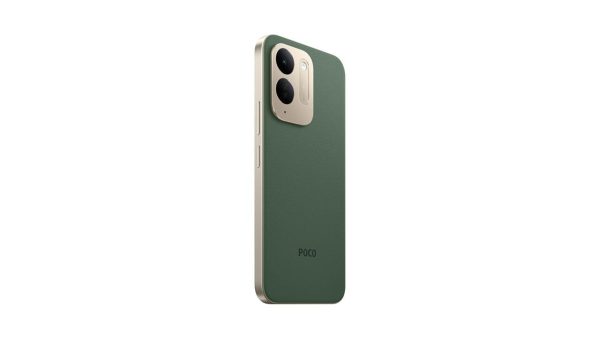
Besides the 7500 mAh battery and 6.9 inch screen, what else does the POCO C95 Pro 4G have to make it a secondary device worth buying?

Besides the 7500 mAh battery and 6.9 inch screen, what else does the POCO C95 Pro 4G have to make it a secondary device worth buying?

November 5, 2026
App fixes printer errors automatically, effective immediately with 1 click

App fixes printer errors automatically, effective immediately with 1 click

November 5, 2026
What to do when your company opening information is stolen?

What to do when your company opening information is stolen?

November 4, 2026
Instructions on how to buy super bargain 1k Bach Hoa Xanh products

Instructions on how to buy super bargain 1k Bach Hoa Xanh products

November 6, 2026
Besides the 7500 mAh battery and 6.9 inch screen, what else does the POCO C95 Pro 4G have to make it a secondary device worth buying?

Besides the 7500 mAh battery and 6.9 inch screen, what else does the POCO C95 Pro 4G have to make it a secondary device worth buying?

November 5, 2026
App fixes printer errors automatically, effective immediately with 1 click

App fixes printer errors automatically, effective immediately with 1 click

November 5, 2026
AnonyViet - English Version

AnonyViet

AnonyViet is a website share knowledge that you have never learned in school!

We are ready to welcome your comments, as well as your articles sent to AnonyViet.

Follow Us

Contact:

Email: anonyviet.com[@]gmail.com

Main Website: https://anonyviet.com

Recent News

Instructions on how to buy super bargain 1k Bach Hoa Xanh products

Instructions on how to buy super bargain 1k Bach Hoa Xanh products

November 6, 2026
Besides the 7500 mAh battery and 6.9 inch screen, what else does the POCO C95 Pro 4G have to make it a secondary device worth buying?

Besides the 7500 mAh battery and 6.9 inch screen, what else does the POCO C95 Pro 4G have to make it a secondary device worth buying?

November 5, 2026
  • Home
  • Home 2
  • Home 3
  • Home 4
  • Home 5
  • Home 6
  • Next Dest Page
  • Sample Page

say88 tỷ lệ kèo nhà cái kèo nhà cái 5 febet

No Result
View All Result
  • Home
  • News
  • Software
  • Knowledge
  • MMO
  • Tips
  • Security
  • Network
  • Office

say88 tỷ lệ kèo nhà cái kèo nhà cái 5 febet

wpDiscuz
0
0
Would love your thoughts, please comment.x
()
x
| Reply