• Home
  • News
  • Software
  • Knowledge
  • MMO
  • Tips
  • Security
  • Network
  • Office
AnonyViet - English Version
  • Home
  • News
  • Software
  • Knowledge
  • MMO
  • Tips
  • Security
  • Network
  • Office
No Result
View All Result
  • Home
  • News
  • Software
  • Knowledge
  • MMO
  • Tips
  • Security
  • Network
  • Office
No Result
View All Result
AnonyViet - English Version
No Result
View All Result

How to register for a Microsoft Edu Email account

AnonyViet by AnonyViet
January 25, 2023
in Tips
0

When you become a student of a particular university or college, you will enjoy one of the best student perks of having an edu email, you will have an .edu email account in your name. yours, for example: [email protected]. But if you are not a student and are in dire need of an .edu email to register for vip accounts on Canva, Zoom, then this article is for you. I will show you how to sign up for a Microsoft edu email account and of course this account also comes with Office 365 A1 and OneDrive 5TB or Google Workspace.

Join the channel Telegram of the AnonyViet 👉 Link 👈

How to register for a Microsoft Edu Email account

The A1 license includes Office 365 for the web with popular apps like Outlook, Word, PowerPoint, Excel, and OneNote so students, faculty, and staff can work together.

Licenses include:

  • 50 GB mailbox (accessible through Outlook on the web).
  • Online access to Word, Excel, PowerPoint and OneNote. The documents you create are stored in OneDrive, so you can access them from anywhere.
  • Access to popular Office 365 services like OneDrive, SharePoint, Teams, Sway, Forms, Stream, Power Automate, and Power Apps.

Features of A1 license users:

  • Work together with co-authorization, real-time autosave, and easy sharing in your favorite web apps like Word, PowerPoint, and Excel.
  • Leverage Microsoft Teams, integrating the meetings, chat, calls, content, and apps your school needs.
  • Stay organized with OneNote, the cloud note-taking service.
  • Inform and engage with communication sites and team sites on your intranet using SharePoint.
  • Create, manage, and share videos securely with an enterprise video service.
  • Develop apps without code to scale enterprise data quickly with custom web and mobile apps.
  • Use workflow automation across apps and services to automate business processes without writing code.
  • Communicate easily with HD video conferencing meetings.

Benefits of registering an Edu Email account

1. GitHub Student Developer Pack

The first and biggest benefit of having a .edu email address is the GitHub Student Developer Pack, the best free developer tools and services for students. This student bundle comes with 12 great deals and free services that might be useful to you, such as $15 Amazon AWS coupon, $50 Digital Ocean coupon and more another.

2. Amazon Student Pack

When you use a .edu email account and sign up for an Amazon Student account – you will be able to use this Edu email for Amazon Prime for free for six months, which has many benefits such as

  • Free TWO DAY shipping on many products on Amazon.
  • Get unlimited movies, TV shows and music online instantly.
  • Access exclusive features for students.
  • Unlimited photo storage with Amazon Prime Photos.

3. LastPass

LastPass offers six months of LastPass Premium to any user with a .edu email address.

5. Apple

You’ll save a lot of money by using your .edu email address to buy products from Apple. There are deals to save up to $200 on Apple computers.

6. Microsoft DreamSpark

Get Microsoft DreamSpark with lots of useful software and sign up for Microsoft Office 365 for free.

How to sign up for a Microsoft edu email account

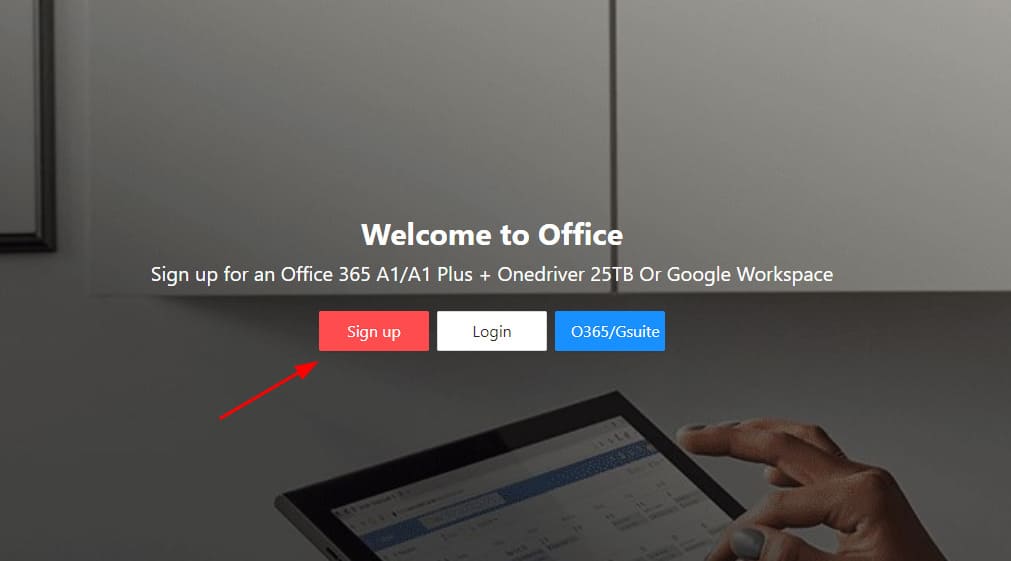
Step 1: First, you access the website vnshare.top here. Next, click on “Sign Up”.
How to register for an Edu Email account of Microsoft 11

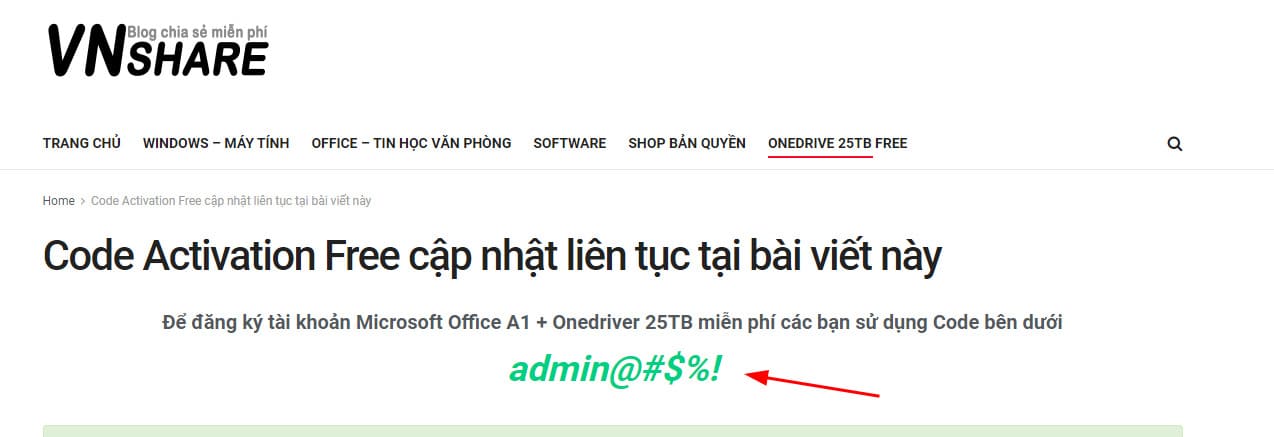
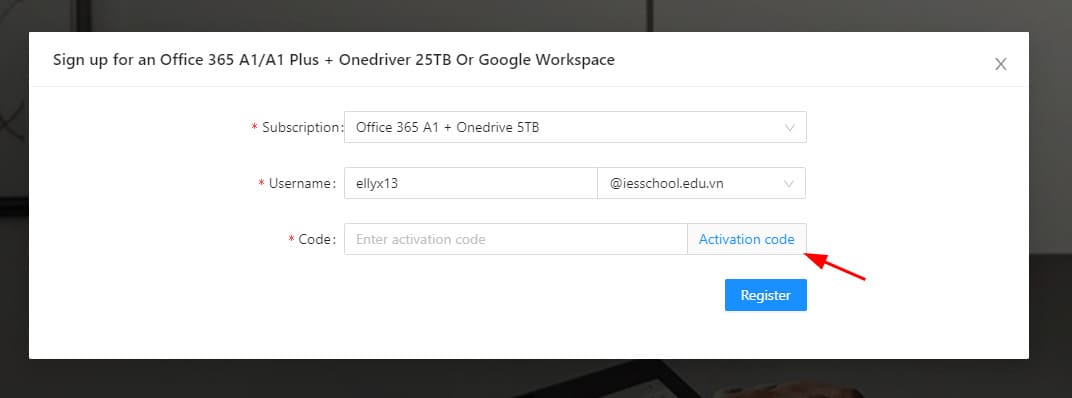
Step 2: Choose the Office 365 A1 + Ondrive 5TB plan. Enter the username you want and select email edu. Enter the Code: [email protected] (skip step 3), go to step 4
How to register for a Microsoft Edu Email account 12

Step 3: Copy the code below.

How to register for a Microsoft Edu Email account 13

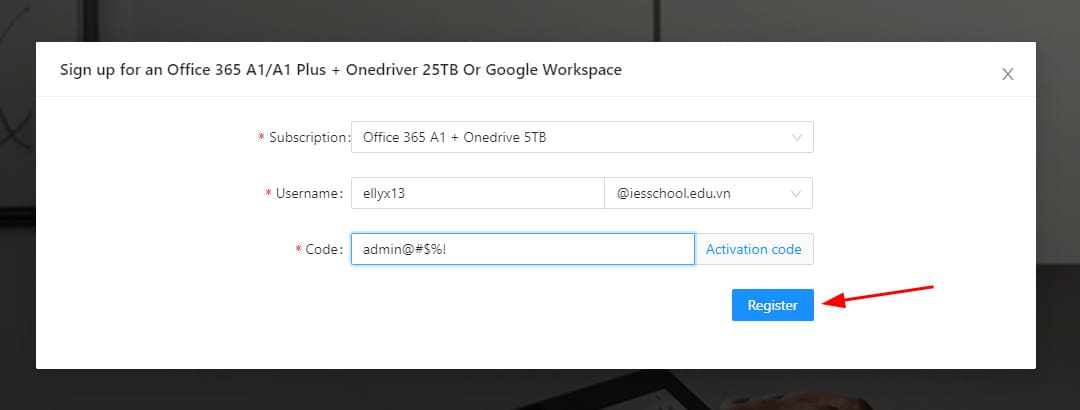
Step 4: Go back to the vnshare website, enter the code you just copied and press “Register”.
How to register for a Microsoft Edu Email account 14

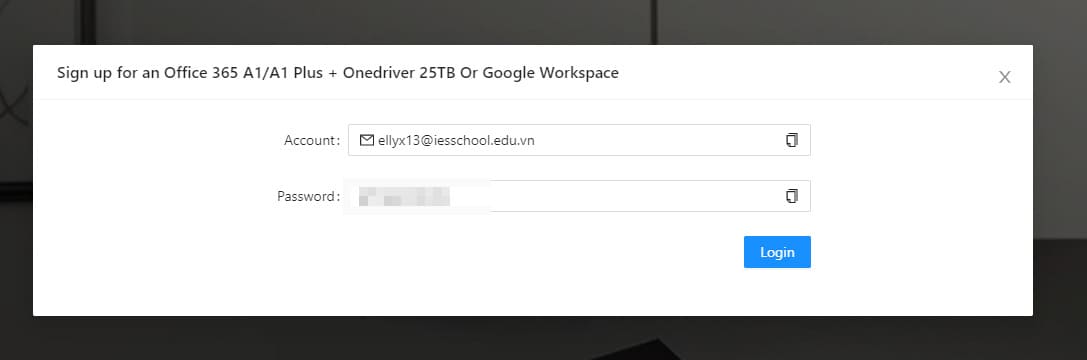
Step 5: The website will provide you with an edu email account and password.
How to register for a Microsoft Edu Email account 15

Step 6: Sign in to the Office website here.How to register for a Microsoft Edu Email account 16
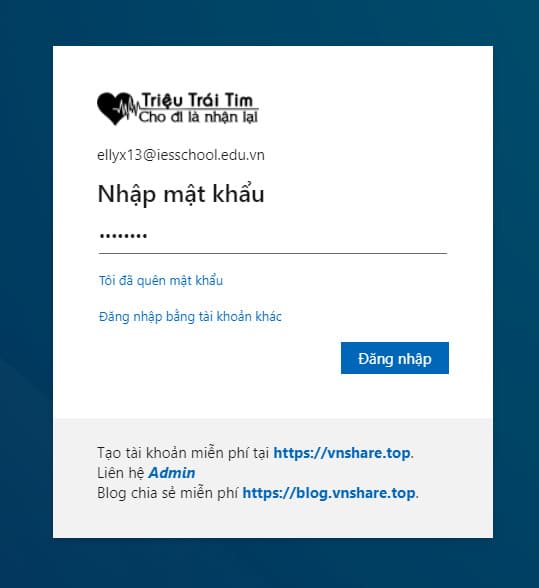
Step 7: Change your edu account password.
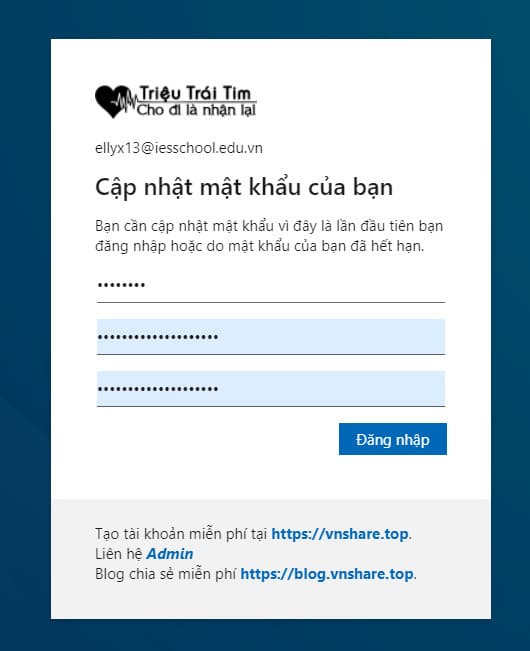
How to register for a Microsoft Edu Email account 17

Step 8: So it’s a success.

How to register for a Microsoft Edu Email account 18

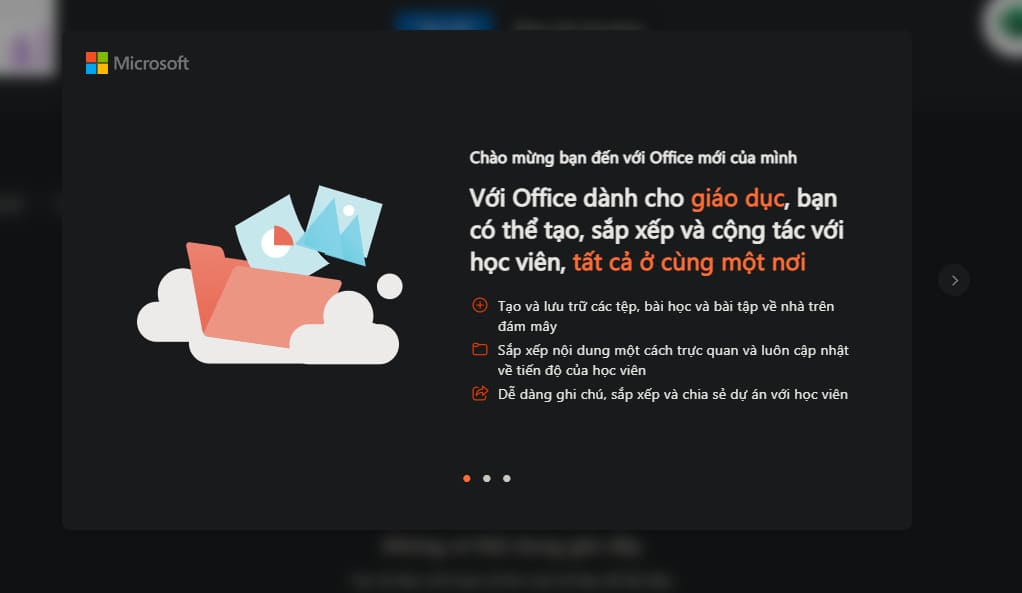
If you access your Office account, you will see the A1 license.
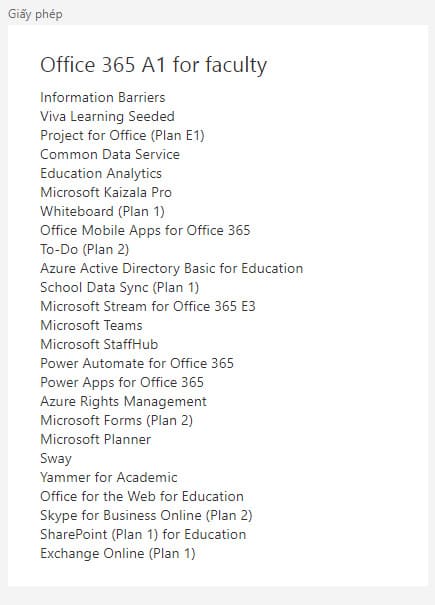
How to register for a Microsoft Edu Email account 19

When you sign up for an Edu Email account, you can use free Microsoft applications and 5TB Onedrive storage. But I advise not to save too important things in OneDrive.

Alternatively, you can also try another way to sign up for Office here.

The article achieved: 5/5 – (101 votes)

Tags: accountemailMicrosoftRegister
Previous Post

Top 10 most popular hacking techniques you should know

Next Post

Lesson 257: GetPivotData function in Excel

AnonyViet

AnonyViet

Related Posts

How to cancel Facebook Plus package to avoid automatic renewal
Tips

How to cancel Facebook Plus package to avoid automatic renewal

November 23, 2026
How to unlock iPhone Duo face on iOS 27.3 Beta 2
Tips

How to unlock iPhone Duo face on iOS 27.3 Beta 2

November 23, 2026
Naykia: App saves posts across multiple platforms, keeping the post intact even if the original post is deleted
Tips

Naykia: App saves posts across multiple platforms, keeping the post intact even if the original post is deleted

November 22, 2026
Free CNSF certification exam guide from Red Team Leaders
Tips

Free CNSF certification exam guide from Red Team Leaders

November 21, 2026
Instructions for registering Google AI Pro for 2 years for free until 2028
Tips

Instructions for registering Google AI Pro for 2 years for free until 2028

November 21, 2026
Instructions for registering for free Google AI Ultra + Youtube Premium
Tips

Instructions for registering for free Google AI Ultra + Youtube Premium

November 18, 2026
Next Post
Lesson 257: GetPivotData function in Excel

Lesson 257: GetPivotData function in Excel

0 0 votes
Article Rating
Subscribe
Login
Notify of
guest

guest

0 Comments
Oldest
Newest Most Voted

Recent News

How to cancel Facebook Plus package to avoid automatic renewal

How to cancel Facebook Plus package to avoid automatic renewal

November 23, 2026
SSHWATCH: Dashboard to see realtime VPS attacks using Honeypot

SSHWATCH: Dashboard to see realtime VPS attacks using Honeypot

November 23, 2026
Detailed review of realme C01: Breaking the stereotype of cheap smartphones with 6,500 mAh battery and 120Hz screen

Detailed review of realme C01: Breaking the stereotype of cheap smartphones with 6,500 mAh battery and 120Hz screen

November 23, 2026
Purple Team: How to verify that the monitoring system can actually detect attacks

Purple Team: How to verify that the monitoring system can actually detect attacks

November 23, 2026
How to cancel Facebook Plus package to avoid automatic renewal

How to cancel Facebook Plus package to avoid automatic renewal

November 23, 2026
SSHWATCH: Dashboard to see realtime VPS attacks using Honeypot

SSHWATCH: Dashboard to see realtime VPS attacks using Honeypot

November 23, 2026
Detailed review of realme C01: Breaking the stereotype of cheap smartphones with 6,500 mAh battery and 120Hz screen

Detailed review of realme C01: Breaking the stereotype of cheap smartphones with 6,500 mAh battery and 120Hz screen

November 23, 2026
AnonyViet - English Version

AnonyViet

AnonyViet is a website share knowledge that you have never learned in school!

We are ready to welcome your comments, as well as your articles sent to AnonyViet.

Follow Us

Contact:

Email: anonyviet.com[@]gmail.com

Main Website: https://anonyviet.com

Recent News

How to cancel Facebook Plus package to avoid automatic renewal

How to cancel Facebook Plus package to avoid automatic renewal

November 23, 2026
SSHWATCH: Dashboard to see realtime VPS attacks using Honeypot

SSHWATCH: Dashboard to see realtime VPS attacks using Honeypot

November 23, 2026
  • Home
  • Home 2
  • Home 3
  • Home 4
  • Home 5
  • Home 6
  • Next Dest Page
  • Sample Page

say88 tỷ lệ kèo nhà cái kèo nhà cái 5 febet

No Result
View All Result
  • Home
  • News
  • Software
  • Knowledge
  • MMO
  • Tips
  • Security
  • Network
  • Office

say88 tỷ lệ kèo nhà cái kèo nhà cái 5 febet

wpDiscuz
0
0
Would love your thoughts, please comment.x
()
x
| Reply