• Home
  • News
  • Software
  • Knowledge
  • MMO
  • Tips
  • Security
  • Network
  • Office
AnonyViet - English Version
  • Home
  • News
  • Software
  • Knowledge
  • MMO
  • Tips
  • Security
  • Network
  • Office
No Result
View All Result
  • Home
  • News
  • Software
  • Knowledge
  • MMO
  • Tips
  • Security
  • Network
  • Office
No Result
View All Result
AnonyViet - English Version
No Result
View All Result

Lesson 265: Assignment problem in Excel

AnonyViet by AnonyViet
January 25, 2023
in Office
0

This article will guide you to calculate the problem of division of work in Excel.

Join the channel Telegram of the AnonyViet 👉 Link 👈

Assignment problem

Use solvers in Excel to assign people to tasks to reduce total costs.

Model building

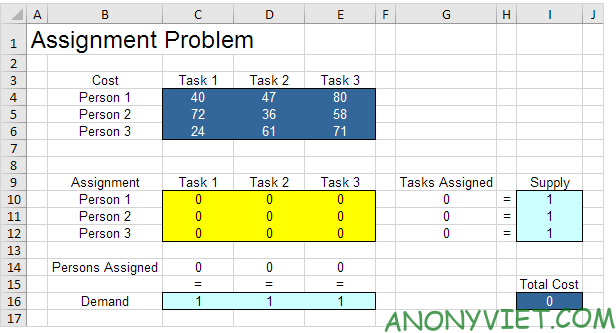
The model we will deal with looks like this in Excel.
Lesson 265: Assignment problem in Excel

Person: Person

Mission: Task

1. To model this Assignment Problem, we first answer the following three questions.

a. What decisions will be made? For this, we need to figure out which task to assign (Yes=1, No=0). For example, if we assign Person 1 to Task 1, cell C10 equals 1. Otherwise, cell C10 equals 0.

b. What are the constraints on these decisions? Each person can only do one task (Supply=1). Each mission requires only one person (Demand = 1).

c.What are the overall performance metrics for these decisions? The overall performance metric is the total cost of the task, so the goal is to minimize this number.

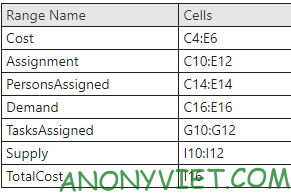
2. To make the model easier to understand
Lesson 265: Assignment problem in Excel 15

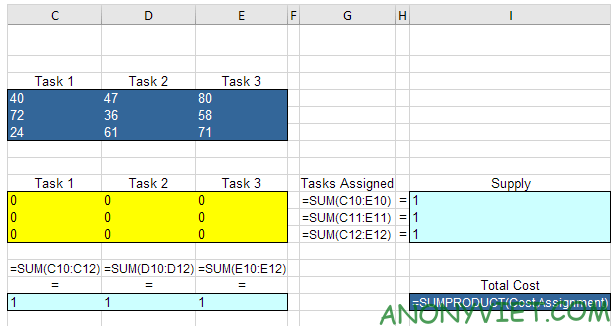
3. Add the Function as follows

Lesson 265: Assignment problem in Excel 16

Explanation: The SUM functions calculate the number of tasks assigned to a person and the number of people assigned to a task.

Trial and error

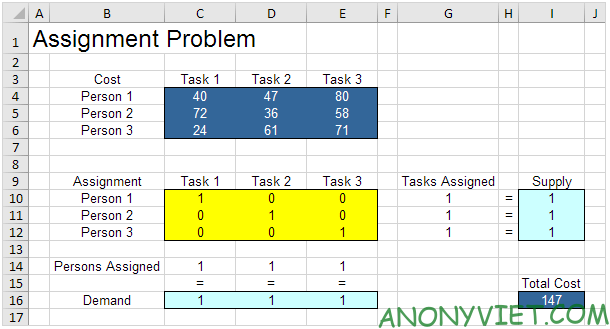
For example, if we assign Person 1 for Task 1, Person 2 for task 2 and Person 3 for Task 3, the Task is assigned by Supply and Person is assigned by Demand. This solution has a total cost of 147.Lesson 265: Assignment problem in Excel 17
Solve the model

To find the optimal solution, follow the steps below.

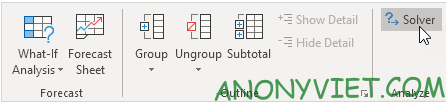
1. On the Data table, Solver
Lesson 265: Assignment problem in Excel 18

Enter solver parameters. The result should match the figure below.
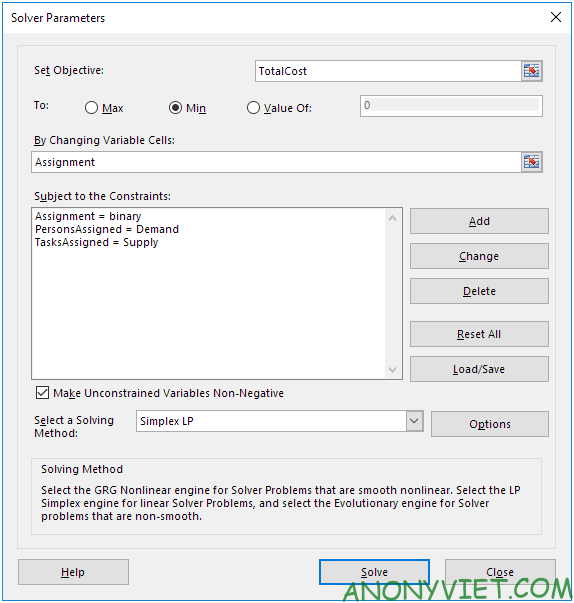
Lesson 265: Assignment problem in Excel 19

2. Enter TotalCost for Target.

3. Click Min.

4. Enter Assignment for Changing Variable Cells.

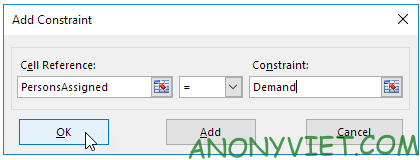
5. Click Add.
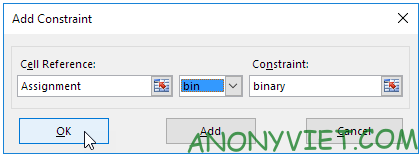
Lesson 265: Assignment problem in Excel 20

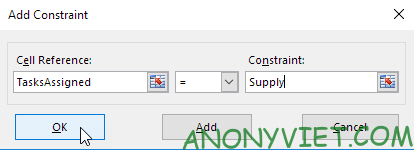
6. Click Add

Lesson 265: Assignment problem in Excel 21

7. Click Add

Lesson 265: Assignment problem in Excel 22

8. Select ‘Make Unconstrained Variables Non-Negative’ ‘ and select ‘Simplex LP’.

9. Finally press Solve

Result:
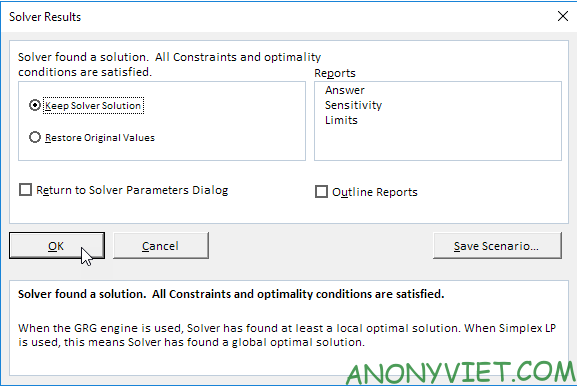
Lesson 265: Assignment problem in Excel 23

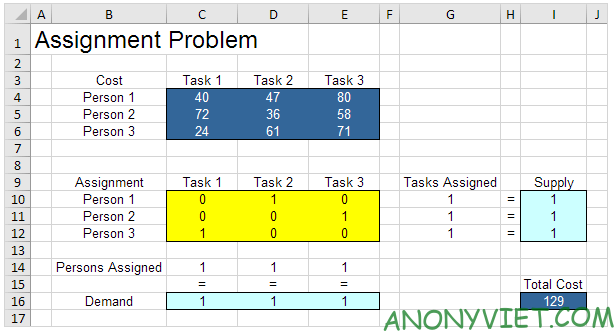
Optimal solution:

Lesson 265: Assignment problem in Excel 24

Conclusion: it is optimal to assign Person 1 for Task 2, Person 2 for Task 3 and Person 3 for Task 1. This solution gives a minimum cost of 129. All are satisfied.


In addition, you can also view many other excel articles here.

The article achieved: 5/5 – (100 votes)

Tags: AssignmentExcelLessonproblem
Previous Post

How to reopen recently closed Tabs on Chrome browser

Next Post

How to create a Web Server on VPS with Hostvn Script

AnonyViet

AnonyViet

Related Posts

Instructions on how to hide formulas in Excel to secure data
Office

Instructions on how to hide formulas in Excel to secure data

February 6, 2026
Top who creates the most beautiful presentation slide today
Office

Top who creates the most beautiful presentation slide today

September 23, 2025
Automatically check and correct spelling errors on Google Docs
Office

Automatically check and correct spelling errors on Google Docs

February 23, 2025
Instructions for downloading Google Docs files easily on any device
Office

Instructions for downloading Google Docs files easily on any device

December 18, 2024
Launching AI image creation feature on Google Docs
Office

Launching AI image creation feature on Google Docs

November 20, 2024
Instructions for using Google Docs without internet
Office

Instructions for using Google Docs without internet

November 2, 2024
Next Post
How to create a Web Server on VPS with Hostvn Script

How to create a Web Server on VPS with Hostvn Script

0 0 votes
Article Rating
Subscribe
Login
Notify of
guest

guest

0 Comments
Oldest
Newest Most Voted
Inline Feedbacks
View all comments

Recent News

How to intercept traffic using Burp Suite to analyze HTTP/HTTPS

How to intercept traffic using Burp Suite to analyze HTTP/HTTPS

April 18, 2026
How to avoid Adblock detection on Youtube with 4 good tips

How to avoid Adblock detection on Youtube with 4 good tips

April 17, 2026
How to transfer ChatGPT data to Claude is extremely simple

How to transfer ChatGPT data to Claude is extremely simple

April 16, 2026
How to authenticate the owner’s SIM on VNeID from April 15

How to authenticate the owner’s SIM on VNeID from April 15

April 15, 2026
How to intercept traffic using Burp Suite to analyze HTTP/HTTPS

How to intercept traffic using Burp Suite to analyze HTTP/HTTPS

April 18, 2026
How to avoid Adblock detection on Youtube with 4 good tips

How to avoid Adblock detection on Youtube with 4 good tips

April 17, 2026
How to transfer ChatGPT data to Claude is extremely simple

How to transfer ChatGPT data to Claude is extremely simple

April 16, 2026
AnonyViet - English Version

AnonyViet

AnonyViet is a website share knowledge that you have never learned in school!

We are ready to welcome your comments, as well as your articles sent to AnonyViet.

Follow Us

Contact:

Email: anonyviet.com[@]gmail.com

Main Website: https://anonyviet.com

Recent News

How to intercept traffic using Burp Suite to analyze HTTP/HTTPS

How to intercept traffic using Burp Suite to analyze HTTP/HTTPS

April 18, 2026
How to avoid Adblock detection on Youtube with 4 good tips

How to avoid Adblock detection on Youtube with 4 good tips

April 17, 2026
No Result
View All Result
  • Home
  • News
  • Software
  • Knowledge
  • MMO
  • Tips
  • Security
  • Network
  • Office

wpDiscuz
0
0
Would love your thoughts, please comment.x
()
x
| Reply