

Mosquito swatting game calls students’ names It’s been a pretty interesting trend lately. Instead of just flipping through the notebook and calling out names dryly, teachers can now make a little variation to make the atmosphere more exciting. The thrill of waiting to see whose name the racket hits really keeps the children awake. Let’s go together AnonyViet Discover this cool tool now.
📢 Join the channel Telegram belong to AnonyViet
Update new articles, cool tools and IT tips fastest
The obsession with returning homework and the appearance of the mosquito swatter game call students’ names
When I used to go to school, my biggest fear was when the teacher opened the attendance book and checked the pen. The whole class was silent, not daring to breathe loudly. Now that I’m a teacher, I find that calling names like that is really boring. The kids are so stressed. Thanks to that, when I learned about the game of swatting mosquitoes and calling students’ names, I felt like I had struck gold. The idea here is extremely simple but very effective.
Each child in the class will turn into a mosquito buzzing on the projector screen. Teachers just press a button and a cartoon character appears holding a racket, aiming straight at a mosquito and shouting. The name of the person who was hit appears loudly. Needless to say, the children burst out laughing. Both surprising and funny. Instead of being scared, they were eagerly waiting to see which unlucky person would be summoned today. This is truly a great way to start class.

In addition, I have introduced the game UFO calling names and answering cards, which is equally hot, you can see more HERE.
Instructions for playing the mosquito-swatting game and calling students’ names
Many people think that these interactive web games must be very complicated to install. Actually, it’s that easy. The interface is completely in Vietnamese so anyone can understand it. Just follow this order and you’re done.
Step 1: First, open your web browser and access the link HERE.
Right on the main screen, if you look closely you will see the button Setting. Click on it to start creating a completely new class.

Step 2: At this point, the screen will display empty cells. You fill in the class name, for example Class 10A1.
Then copy the entire list of student names and paste them into the box below. When finished, press the button More for the system to save the data.
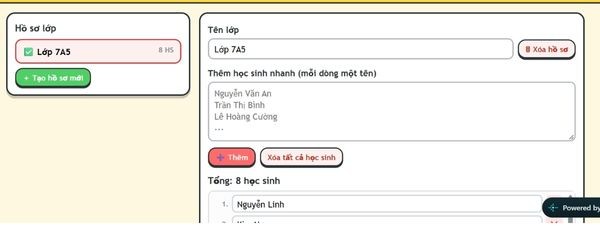
Step 3: Once you’ve saved the list, find the button Back to home page to return to the previous screen. Now confidently click the button Start playing The last red color is in the middle of the screen.

Step 4: Don’t rush to swat the mosquitoes right away. Please look down at the toolbar below to make a little more dramatic tweak to the game of mosquito swatting and calling students’ names. Here there is a section to adjust the mosquito flying speed and the waiting time to beat in three levels: Fast, Medium, Slow. Depending on your taste, choose. I often let the mosquitoes fly quickly so that their eyes are squinted. Don’t forget to check the box Calls are not duplicated if you want to make sure every child gets on the board.
Step 5: Now everything is ready. Now you just need to press the button Name.
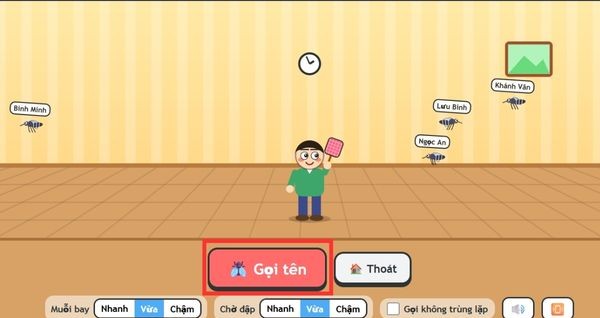
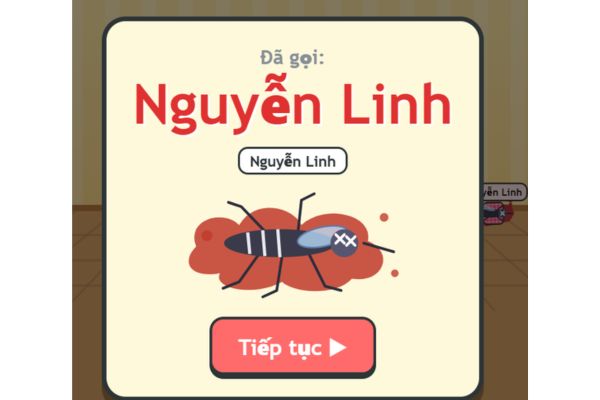
The character will automatically swing the racket and boom, a random name appears. The game continues until you want to stop.
Practical experience when applied in class
Since using this website, the atmosphere in my class is completely different. The kids who often fell asleep at the last table had to raise their heads to see who was being beaten. Therefore, I sincerely recommend that every teacher should try it at least once. Sometimes, no matter how good the lecture is, the introduction is boring and it is difficult for students to absorb.
Using the mosquito swatting game to call students’ names is a small dose of mental medicine. Don’t waste money, don’t waste time preparing cumbersome teaching materials. You only need a laptop connected to the internet to stir up the whole classroom. Furthermore, the system’s automatic random selection also helps teachers avoid being known to favor or favor students. In short, if you’re stuck for ideas to warm up the classroom, immediately remember the game of swatting mosquitoes and calling students’ names. It meets all the criteria of being fast, compact, nimble and extremely entertaining.
Conclusion
In short Mosquito swatting game calls students’ names is a small but powerful tool. It helps dispel the stressful atmosphere every time the teacher checks old lessons. Instead, there were bursts of laughter from both the teacher and the student. Teachers, please try applying it tomorrow and see how the children react.
Frequently Asked Questions (Q&A)
1. Does this app limit the number of students in a class?
According to my experience, you can comfortably paste the list of a normal class of about 40 to 50 students. The system still recognizes and creates a sufficient number of corresponding mosquitoes on the screen.
2. Can I save many different classes on the web?
You can absolutely create and save different layer names in the settings. When it comes to a class period, you just need to select the correct class name and the list will automatically appear.
3. How does the non-duplicate call function work?
When you check this option, students who have been hit and called will not appear again in the next spins. This ensures fairness, everyone will have their turn.








