SynthID Detector Google has just officially expanded to users around the world. Previously this tool was only available to a small group of journalists or research experts. Now anyone can use it to see if the photo or video they just glanced at is a virtual product created by AI. Let’s go together AnonyViet Let’s explore in detail how it works.
📢 Join the channel Telegram belong to AnonyViet
Update new articles, cool tools and IT tips fastest
The birth of a national AI checking tool
Surfing social networks is really tiring these days. Every few days, I see a surreal photo or virtual-looking video floating around without knowing if it’s real or drawn by a computer. In the past, the photo-production models were still cheap, you could tell right away because the fingers and toes were often stuck together. But now it’s different, they’re so smooth that they fool even the most discerning eyes. Sounds impersonating famous people’s voices are also everywhere, making anyone who hears them startled.
Thanks to that, Google decided to officially expand access to an AI content testing website to everyone globally. For more than a year, it was tested and limited to only journalists and researchers, and now we can touch it with our own hands. The best part is that it is completely free and supports extremely easy-to-understand English.

What is SynthID Detector and how does it work?
In simple terms, SynthID Detector is like a counterfeit money scanner. But instead of looking at the watermark on the bill, it looks for an invisible copyright mark inserted directly inside the photo, video or audio file. Technical people often call this steganographic payload. It sounds extremely complicated, but in fact it is just extremely small changes in the frequency components or bit distribution of the file.
When you look at the photo with your naked eyes, you will see that it is still sparklingly beautiful, the quality has not been reduced or blurred at all. This mark is so well hidden that it is completely invisible to human visual perception. The key point here is that this tool doesn’t care about trivial errors like AI drawing the wrong scene or blurring the background. Instead, it only focuses on detecting the specific digital embedded code generated by the system. If there is a code, it says AI, if there is no code, it says AI.
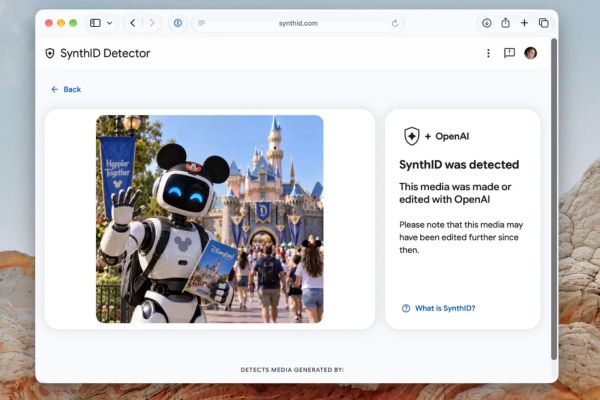
Which big guys are playing on this playground?
Google alone cannot cover this vast internet. Therefore, they have invited a series of other big names to join this ecosystem. Google itself has integrated this invisible mark into a series of their homegrown products. Which is GeminiVids, Flow, ProducerAI, Nano Banana, Veo or Lyria have it all.
But the good thing is that they also cooperate with OpenAI, NVIDIA and Kakao. This means that photos or videos created from these platforms will also be caught if they are checked. In the near future, Apple has also announced that it will jump into the game and integrate this system for Apple applications. Although the specific date and time have not yet been finalized, just hearing it already feels prestigious.
Instructions on how to use SynthID Detector
Step 1: Open your browser and go straight to the website https://synthid.com/
Here you can log in with your Google, Apple or OpenAI account.
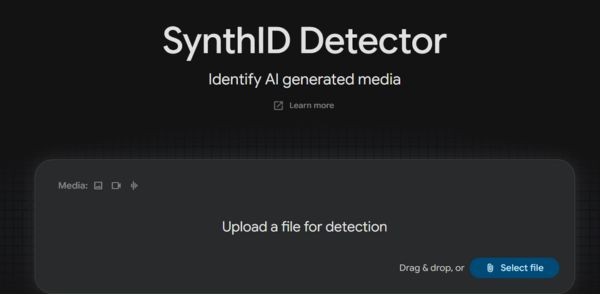
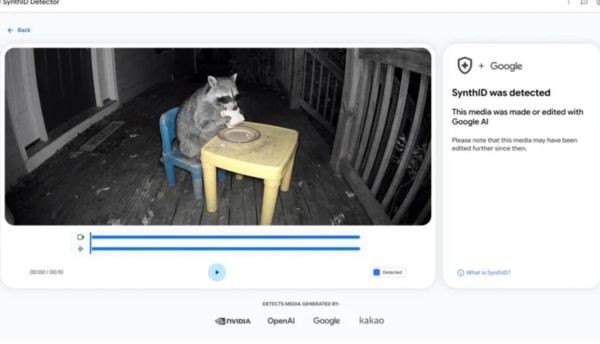
Step 2: Click the button to upload an image, video or audio file that you are in doubt about. SynthID Detector’s system will automatically run in the background and check to see if the file contains a watermark from Google or their partners. Wait a few seconds and the results will be right in front of you.
Is data security a concern?
Many people often worry about uploading personal files to strange websites for fear of having their data stolen. Just common sense, me too. But according to Google’s commitment, everything is processed in real time. That means their server just borrows your file to scan it once, displays the results and then deletes it.
However, there is a bit of technical information that will be retained. Specifically, a digital signature related to that file along with your user ID will be temporarily saved. Don’t worry too much because according to the terms of service, all this temporary data will be cleaned up after 24 hours. Thanks to that, you can rest assured and check the goods comfortably. Of course, to be careful, you should still go through their privacy policy a bit before using it to be sure.
Not everything can be detected
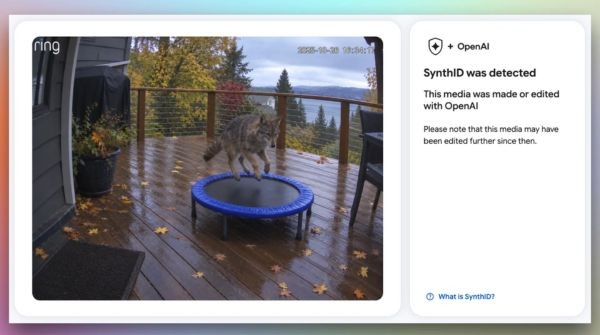
Having complimented you for a while, now I have to talk about its weaknesses. Don’t think that having this tool in your hand will make you a saint without dead ends. In fact, SynthID Detector can only detect files with the correct insert watermark compatible of its system only.
Suppose a photo is 100% clearly drawn by AI, but that AI tool is not part of Google’s alliance, does not insert invisible marks, or inserts another type of mark. At this point, the website has given up and cannot be recognized.
Another thing is that even though this invisible mark is very stubborn, if someone deliberately takes the photo for post-production editing that is too harsh, like cutting and distorting it to pieces, sometimes at the technical level that mark is also affected and distorts the results. Anyway, using SynthID Detector every day will help you be much more sensitive when receiving information online.
Conclusion
Appearance of SynthID Detector has really solved the headache of many people when surfing the web. Checking whether a photo or video is AI or not now only takes a few short seconds. Don’t forget to share this cool tool for your friends to use.
Frequently Asked Questions (Q&A)
1. Can this tool detect all AI photos in the world?
No, my friend. It only recognizes files that have an invisible copyright stamp from compatible systems like Google or OpenAI. If the AI image does not have this mark, the machine will still give up.
2. Will that invisible mark make my photo worse?
Absolutely no effect on our normal vision at all. It is designed to hide deep inside the technical data so the image or sound quality remains intact.
3. Will the file I upload to the web for testing be permanently saved by Google?
After they process it, they delete it immediately to return the results to you. Only some digital information and your ID are saved temporarily but will be deleted after 24 hours.