• Home
  • News
  • Software
  • Knowledge
  • MMO
  • Tips
  • Security
  • Network
  • Office
AnonyViet - English Version
  • Home
  • News
  • Software
  • Knowledge
  • MMO
  • Tips
  • Security
  • Network
  • Office
No Result
View All Result
  • Home
  • News
  • Software
  • Knowledge
  • MMO
  • Tips
  • Security
  • Network
  • Office
No Result
View All Result
AnonyViet - English Version
No Result
View All Result

How to change the default font in Word

AnonyViet by AnonyViet
June 27, 2026
in Tips
0

Word is a powerful application, but the configuration interface is not very intuitive. You can easily change the font in Word, but every time you create a new document the font returns to the default font. So, in this article, I will show you how to change the default font in Microsoft Word.

📢 Join the channel Telegram belong to AnonyViet


👉 Go to Telegram AnonyViet

Update new articles, cool tools and IT tips fastest
How to change the default font in Word

How to change the default font in Word

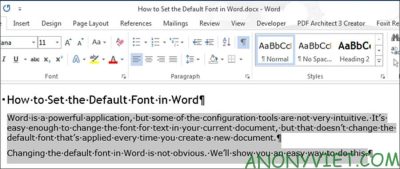
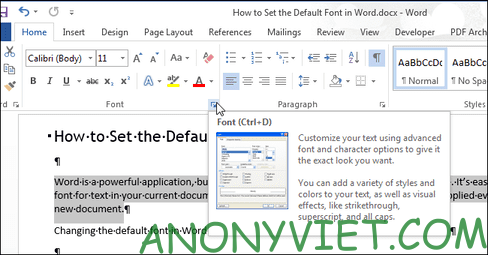
Open or create a new Word document. Select the text and click the arrow button next to “Font” in the “Font” section of the “Home” tab.
Change font word

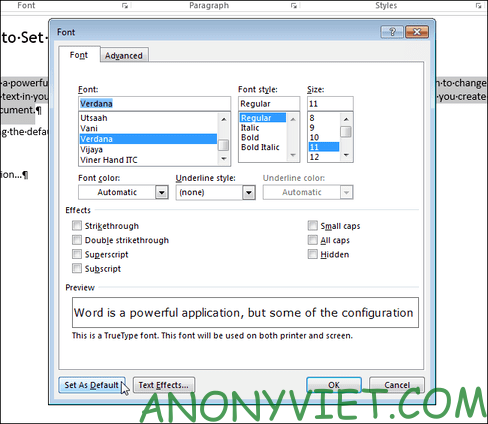
On the “Font” dialog box, select the font you want to set as default in the “Font” list and click the “Set As Default” button.
Set As Default

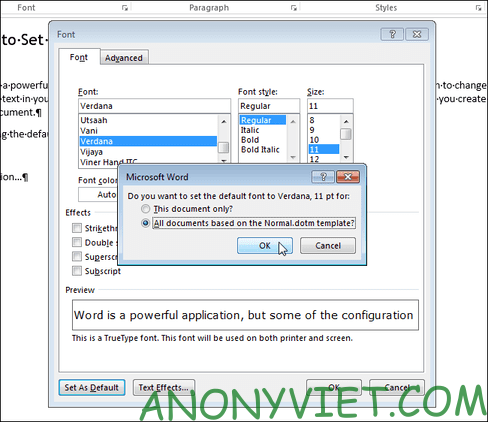
A dialog box will ask whether you should set the default font for the current document only or for all other documents. Select “All documents based on the Normal.dotm template” and click “OK”.
all documents based on the Normal.dotm template

NOTE: The new default font is only saved to the template currently in use. Existing documents will not be changed the next time they are opened.

For documents in Vietnam, you should follow the parameters: Times new Roman and font size 13 or 14, so that you don’t have to edit too much when writing the document later.

If you have a custom template applied to the current document, the default font will be saved in that template and not in another template. The easiest way to change the default font in another template is to create a new document and then follow the steps in this article.

So you have successfully changed the default font in Microsoft Word. Now, you don’t need to change the font anymore. All you need to do is open Word and work without worrying about fonts anymore. Additionally, you can also attach viruses to word files here.

Frequently asked questions

Can I change the default font for all my Word documents?

Maybe. After selecting the desired font, select “All documents based on the Normal.dotm template” in the confirmation dialog box to apply to all new documents based on the standard template.

If I already have multiple Word documents, will changing the default font affect them?

Are not. The change only affects new Word documents created after the change. Existing documents will retain the old font.

Where is the default font saved?

The default font is saved in the template being used, usually Normal.dotm. If you use a custom template, the font will be saved in that template.


Previous Post

Tips for browsing the web with Safari on iPhone

AnonyViet

AnonyViet

Related Posts

11 reasons to buy a Macbook instead of a Windows Laptop
Tips

11 reasons to buy a Macbook instead of a Windows Laptop

June 26, 2026
Instructions on how to change Gmail address without worrying about losing data
Tips

Instructions on how to change Gmail address without worrying about losing data

June 25, 2026
8 quick tips for learning Excel that anyone can learn
Tips

8 quick tips for learning Excel that anyone can learn

June 25, 2026
How to quickly compare the content of 2 Excel files
Tips

How to quickly compare the content of 2 Excel files

June 24, 2026
How to create funny selfies with pets for your pets
Tips

How to create funny selfies with pets for your pets

June 19, 2026
Chrome extension not working error and the fastest way to fix it
Tips

Chrome extension not working error and the fastest way to fix it

June 19, 2026
0 0 votes
Article Rating
Subscribe
Login
Notify of
guest

guest

0 Comments
Oldest
Newest Most Voted
Inline Feedbacks
View all comments

Recent News

How to change the default font in Word

How to change the default font in Word

June 27, 2026
Tips for browsing the web with Safari on iPhone

Tips for browsing the web with Safari on iPhone

June 26, 2026
11 reasons to buy a Macbook instead of a Windows Laptop

11 reasons to buy a Macbook instead of a Windows Laptop

June 26, 2026
Instructions on how to change Gmail address without worrying about losing data

Instructions on how to change Gmail address without worrying about losing data

June 25, 2026
How to change the default font in Word

How to change the default font in Word

June 27, 2026
Tips for browsing the web with Safari on iPhone

Tips for browsing the web with Safari on iPhone

June 26, 2026
11 reasons to buy a Macbook instead of a Windows Laptop

11 reasons to buy a Macbook instead of a Windows Laptop

June 26, 2026
AnonyViet - English Version

AnonyViet

AnonyViet is a website share knowledge that you have never learned in school!

We are ready to welcome your comments, as well as your articles sent to AnonyViet.

Follow Us

Contact:

Email: anonyviet.com[@]gmail.com

Main Website: https://anonyviet.com

Recent News

How to change the default font in Word

How to change the default font in Word

June 27, 2026
Tips for browsing the web with Safari on iPhone

Tips for browsing the web with Safari on iPhone

June 26, 2026
  • Home
  • Home 2
  • Home 3
  • Home 4
  • Home 5
  • Home 6
  • Next Dest Page
  • Sample Page

6789 kv999

No Result
View All Result
  • Home
  • News
  • Software
  • Knowledge
  • MMO
  • Tips
  • Security
  • Network
  • Office

6789 kv999

wpDiscuz
0
0
Would love your thoughts, please comment.x
()
x
| Reply