• Home
  • News
  • Software
  • Knowledge
  • MMO
  • Tips
  • Security
  • Network
  • Office
AnonyViet - English Version
  • Home
  • News
  • Software
  • Knowledge
  • MMO
  • Tips
  • Security
  • Network
  • Office
No Result
View All Result
  • Home
  • News
  • Software
  • Knowledge
  • MMO
  • Tips
  • Security
  • Network
  • Office
No Result
View All Result
AnonyViet - English Version
No Result
View All Result

Instructions on how to change iPhone fonts beautifully with Lara

AnonyViet by AnonyViet
May 20, 2026
in Tips
0

How to change iPhone font has long been the desire of many users who want to make a difference for their phone. Now, with the support of the Lara app, this is easier than ever on new iOS versions. Let’s explore with AnonyViet now.

📢 Join the channel Telegram belong to AnonyViet


👉 Go to Telegram AnonyViet

Update new articles, cool tools and IT tips fastest

Instructions on how to change iPhone font

Customizing the interface on the iOS operating system is always strictly controlled by Apple. However, with the Lara tool, users can flexibly change iPhone fonts on iOS versions 17.0 to 17.6.1 and 18.0 to 18.1.

Step 1: Download and install Lara application on the device. Open the application, select Run Exploit to grant system access.

Step 2: Select method Hybrid in the main interface. Then you need to enable important options including: Disable log dividers, Keep Alive and Show File Manager in Tabs.

Step 3: In the RemoteCall section, turn on the option Allow >10 dock icons if you want to increase the number of applications displayed on your Dock.
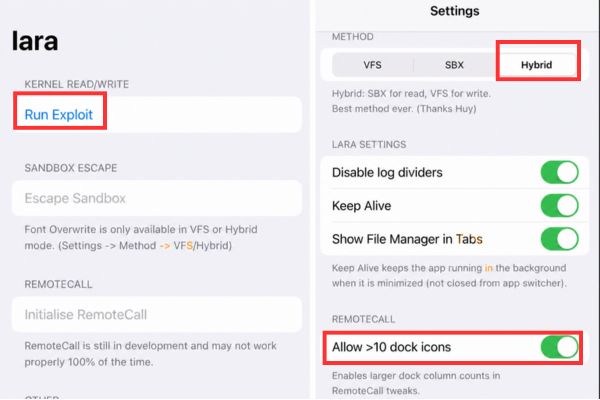
Instructions on how to change iPhone fonts beautifully with LaraTurn on the Allow >10 dock icons option

Step 4: Go back to the Lara app home screen and select it again Run Exploit to confirm final access. Click next Initialise RemoteCall.
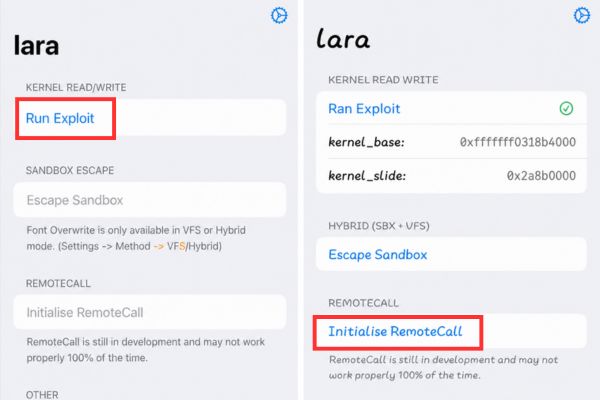
Select Run Exploit again

Step 5: Then, go to the Tweaks section to adjust the number of Dock columns as desired and click Apply Dock Columns.
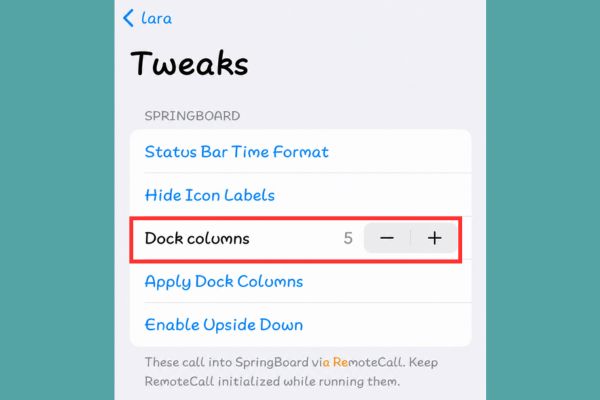
Adjust the number of Dock columns as desired

Step 6: In the Lara application, select Escape Sandbox then select next Initialize VFS to initialize the virtual file system.
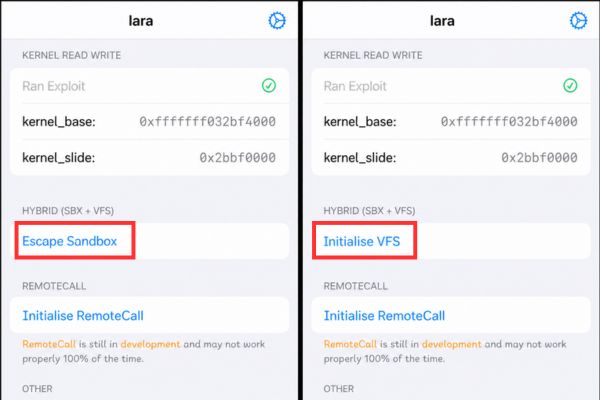
Select Initialise VFS

Step 7: Finally, go to Tweaks, select Font Overwrite. Here, you can select available fonts from the list or tap Import Fonts to select the font file (.ttf) downloaded to your device. After selecting, the application will automatically overwrite the font into the system.
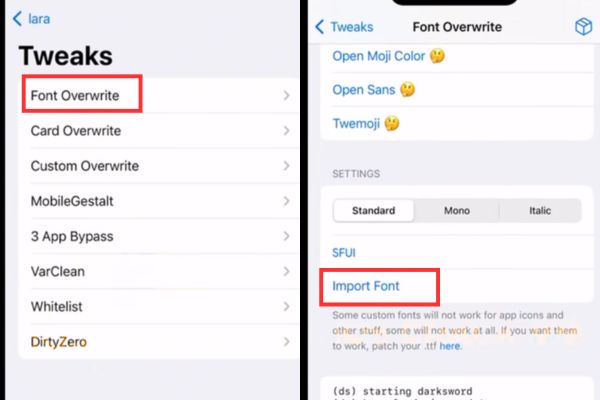
Click Import Font to select the font file (.ttf) downloaded to your computer

Important note when changing iPhone font

When doing how to change the font iPhonealways make sure your device has backed up important data iCloud. Although this tool is quite stable, tampering with system files always poses small risks if the font file is not compatible.

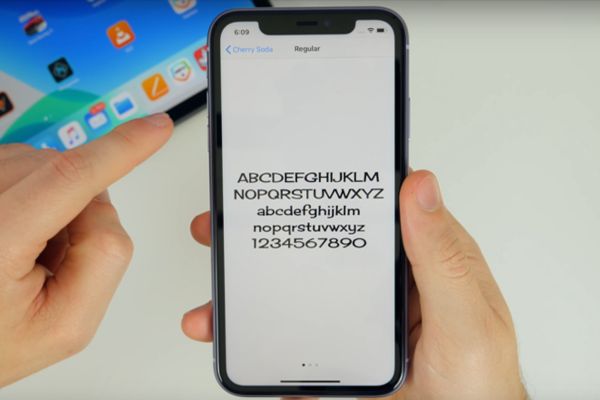
If you encounter an application crashing when trying to change the iPhone font, restart the device and try again. Finally, changing iPhone fonts should only be done on iOS versions that are on the support list. Attempting to apply on other versions may result in unexpected display errors or crashes.
Important note when changing iPhone font

Conclusion

If you love something new, give it a try How to change iPhone font today. Don’t forget to follow AnonyViet’s next articles to update more great tips about technology!

Frequently Asked Questions (Q&A)

1. Does changing the iPhone font void the warranty?

No, because this is a method of using the Sandbox Escape vulnerability, which does not permanently interfere with the root system.

2. Can I use any font file to make changes?

You should use standard .ttf format files to avoid font display errors on the system.

3. What should I do if my computer has a font error after installing it?

You just need to go back to the Lara application, select Font Overwrite and click Restore Default to restore the original font.


Tags: beautifullychangeFontsInstructionsiPhoneLara
Previous Post

Don’t rush to buy a new MacBook if you don’t know these differences

AnonyViet

AnonyViet

Related Posts

Create images of guardian mascots using AI according to year of birth
Tips

Create images of guardian mascots using AI according to year of birth

May 20, 2026
Try the Shopee Profit Calculator now, avoid the risk of selling at a loss
Tips

Try the Shopee Profit Calculator now, avoid the risk of selling at a loss

May 19, 2026
Prompt converts photos into extremely impressive children’s drawings
Tips

Prompt converts photos into extremely impressive children’s drawings

May 17, 2026
Instructions for receiving 1 month of ChatGPT Plus for free
Tips

Instructions for receiving 1 month of ChatGPT Plus for free

May 12, 2026
How to get ChatGPT Business 48 months discount from only 0 VND
Tips

How to get ChatGPT Business 48 months discount from only 0 VND

May 9, 2026
How to create a tiny version of yourself to follow the trend very easily
Tips

How to create a tiny version of yourself to follow the trend very easily

May 9, 2026
0 0 votes
Article Rating
Subscribe
Login
Notify of
guest

guest

0 Comments
Oldest
Newest Most Voted
Inline Feedbacks
View all comments

Recent News

Instructions on how to change iPhone fonts beautifully with Lara

Instructions on how to change iPhone fonts beautifully with Lara

May 20, 2026
Don’t rush to buy a new MacBook if you don’t know these differences

Don’t rush to buy a new MacBook if you don’t know these differences

May 20, 2026
Create images of guardian mascots using AI according to year of birth

Create images of guardian mascots using AI according to year of birth

May 20, 2026
Try the Shopee Profit Calculator now, avoid the risk of selling at a loss

Try the Shopee Profit Calculator now, avoid the risk of selling at a loss

May 19, 2026
Instructions on how to change iPhone fonts beautifully with Lara

Instructions on how to change iPhone fonts beautifully with Lara

May 20, 2026
Don’t rush to buy a new MacBook if you don’t know these differences

Don’t rush to buy a new MacBook if you don’t know these differences

May 20, 2026
Create images of guardian mascots using AI according to year of birth

Create images of guardian mascots using AI according to year of birth

May 20, 2026
AnonyViet - English Version

AnonyViet

AnonyViet is a website share knowledge that you have never learned in school!

We are ready to welcome your comments, as well as your articles sent to AnonyViet.

Follow Us

Contact:

Email: anonyviet.com[@]gmail.com

Main Website: https://anonyviet.com

Recent News

Instructions on how to change iPhone fonts beautifully with Lara

Instructions on how to change iPhone fonts beautifully with Lara

May 20, 2026
Don’t rush to buy a new MacBook if you don’t know these differences

Don’t rush to buy a new MacBook if you don’t know these differences

May 20, 2026
No Result
View All Result
  • Home
  • News
  • Software
  • Knowledge
  • MMO
  • Tips
  • Security
  • Network
  • Office

wpDiscuz
0
0
Would love your thoughts, please comment.x
()
x
| Reply