TikTok Pro Tools is the perfect solution for those who feel that the experience of watching Tot Top on the computer is too monotonous and limited. This utility opens up a whole new world with a series of powerful customization features, helping you master the game. Let’s explore with AnonyViet what’s special about this tool.
📢 Join the channel Telegram belong to AnonyViet
Update new articles, cool tools and IT tips fastest
Are you someone who spends hours every day exploring the creative world on TikTok, but is often on your computer? If the answer is yes, you’ve probably experienced the web version of TikTok There are many limitations, lacking flexibility and convenience compared to mobile applications.
Everything will change completely with TikTok Pro Tools – a browser extension developed by Vietnamese developer Diep Van Tien. This is not just a tool, but a comprehensive set of solutions, promising to redefine the way you “plow Top Top” on PC.
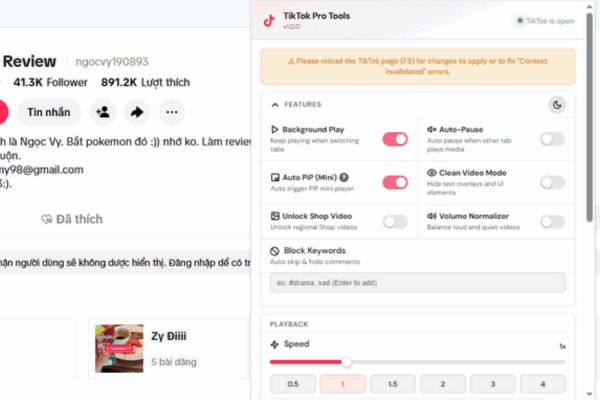
Instead of just scrolling and watching, this extension gives you incredible power to customize and control your experience.
Smooth multitasking
- Background Play: Now you can switch to other tabs to work, compose emails or read news while the sound from the TikTok video continues to play. This feature is extremely ideal for listening to podcasts, reviewing or telling stories on TikTok.
- Auto Picture-in-Picture (Auto PiP): As soon as you leave the TikTok tab, the video will automatically shrink to a floating window and pin on the screen. You can move and resize this window, allowing you to both monitor videos and complete work effectively.

Vivid sound, customized to your taste
The audio-visual experience would not be complete without quality sound. This utility understands that and brings:
- Equalizer EQ & Bass Boost: Do you like strong, “tight” bass for dance music? Or want the voice in podcast videos to be clearer? The built-in equalizer lets you customize audio frequencies, plus a dedicated Bass Boost mode will keep you happy.
- 360 degree surround sound: A unique feature that creates spatial sound effects, giving a realistic feeling and completely different from the default stereo sound.

Step 1: Access the download link HERE. Press Code > Select Download ZIP.
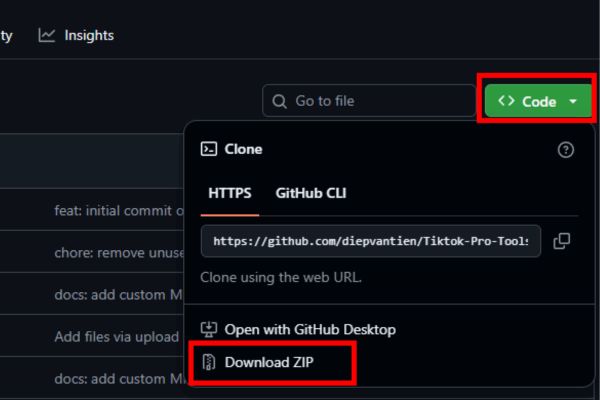
Then, use an extraction tool (like WinRAR or 7-Zip) to extract the entire file into a separate folder.
Step 2: Open Google Chrome browser, type the address chrome://extensions/ go to the address bar and press Enter.
Step 3: At the utility management page, find and flip the switch Developer mode (Developer Mode) in the top right corner to location ON.
Step 4: Some new buttons will appear. Please click the button Download the unpacked utility.
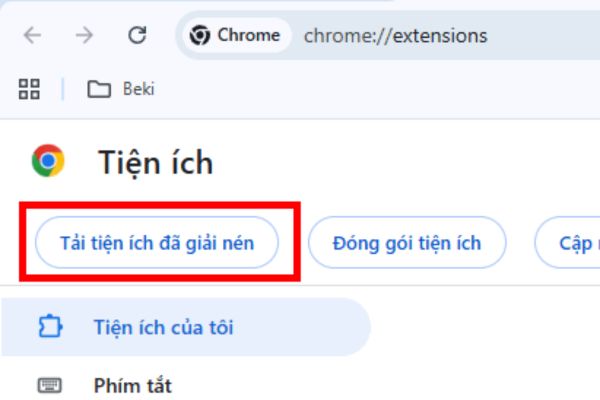
Step 5: A folder selection window will appear. Please find and select the correct folder that you extracted in Step 1.
Step 6: The add-on will be installed and appear in the list. Now, you just need to visit the TikTok website, click on the extension icon on the toolbar to start customizing and enjoying.
Other useful tools not to be missed
In addition to the main features, TikTok Pro Tools is also equipped with many small but extremely powerful “weapons”:
- Download videos without watermark: Easily save your favorite videos in original quality without the distraction of the TikTok logo and user ID.
- Capture Frame: Need a specific image from a video to make a meme or document? This feature allows you to “freeze” and save any moment.
- Smart content filtering: If you get tired of a certain trend or topic, just add related keywords or hashtags to the block list, the utility will automatically ignore them.
- Auto pause: The utility will automatically stop the TikTok video when it detects sound from another tab (for example, a YouTube video), avoiding “sound chaos”.
Conclusion
Overall, TikTok Pro Tools is not just an extension but a powerful companion for anyone who loves TikTok on PC. With powerful and practical features, it deserves a place in your browser. Install and experience the difference today!
Frequently Asked Questions (Q&A)
1. Is the TikTok Pro Tools extension free?
Yes, this is a completely free utility provided to the community by an independent developer.
2. Does this extension work on browsers other than Chrome?
In theory, it can work on browsers using the Chromium core such as Microsoft Edge, Coc Coc, Brave… by performing the same installation steps.
3. Is it safe to install the utility from the extracted file?
Installing extensions this way (outside the box) always carries a certain level of risk. You should make sure to download the file from an official or trustworthy source provided by the developer to ensure safety.