How to upgrade CapCut Pro for free Helps you save significant costs while still being able to use exclusive effects and filters. This is the optimal solution for those who want to improve the quality of their personal videos. Join AnonyViet to discover the safe and effective steps below.
📢 Join the channel Telegram belong to AnonyViet
Update new articles, cool tools and IT tips fastest
Comparison between the regular version and the Pro CapCut version
To understand why many people are looking for a way to upgrade CapCut Pro for free, let’s look at the comparison table below to see the clear differences between the two versions:
| Features | CapCut Regular version | CapCut Pro Version |
| Effects & Filters | Limited, has watermark | Fully unlocked, no watermark |
| Advanced AI tools | Not supported | Full support (background separation, face editing) |
| Copyrighted music store | Basic, few options | Unlimited, trending music |
| Remove the CapCut logo | Manual, time consuming | Automatic, professional |
| Video output quality | Limit | Supports 4K, 60fps smoothly |
Why need to use Filza to upgrade?
On the iOS operating system, Apple sets up a very strict security mechanism, preventing users from interfering with the application’s root directory. However, for devices already Jailbreakthe Filza tool acts as a powerful file manager. It allows you to access configuration files and cookie files that store login sessions. The way to upgrade CapCut Pro for free is essentially the process of replacing the application’s current cookie file with a file that has pre-configured Pro access rights.

Instructions on how to upgrade CapCut Pro for free
Note that this method requires your device to be jailbroken and have a file management application installed Filza from reputable sources. Then carefully follow each step below:
Step 1: Open Safari browser on your iPhone, access the link https://is.gd/ccprofile to download the necessary cookie file to your device. Please ensure a stable network connection to avoid file corruption during the download process.

Step 2: Open the app File on your phone, find the file you just downloaded. This is the file that contains the configuration parameters we will use to override.
Step 3: Click Share icon in the lower left corner of the screen, select More then select the application Filza to open this file in the system management environment.
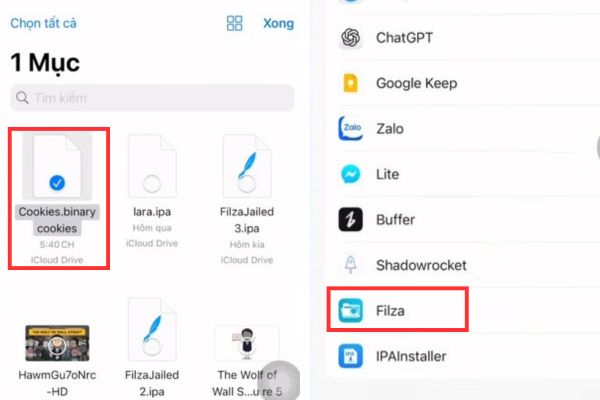
Step 4: In the Filza interface, tap the icon Tabcreate a new tab for easy operation. Click on the star icon, select item Application management to list all installed applications on the device.
Step 5: Browse for apps CapCut in the list, tap letter i to view data folder details. Then you choose to enter data > Library > Cookies.

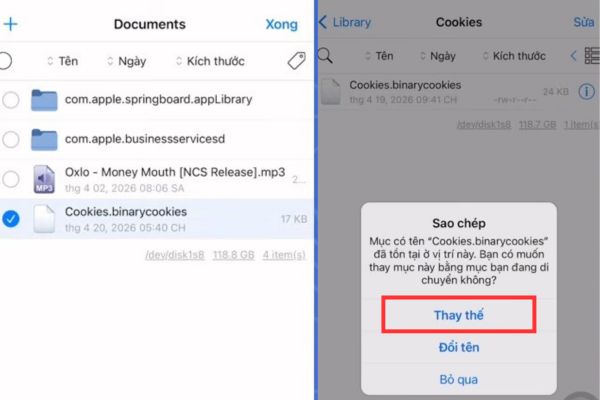
Step 6: Here, you will see a file named Cookies.binarycookies. Please press the button Fixselect this file, then press Edit name and copy the entire name of that file.
Step 7: Go back to the Document tab (where the file you downloaded in Step 1 is located), click Fixselect that cookie file and paste the copied name to rename it to match.
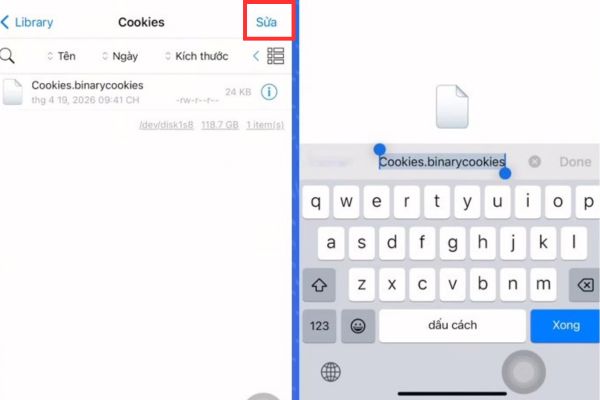
Step 8: Press Fix, select the renamed file and press Copy. Return to the Cookies tab, press the button Paste and choose Replace to overwrite the old file with the new file.
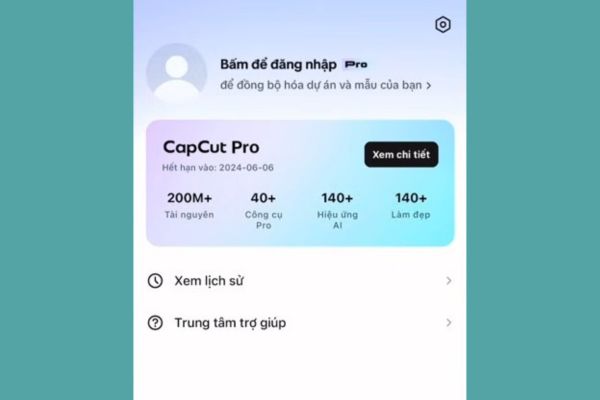
Step 9: Once completed, check in the account or Pro features section to confirm if the account has been upgraded to the Pro plan.
Conclusion
Hope this article is about How to upgrade CapCut Pro for free has helped you gain more useful knowledge to create videos. Always be careful when tampering with system files to ensure device safety. Hope you have impressive and professional footage.
Frequently Asked Questions (Q&A)
1. Will this method cause old project data to be lost?
Usually not, but you should back up important projects before tampering with system files to ensure safety.
2. Why have I followed the correct steps but still can’t see Pro?
Make sure you completely close the CapCut application in multitasking before overwriting the file and restart the computer if necessary.
3. Is this free CapCut Pro upgrade method safe for your account?
Interfering with system files always poses risks to security and developer policies, you should consider carefully before doing so.