How to detect malicious code in APK files This is a necessary skill when you want to install applications that are not on the Play Store to overcome geographical barriers. This helps prevent viruses from entering and stealing important personal data from unofficial sources. Let’s explore powerful tools to do this with AnonyViet.
📢 Join the channel Telegram belong to AnonyViet
Update new articles, cool tools and IT tips fastest
Instructions on how to detect malicious code in APK files
Installing applications from external sources (sideloading) brings freedom of experience but also comes with many risks. To ensure device safety, below are the most effective methods of checking APK files that you should apply.
Method 1: Take advantage of features available on your phone
Most modern Android smartphones are equipped with security layers to detect suspicious application behavior.
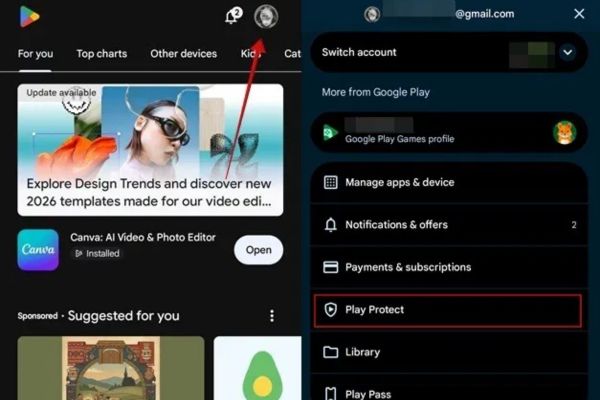
Step 1: Open the app Google Play Store on your phone.
Step 2: Click on the Google account avatar in the upper right corner of the screen.
Step 3: Select item Play Protect from the menu that appears.
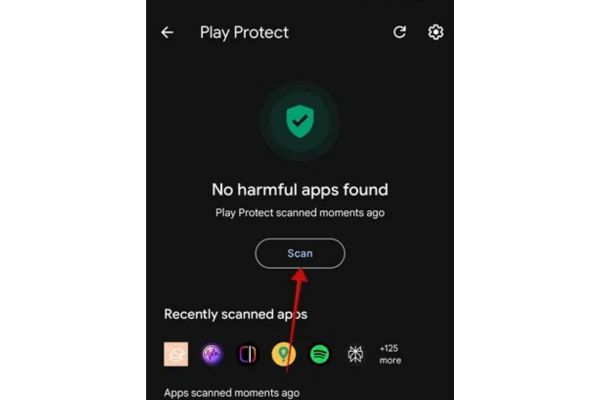
Step 4: Click the button Scan for the system to start checking the entire device.
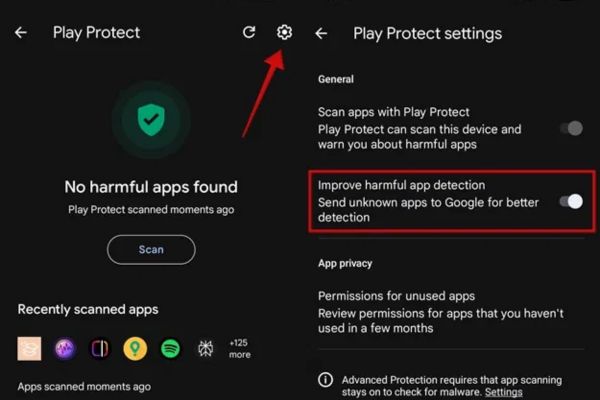
To increase effectiveness, click the gear icon (Settings) in the Play Protect interface and enable the option Improve harmful app detection (Improved detection of malicious applications). Additionally, you can also access this feature via the link: Settings → Security and privacy → App security.
Method 2: Use the manufacturer’s own security tools
Some phone companies integrate a separate layer of protection to support users.
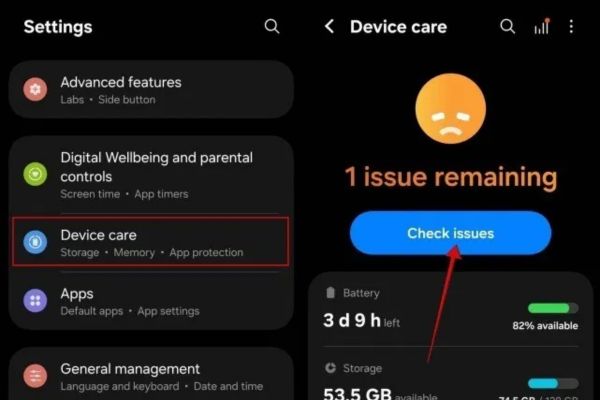
- For Samsung: The company provides security solutions in partnership with McAfee. You access Settings → Device care. Here, you can press Check issues to scan or enter items Diagnostics to further examine the application’s security issues.
- For Motorola: This company’s devices often come with a software suite Moto Securespecifically designed to optimize and protect your phone.
Method 3: Using online tools
Although Google Play Protect is very useful, it is not an impenetrable firewall. To be more certain, you should use the specialized online scanning tools below.
VirusTotal
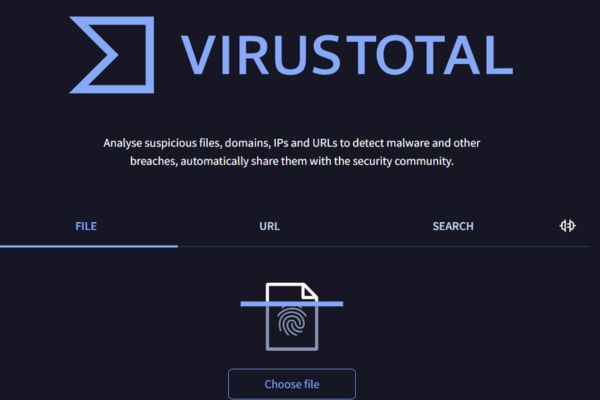
This is one of the most reputable services today, allowing file analysis through the databases of many different antivirus programs.
Step 1: Access VirusTotal website or download the app from Play Store.
Step 2: Select the File tab to upload APK files need to check, or select the URL tab to paste the file download link. You can also use the search function to check the IP address or file hash.
Step 3: Wait for the system to analyze and return results from dozens of security providers.
Note: VirusTotal’s mobile app version can scan apps installed on the device, but the individual file scanning feature sometimes worked unstable in some tests.
Internxt
If you have a large APK file, Internxt is a great alternative.
Step 1: Visit our virus scanning website Internxt.
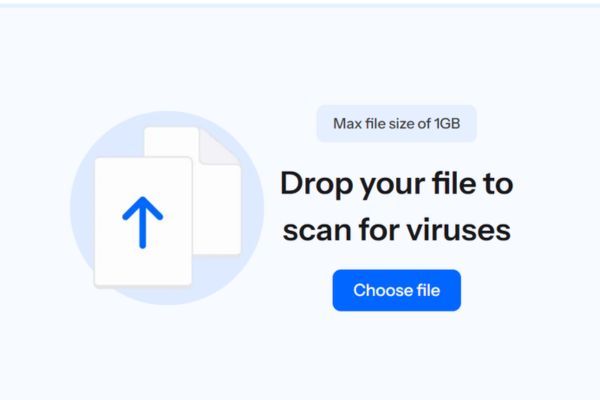
Step 2: Drag and drop your APK file into the upload box (supports files up to 1GB).
Step 3: The system, powered by BitDefender technology, will quickly tell if the file is clean or infected with malware.
Compare virus scanning methods
To help you easily choose, below is a quick comparison table of the tools mentioned above:
| Criteria | Google Play Protect | VirusTotal | Internxt |
| Tool type | Integrated on Android | Online & Apps | Online |
| Scanning capabilities | Scan installed apps | Scan APK files, URLs, Hash | Scan large APK files |
| Technology | Google AI | Multi-engine | BitDefender |
| Advantage | Convenient, automatic | Very high accuracy | Supports files up to 1GB |
| Disadvantages | New malware may be missed | Mobile apps sometimes fail | Web access required |

Method 4: Install a specialized anti-virus application
If you are someone who often tinkers with and installs APK files from many sources, having a professional anti-virus application is necessary. This is an active defense layer that makes detecting malicious code in APK files more automated.
Recommended by security experts Malwarebytesan app that has proven effective in removing mobile malware. Besides, BitDefender and Norton360 are also trustworthy names for you to consider.
Remember, even if you are careful, sophisticated malware like Brokewell can still find ways to slip through the cracks to automatically install malicious files without your consent. Therefore, a combination of manual scanning and real-time protection software is the safest strategy.

Frequently asked questions
1. Is Google Play Protect enough to protect your phone from any malicious APK files?
Not quite. Although Play Protect is very useful, it can still miss new or sophisticated malware. You should combine online scanning tools like VirusTotal for more accurate results.
2. Can I scan APK files without installing any additional applications?
Have. You can use online web browser scanners like VirusTotal or Internxt. Just upload the file or paste the download link to check immediately.
3. What should I do if I accidentally install an APK file with malicious code?
Disconnect the internet connection immediately, then boot the phone into safe mode (Safe Mode) to remove the application. Next, run a full scan using Play Protect or an antivirus app like Malwarebytes to clean the device.
Conclusion
Installing external applications brings many benefits but also poses unpredictable risks. Hope with How to detect malicious code in APK files that we just shared, you will have more experience to protect your device. Don’t forget to scan files before installing and use reputable security software to stay safe in the digital world.