How to send secret messages above Facebook is becoming a trend for those who want to protect their privacy. With just one compact tool, sensitive content will be completely encrypted into invisible characters. This is a great solution to share confidential information without fear of it being revealed in chat history.
📢 Join the channel Telegram belong to AnonyViet
Update new articles, cool tools and IT tips fastest
Benefits of sending secret messages on Facebook
Using the message hiding tool brings many practical benefits to Messenger users in controlling displayed information.
Absolute privacy protection
When sending a message, sensitive content will be hidden, leaving no trace in the regular chat history. This helps you feel more secure when sharing confidential information without worrying about others accidentally reading it.
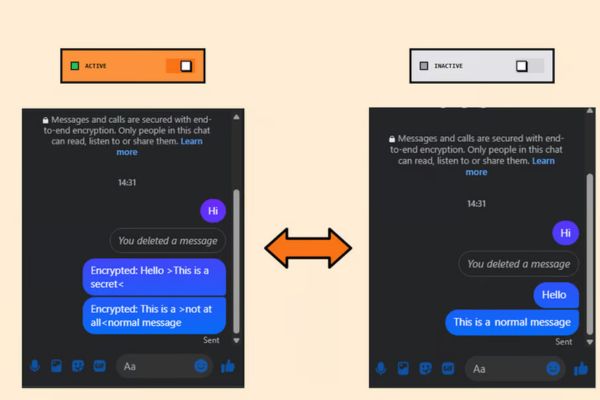
Make interactions interesting
This is a great way to create secret games or send private messages to friends. Only people who use the tool can understand the real content behind the normal words.
Simple and quick operation
The extension is designed to be minimalist, with just one button to activate. Users do not need to perform complicated configuration steps or have in-depth knowledge of coding.
Instructions on how to send secret messages on Facebook
To start using the message stealth feature, follow the specific instructions below on your computer browser.
Step 1: Visit the Chrome web store and search for the extension “Invisible Message for Facebook” or access directly via the link HERE.
Step 2: Click the button Download to install the extension on your browser.

Step 3: Click on the extension icon on the toolbar and switch the button to “Enable” to enable the feature.
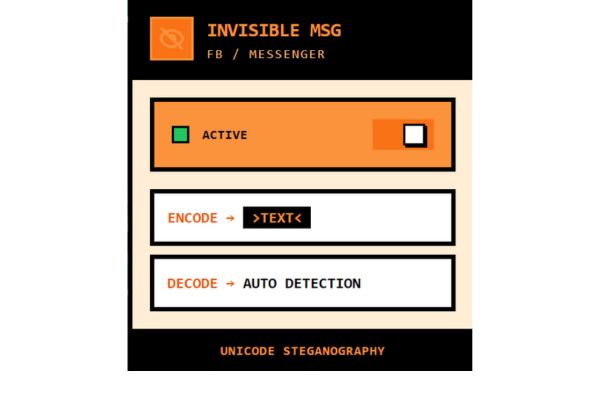
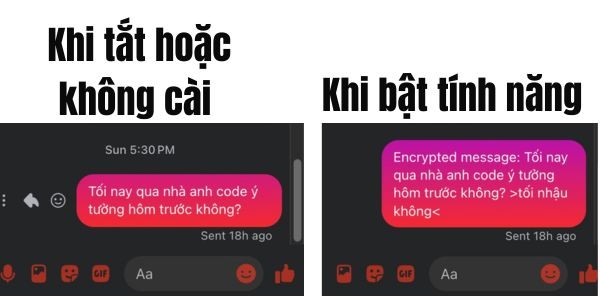
Step 4: Compose a message on Facebook using the syntax: regular message >content you want to hide<.
Step 5: Click send, now the recipient with the extension installed will automatically see the decoded hidden content right in the chat frame.
Important notes
Although this is a very useful tool, to achieve the best results, you need to keep in mind the following points.
- Requires installation from two sides: Both the sender and receiver must install this extension for the encryption and decryption process to be successful.
- Browser support: Currently the tool works best on Chromium-based browsers such as Chrome, Edge, Brave.
- Security properties: This is a method of hiding content using special characters, suitable for personal and fun purposes, and should not be a substitute for specialized encryption methods in financial transactions.
Conclusion
With How to send secret messages on Facebook just shared, the worry of having messages read or information leaked when taking screenshots will no longer exist. Extension provides an invisible but extremely sturdy layer of protection. Wishing you success and a very satisfying texting experience.