• Home
  • News
  • Software
  • Knowledge
  • MMO
  • Tips
  • Security
  • Network
  • Office
AnonyViet - English Version
  • Home
  • News
  • Software
  • Knowledge
  • MMO
  • Tips
  • Security
  • Network
  • Office
No Result
View All Result
  • Home
  • News
  • Software
  • Knowledge
  • MMO
  • Tips
  • Security
  • Network
  • Office
No Result
View All Result
AnonyViet - English Version
No Result
View All Result

Instructions for upgrading to Windows 10 Sun Valley (February 21)

AnonyViet by AnonyViet
March 11, 2026
in Tips
0

Microsoft revealed this week that it has completed Windows 10 Sun Valley version 21H1 and will soon begin releasing it to users. If you want to upgrade to Windows 10 version 21H1 immediately, but don’t want to wait, follow the instructions below.

📢 Join the channel Telegram belong to AnonyViet


👉 Go to Telegram AnonyViet

Update new articles, cool tools and IT tips fastest
Instructions for upgrading to Windows 10 Sun Valley (February 21)

Windows 10 May 2021 Update, also known as 21H1, began rolling out in the Preview channel on April 28, 2021. Like the 20H2 update, this is a minor update that focuses on improvements and security fixes. Major features originally planned for 21H1 have been delayed to 21H2 later in 2021.

You can watch this article to know more about the latest changes of Windows 10 Insider build 19043.928 which Microsoft announced as the final build on April 28, 2021.

Early upgrades to some versions of Windows 10 may encounter many new errors, but I do not believe that version 21H1 will encounter such a situation. Like versions 1909, 2004, and 20H2 before it, Windows 10 version 21H1 is not a “real” feature update. Instead, it’s built on the same code base of 20H2 and is just a minor version with a few new features. Plus, if you’re already using 2004, it’s delivered as a cumulative update, so the whole process should take less than 30 minutes.

Summary of new features in Windows 10 21H1

As a quick summary, here’s what’s new in 21H1 in addition to general fixes, security, remote access, and quality updates:

  • Supports Windows Hello multicamera to set up cameras outside and inside the Laptop using Windows Hello.
  • Windows Defender Application Guard performance improvements include optimizing document open times.
  • Windows Management Instrumentation (WMI) Group Policy Service(GPSVC) updates improve performance to support remote work scenarios.

How to upgrade Windows 10 Sun Valley Version 21H1

First, you need to open the Settings application by pressing Windows+ I and go to section Update & Security > Windows Insider Program.
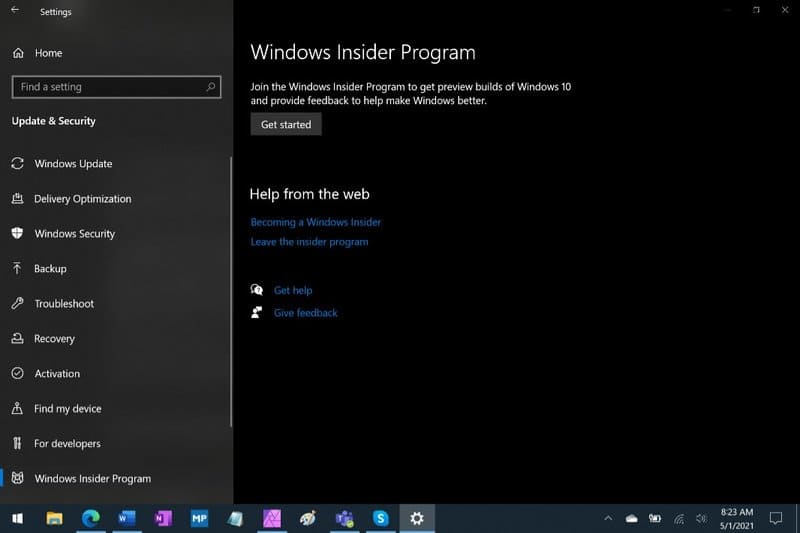
How to upgrade Windows 10 version 21H1

Next, click the “Get started” button. Select your Microsoft account.
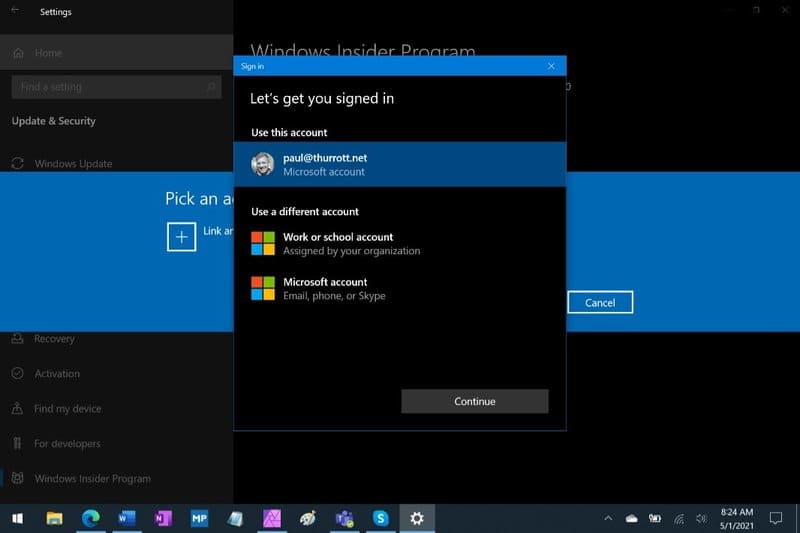
Get started

Select “Release Preview Channel” then click the Confirm button. Then, click Confirm and restart your PC when prompted.

When your PC restarts, go to Update & Security > Windows Update and click the Check for updates button. You will see the “Feature update to Windows 10, version 21H1” update offered as an optional installation. Install any previously pending updates. Then, click “Download and install”.
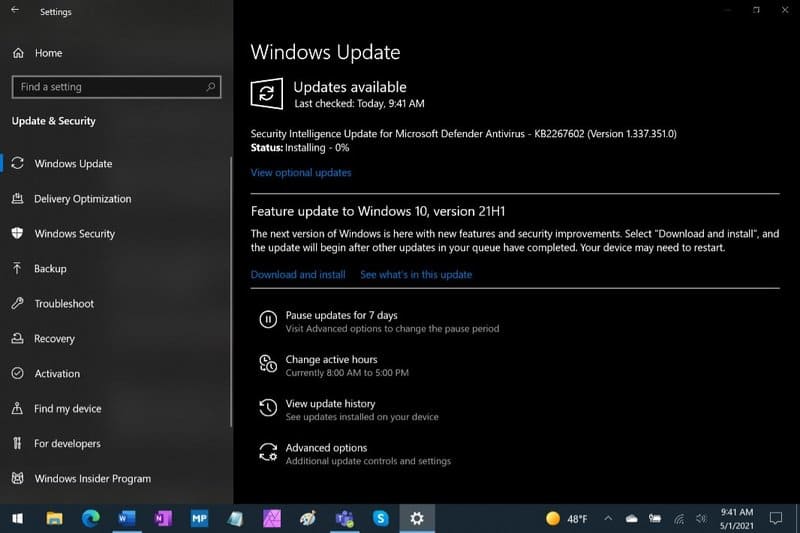
Feature update to Windows 10, version 21H1

The feature update will be downloaded and installed. If you are already using Windows 10 version 2004, this process will only take a few minutes as this is not a true feature update. Click Restart now when prompted.

When your PC restarts, you’ll see that you’re now using Windows 10 version 21H1. Look in Settings > System > About or tap Windows + R and import winver.
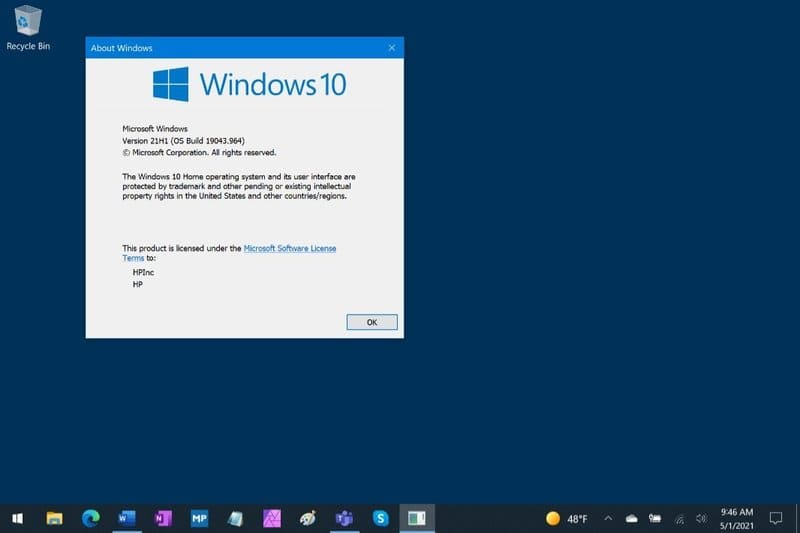
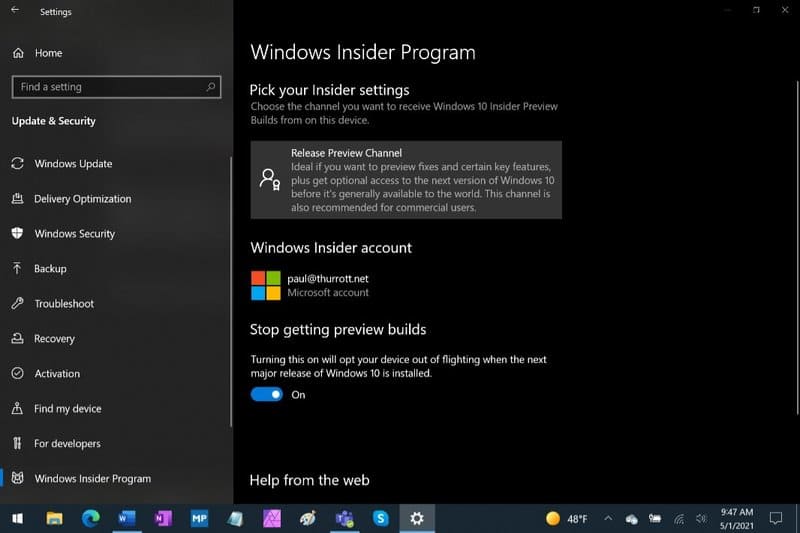
Install Windows 10 version 21H1

Now, you need to exit the program Windows Insider Program Microsoft: Open Settings and go to Update & Security > Windows Insider Program. Enable the “Stop getting preview builds” option. You will continue to receive your normal updates going forward.
Instructions for upgrading to Windows 10 Sun Valley (February 21) 6

That’s it, you have completed the update to Windows 10 21H2, wait for Windows Update to download the file and automatically upgrade and you’re done.

Frequently asked questions

Do I need to wait to receive the Windows 10 21H1 update?

No, you can follow the instructions in the article to upgrade to Windows 10 21H1 now. However, keep in mind that this is a minor update, mainly focused on bug fixes and performance improvements.

Does upgrading to Windows 10 21H1 take a long time?

If you are using Windows 10 version 2004, the upgrade process will be very quick, taking less than 30 minutes. For other versions, the time may be a little longer.

After upgrading, do I need to do anything else?

After upgrading, you should exit the Windows Insider Program to continue receiving regular updates from Microsoft. You can also check your Windows version by going to Settings > System > About or pressing Windows + R and entering winver.


Previous Post

Compilation of free and cheap APIs to run OpenClaw stably

Next Post

If you have 20 million, should you buy an iPhone 15 or add 1 million to an iPhone 16?

AnonyViet

AnonyViet

Related Posts

How to record reaction videos with Android phones, no app needed
Tips

How to record reaction videos with Android phones, no app needed

June 1, 2026
Instructions on how to get Google AI Pro 1 year for free for new accounts
Tips

Instructions on how to get Google AI Pro 1 year for free for new accounts

June 1, 2026
Top free AI tools to help write, test and optimize content
Tips

Top free AI tools to help write, test and optimize content

June 1, 2026
Instructions for receiving Lovable Pro 12 months for free
Tips

Instructions for receiving Lovable Pro 12 months for free

May 29, 2026
Instructions for receiving 1 month of ElevenLabs Creator for free worth
Tips

Instructions for receiving 1 month of ElevenLabs Creator for free worth $22

May 25, 2026
How to create beautiful studio-like preschool graduation photos for your child
Tips

How to create beautiful studio-like preschool graduation photos for your child

May 21, 2026
Next Post
If you have 20 million, should you buy an iPhone 15 or add 1 million to an iPhone 16?

If you have 20 million, should you buy an iPhone 15 or add 1 million to an iPhone 16?

0 0 votes
Article Rating
Subscribe
Login
Notify of
guest

guest

0 Comments
Oldest
Newest Most Voted
Inline Feedbacks
View all comments

Recent News

How to record reaction videos with Android phones, no app needed

How to record reaction videos with Android phones, no app needed

June 1, 2026
Instructions on how to get Google AI Pro 1 year for free for new accounts

Instructions on how to get Google AI Pro 1 year for free for new accounts

June 1, 2026
Top free AI tools to help write, test and optimize content

Top free AI tools to help write, test and optimize content

June 1, 2026
TruyenDrive: Turn Google Drive into a professional manga reader

TruyenDrive: Turn Google Drive into a professional manga reader

May 31, 2026
How to record reaction videos with Android phones, no app needed

How to record reaction videos with Android phones, no app needed

June 1, 2026
Instructions on how to get Google AI Pro 1 year for free for new accounts

Instructions on how to get Google AI Pro 1 year for free for new accounts

June 1, 2026
Top free AI tools to help write, test and optimize content

Top free AI tools to help write, test and optimize content

June 1, 2026
AnonyViet - English Version

AnonyViet

AnonyViet is a website share knowledge that you have never learned in school!

We are ready to welcome your comments, as well as your articles sent to AnonyViet.

Follow Us

Contact:

Email: anonyviet.com[@]gmail.com

Main Website: https://anonyviet.com

Recent News

How to record reaction videos with Android phones, no app needed

How to record reaction videos with Android phones, no app needed

June 1, 2026
Instructions on how to get Google AI Pro 1 year for free for new accounts

Instructions on how to get Google AI Pro 1 year for free for new accounts

June 1, 2026
No Result
View All Result
  • Home
  • News
  • Software
  • Knowledge
  • MMO
  • Tips
  • Security
  • Network
  • Office

wpDiscuz
0
0
Would love your thoughts, please comment.x
()
x
| Reply