• Home
  • News
  • Software
  • Knowledge
  • MMO
  • Tips
  • Security
  • Network
  • Office
AnonyViet - English Version
  • Home
  • News
  • Software
  • Knowledge
  • MMO
  • Tips
  • Security
  • Network
  • Office
No Result
View All Result
  • Home
  • News
  • Software
  • Knowledge
  • MMO
  • Tips
  • Security
  • Network
  • Office
No Result
View All Result
AnonyViet - English Version
No Result
View All Result

How to find videos you’ve watched on Facebook

AnonyViet by AnonyViet
February 15, 2026
in Tips
0

How to find the video you watched above Facebook It’s actually very simple, but not everyone notices this hidden feature. The fact that the application automatically refreshes the news feed often causes the video being watched to disappear, causing a very “inhibiting” feeling. This article will guide you to quickly restore that experience on both your phone and computer.

Join the channel Telegram belong to AnonyViet 👉 Link 👈

Instructions on how to find videos you’ve watched on Facebook

To review the content store that has been interacted with, users need to access the history management section. Below are detailed steps on each type of device.

Step 1: User open Facebook application and click on the icon Video on the navigation bar.
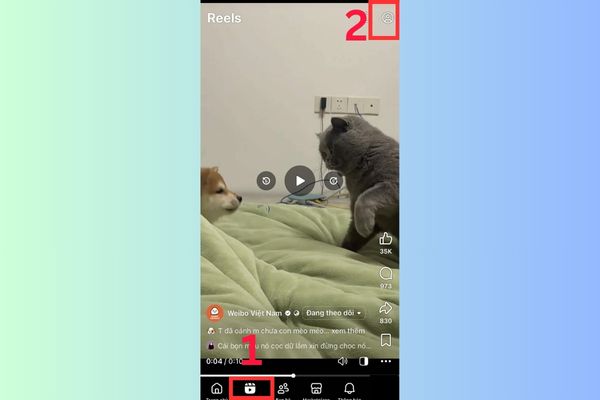
Instructions on how to find videos you've watched on Facebook
Instructions on how to find videos you’ve watched on Facebook

Step 2: You continue to select the icon Individual (Human figure) or Magnifying Glass icon depending on the updated version.

Step 3: The system will display an options menu, click “Movie footage watchedA list of all videos you’ve ever watched will appear, sorted by time from newest to oldest so you can easily choose to watch them again.
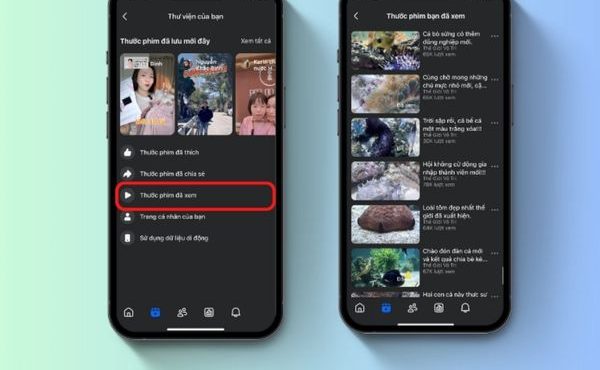
Click on the item "Movie footage watched"
Click on “Watched movies”

Why do you need to know this trick?

Understanding how to retrieve your viewing history brings more benefits than you think.

  • Users save time searching when they want to review or share good videos with friends.
  • You can control the content you consume, thereby better understanding your personal entertainment habits.
  • This feature supports content filtering, helping users find good Fanpages that they used to browse but forgot to follow.

Why do you need to know this trick?

How to delete video viewing history for security

Sometimes storing too much history will affect the recommendation algorithm or reveal private information. Facebook allows this trace to be erased very quickly.

  1. At the Watched Videos list interface just accessed above, you will see a button or option Delete video viewing history.
  2. Users just need to click and confirm the action for the system to clean up all old data.

Cleaning history helps refresh the algorithm, allowing Facebook to suggest videos that are fresher and more relevant to current interests.

Important notes

Although the history review feature works quite stably, there are still some exceptions that users need to keep in mind to avoid panic when they don’t see data.

  • Videos you watch while not logged in or in the browser’s incognito mode will not be recorded by the system.
  • If the original videos have been deleted by the owner or the Fanpage is locked, even if they are in history, you cannot view that content again.
  • Facebook has a mechanism to automatically clean old data, so videos you watched too long ago may no longer appear in the list.

Important notes
Important notes

Conclusion

Hope with How to find videos you’ve watched on Facebook Just shared, your social networking experience will be more complete. Don’t forget to periodically clean your history to protect your privacy and refresh your feed. Wishing you success in performing this operation.


Tags: FacebookFindvideosWatchedyouve
Previous Post

7 other features of USB you may not know

Next Post

How to edit Vintage color photos online using TikTok

AnonyViet

AnonyViet

Related Posts

How to add sliders to Facebook Stories to easily rewind videos
Tips

How to add sliders to Facebook Stories to easily rewind videos

April 21, 2026
How to change the default font on Windows 10
Tips

How to change the default font on Windows 10

April 13, 2026
5 tips for using a Browser to replace an App (helps save RAM, time and money)
Tips

5 tips for using a Browser to replace an App (helps save RAM, time and money)

April 13, 2026
How to make funny MeMe photos without Photoshop within 10 seconds
Tips

How to make funny MeMe photos without Photoshop within 10 seconds

April 11, 2026
How to quickly design your own Logo without Photoshop
Tips

How to quickly design your own Logo without Photoshop

April 10, 2026
How to convert Website into App on Windows
Tips

How to convert Website into App on Windows

April 9, 2026
Next Post
How to edit Vintage color photos online using TikTok

How to edit Vintage color photos online using TikTok

0 0 votes
Article Rating
Subscribe
Login
Notify of
guest

guest

0 Comments
Oldest
Newest Most Voted
Inline Feedbacks
View all comments

Recent News

Decoding the problem of 4GB RAM and processing performance

Decoding the problem of 4GB RAM and processing performance

April 21, 2026
How to add sliders to Facebook Stories to easily rewind videos

How to add sliders to Facebook Stories to easily rewind videos

April 21, 2026
Reputable LG repair service in Hanoi & Ho Chi Minh City with LGservicecenter

Reputable LG repair service in Hanoi & Ho Chi Minh City with LGservicecenter

April 21, 2026
Japanese Watch Week: Choose the color that suits your destiny, start the new year well at Mobile World

Japanese Watch Week: Choose the color that suits your destiny, start the new year well at Mobile World

April 20, 2026
Decoding the problem of 4GB RAM and processing performance

Decoding the problem of 4GB RAM and processing performance

April 21, 2026
How to add sliders to Facebook Stories to easily rewind videos

How to add sliders to Facebook Stories to easily rewind videos

April 21, 2026
Reputable LG repair service in Hanoi & Ho Chi Minh City with LGservicecenter

Reputable LG repair service in Hanoi & Ho Chi Minh City with LGservicecenter

April 21, 2026
AnonyViet - English Version

AnonyViet

AnonyViet is a website share knowledge that you have never learned in school!

We are ready to welcome your comments, as well as your articles sent to AnonyViet.

Follow Us

Contact:

Email: anonyviet.com[@]gmail.com

Main Website: https://anonyviet.com

Recent News

Decoding the problem of 4GB RAM and processing performance

Decoding the problem of 4GB RAM and processing performance

April 21, 2026
How to add sliders to Facebook Stories to easily rewind videos

How to add sliders to Facebook Stories to easily rewind videos

April 21, 2026
No Result
View All Result
  • Home
  • News
  • Software
  • Knowledge
  • MMO
  • Tips
  • Security
  • Network
  • Office

wpDiscuz
0
0
Would love your thoughts, please comment.x
()
x
| Reply