When Tet comes, everyone wants to buy new clothes, and traditional ao dai is an indispensable outfit if you like taking Tet photos. However, if you don’t have the means to take photos or buy new clothes, you can still combine your face with an existing ao dai model. Currently, there is a fairly simple way to transplant faces into Tet ao dai photos without Photoshop. Let’s join AnonyViet to add faces to Tet photos.
| Join the channel Telegram belong to AnonyViet 👉 Link 👈 |
How to put a face on a photo of ao dai for Tet
There are only 20 days left until Tet. Surely you can feel the color of the sky on Tet (it’s so cold). A characteristic of Tet that we cannot ignore is the ao dai, especially for women addicted to virtual living. So, in this article, I will show you how to put faces on Tet ao dai photos without knowing Photoshop.
First, you choose a beautiful photo of your Tet ao dai. Go to Google and search for the keyword “beautiful ao dai” or enter this link for quick.
For example, I choose this photo:

Next, you choose the photo of the person’s face to combine (your face). Remember to choose which photo to take The face direction is the same as the direction of the ao dai model photoso it will be easier to combine.

Now on your phone, download the Faceapp application above Chplay or Appstore. Faceapp is an application that helps swap faces, but other details remain the same. Therefore, it helps you quickly put your face on a photo of a Tet ao dai in a few seconds.

You open the application FaceApp just downloaded, and select the ao dai photo to combine. On the left is a sample photo, on the right is your face.
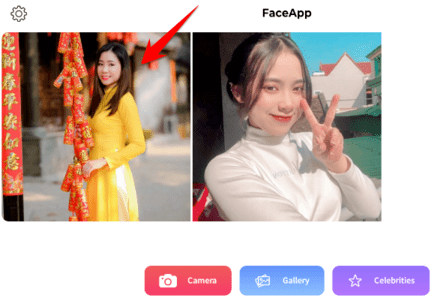
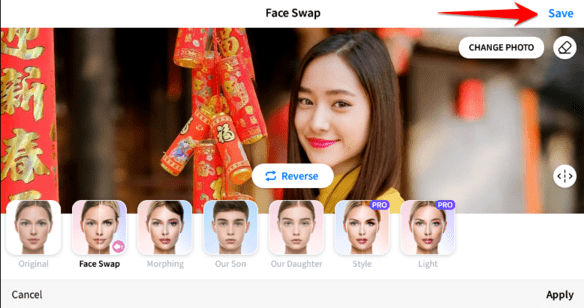
Drag the bottom slider to the left and select Face Swap.
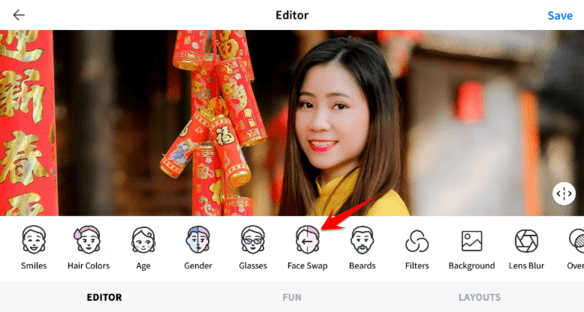
Next, select next Face Swap, and choose “Pick from gallery”.
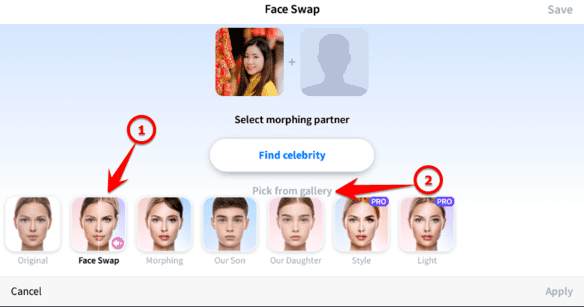
Select the photo of the face you need to combine.
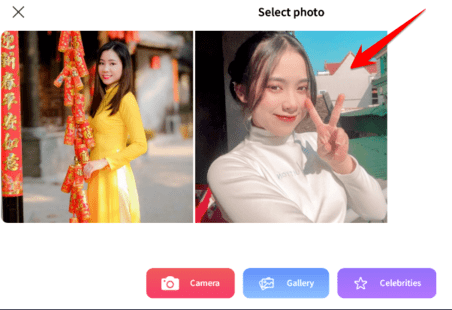
You just need to wait a few seconds and the face will be merged into the ao dai photo. It looks a bit funny, but the first failed face transplant is a bit sad. Once you are satisfied, click Save to save the image.
You can share photos on different social networking sites such as WhatsApp, Telegram, Facebook Messenger,…

That’s it, you can now combine photos wearing ao dai to live virtually during the upcoming Tet holiday. Wishing you success, put together many beautiful photos.
Frequently asked questions
What software do I need to merge faces into ao dai photos?
You just need the FaceApp app, available on Chplay and Appstore.
How to match your face to match the ao dai photo?
Choose a photo of your face with the same facial orientation as the model in the ao dai photo for a more natural composite result.
What if the first face transplant is not satisfactory?
Try again with different photos, adjust the angle, and use FaceApp’s editing features to achieve the best results.