• Home
  • News
  • Software
  • Knowledge
  • MMO
  • Tips
  • Security
  • Network
  • Office
AnonyViet - English Version
  • Home
  • News
  • Software
  • Knowledge
  • MMO
  • Tips
  • Security
  • Network
  • Office
No Result
View All Result
  • Home
  • News
  • Software
  • Knowledge
  • MMO
  • Tips
  • Security
  • Network
  • Office
No Result
View All Result
AnonyViet - English Version
No Result
View All Result

How to Take the “Certified Phishing Prevention Specialist” (CPPS) Security Certificate Test 100% Free

AnonyViet by AnonyViet
December 29, 2025
in Knowledge
0

Nowadays, phishing attacks are increasingly sophisticated. Equipping yourself with knowledge to protect yourself and your organization is extremely necessary. Today, I will guide you how to participate in the course and receive a certificate Certified Phishing Prevention Specialist (CPPS) from the Academy Hack and Fix worth 20 USD but completely free thanks to a special discount code.

Join the channel Telegram belong to AnonyViet 👉 Link 👈

Introduction to the CPPS course

This course is designed to help you understand phishing attacks and how to avoid them. The main content you will learn includes:

  • Definition of Phishing: Understand how attacks work in practice
  • Typical examples: Analyze attacks via SMS, Email and social networks
  • Prevention skills: The best security measures for individuals and organizations
  • Suitable object: Students, beginners, IT professionals, DBAs or anyone who regularly uses the Internet and Email

How to register and apply 100% discount Coupon

Currently, the Certified Phishing Prevention Specialist certificate costs $20. To receive the course for $0, follow these steps:

Step 1: Visit our website Hack and Fix Academy, choose a course Certified Phishing Prevention Specialist (CPPS)
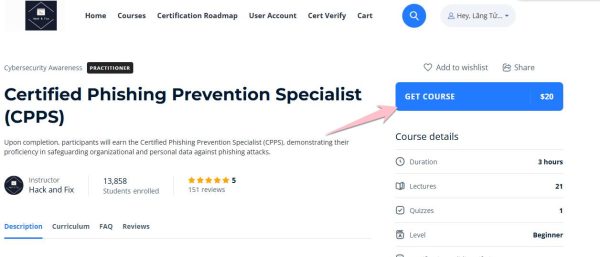
get course Certified Phishing Prevention Specialist

Step 2: Register an account by filling in your details or quickly log in via your Google account.

Step 3: At the checkout page, you will see the base price of 20 USD. Please enter the following Coupon code in the discount box:

Discount code: PHISHING100
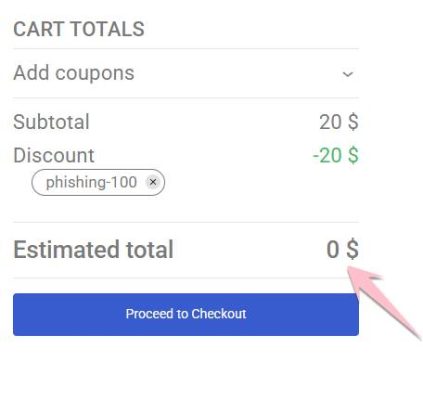
Certified Phishing Prevention Specialist (CPPS) coupon

Step 4: Click “Apply”, the price will be reduced 0 USD. Then, click “Place Order” to complete registration

Step 5: On the next page, fill in your personal information such as full name, email, and city address. Be sure to fill in the correct name so that the certificate shows your correct name. Then press Place order
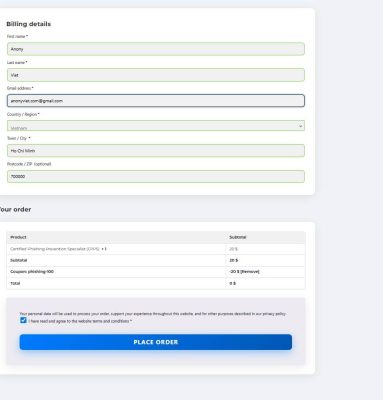
personal information

Step 6: On the next page, press the button View
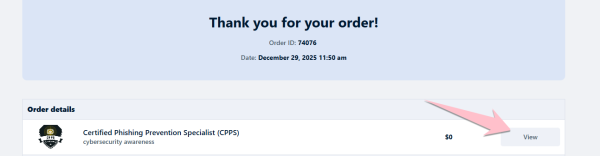
view. view

Step 7: Click Start Course to start learning
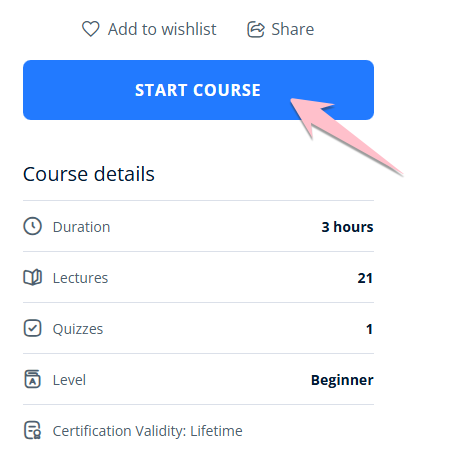
Start Course

Study and certification exam process

After successful registration, you can start your certification journey immediately:

Study: You need to go through the entire curriculum that the academy provides, mastering the steps to prevent fraud.

Exam format: After completing the lesson content, you will participate in a multiple-choice test included 15 questions

Get certificate: If you pass the exam, you will receive an official digital certificate in your name (as shown in the video) to add to your portfolio or LinkedIn, giving you an advantage when applying for a job in the cybersecurity industry.

So I have guided you to take the Certified Phishing Prevention Specialist course and take the exam for free. Try to score 85% on the exam to receive this certificate.

If you don’t know the answer, you can refer to the answer here:

1.It requires users to verify their identity using an additional factor beyond passwords
2.
The sender’s email address

The generic greeting

The urgent language in the message

The suspicious link URL

3. All of the above

4. Hover over the link to check the actual URL

5.Ignore the message and contact your bank using a verified number

6. All of the above

7. The sender’s email address is suspiciously misspelled

8. To train employees to recognize and avoid phishing attempts

9. Conduct follow-up training sessions focused on identifying phishing red flags

10. A sender address that is slightly misspelled

11. Using the same password across multiple accounts

12. A highly targeted attack personalized for an individual or organization

13. Report the email to your IT or cybersecurity team

14. Confirm the caller’s details with the IRS using an official channel

15. Spam filters

If the certificate has the wrong name, go in Settings to change your name.

Tags: CertificateCertifiedCPPSfreePhishingPreventionsecuritySpecialistTest
Previous Post

How to open MBOX files with Mozilla Thunderbird

Next Post

Download the Luc wallpaper and do it: An effective “weapon” against deadlines

AnonyViet

AnonyViet

Related Posts

Super virtual way to change the photography angle using AI on iPhone
Knowledge

Super virtual way to change the photography angle using AI on iPhone

October 9, 2026
How to create Safari extension on iOS 27 and macOS 27
Knowledge

How to create Safari extension on iOS 27 and macOS 27

October 3, 2026
How to write the word Hoa Ki on Casio calculator
Knowledge

How to write the word Hoa Ki on Casio calculator

October 3, 2026
Instructions on how to increase the font size on Apple TV are extremely easy
Knowledge

Instructions on how to increase the font size on Apple TV are extremely easy

October 1, 2026
Instructions on how to turn off Write with Siri on iOS 27
Knowledge

Instructions on how to turn off Write with Siri on iOS 27

October 1, 2026
How to expand photos on iOS 27 with the latest Extend tool
Knowledge

How to expand photos on iOS 27 with the latest Extend tool

October 1, 2026
Next Post
Download the Luc wallpaper and do it: An effective “weapon” against deadlines

Download the Luc wallpaper and do it: An effective "weapon" against deadlines

0 0 votes
Article Rating
Subscribe
Login
Notify of
guest

guest

0 Comments
Oldest
Newest Most Voted

Recent News

NoteCute – Extension to create super cute sticky notes

NoteCute – Extension to create super cute sticky notes

October 10, 2026
Super virtual way to change the photography angle using AI on iPhone

Super virtual way to change the photography angle using AI on iPhone

October 9, 2026
Instructions for detecting network vulnerabilities: How to check the system for data leaks (IP/DNS)

Instructions for detecting network vulnerabilities: How to check the system for data leaks (IP/DNS)

October 9, 2026
Microsoft is preparing to launch Windows 11

Microsoft is preparing to launch Windows 11

October 9, 2026
NoteCute – Extension to create super cute sticky notes

NoteCute – Extension to create super cute sticky notes

October 10, 2026
Super virtual way to change the photography angle using AI on iPhone

Super virtual way to change the photography angle using AI on iPhone

October 9, 2026
Instructions for detecting network vulnerabilities: How to check the system for data leaks (IP/DNS)

Instructions for detecting network vulnerabilities: How to check the system for data leaks (IP/DNS)

October 9, 2026
AnonyViet - English Version

AnonyViet

AnonyViet is a website share knowledge that you have never learned in school!

We are ready to welcome your comments, as well as your articles sent to AnonyViet.

Follow Us

Contact:

Email: anonyviet.com[@]gmail.com

Main Website: https://anonyviet.com

Recent News

NoteCute – Extension to create super cute sticky notes

NoteCute – Extension to create super cute sticky notes

October 10, 2026
Super virtual way to change the photography angle using AI on iPhone

Super virtual way to change the photography angle using AI on iPhone

October 9, 2026
  • Home
  • Home 2
  • Home 3
  • Home 4
  • Home 5
  • Home 6
  • Next Dest Page
  • Sample Page

say88 tỷ lệ kèo nhà cái kèo nhà cái 5 febet

No Result
View All Result
  • Home
  • News
  • Software
  • Knowledge
  • MMO
  • Tips
  • Security
  • Network
  • Office

say88 tỷ lệ kèo nhà cái kèo nhà cái 5 febet

wpDiscuz
0
0
Would love your thoughts, please comment.x
()
x
| Reply