

Creating an engaging PowerPoint presentation often takes hours of design editing and content tweaking, making many people feel frustrated. That’s where WorkPPT comes in – a smart platform that simplifies and speeds up the slide creation process using AI. In this article, we’ll explore the key features, benefits, and how WorkPPT is changing the way professionals build presentations.
| Join the channel Telegram belong to AnonyViet 👉 Link 👈 |
WorkPPT: One of the Best AI PPT Makers of 2025
WorkPPT AI slide maker designed to eliminate complexity in building slides. Instead of spending hours formatting and structuring content, users can simply provide their ideas as a topic, a set of key points, or even upload existing files such as Word documents, PDFs, or PPTX. From there, WorkPPT processes the input and automatically generates a complete, well-structured set of slides in just a few seconds. One-click workflow helps ensure that presentations are not only quick but also complete and professional. Whether you’re preparing for a business presentation, a classroom lecture, or a group meeting, WorkPPT can adapt to different contexts and provide slides that convey ideas clearly.
Key features of WorkPPT AI PPT Maker
Create slides with AI with just one click: Create clear, well-structured and uniformly designed slides with just one click. Save hours of manual work, and create complete presentations in minutes.
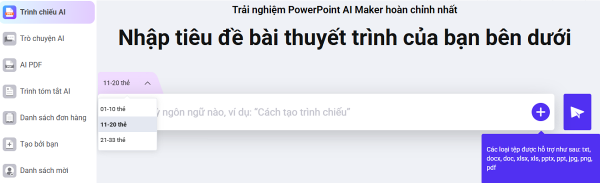
Professional & impressive design: WorkPPT takes the stress out of slide design with its rich template library of more than 5,000 professional templates. These templates cover everything from business reports to creative presentations, designed to suit different industries and presentation styles. The platform also applies smart layouts, alternative images, and consistent formatting, ensuring each set of slides looks professional without users having to worry about design details.
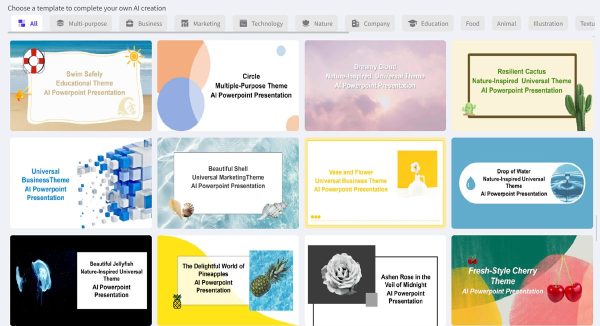
Diverse input and workflow options: No matter where you prefer to start, WorkPPT can adapt to your workflow. You can create slides from a simple title, expand key points into a full presentation, or upload existing Word, PDF, or PPTX files. Before you’re done, you can preview the AI-generated outline, edit it, and create slides that suit your goals.
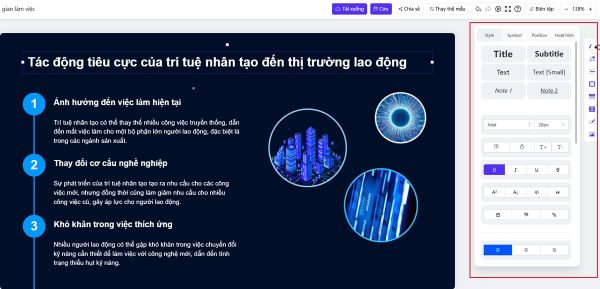
Flexible customization: Once the slide is created, editing is simple. WorkPPT offers a no-frills online editor where you can adjust text, change images, tweak fonts, or add motion effects. This combination of automation and freedom helps you maintain brand consistency while still expressing personal creativity in the final product.
- Export and sharing options: Sharing your work is as easy as creating it. Presentations can be exported in a variety of formats, including PPTX for further editing, PDF for reliable distribution, and PNG or JPG for quick images. Users can also publish online using a share link or print directly, suitable for both digital and offline use.
- Multi-language support: User-friendly interface, available in multiple languages to serve global users.
- Easy-to-use design for beginners: The simple interface doesn’t require too much learning — ideal for first-time users.
- Additional AI productivity tools: In addition to creating presentations, WorkPPT is also a productivity hub. Its Summary AI tool helps summarize long text or documents into easy-to-digest key points, saving valuable time. Integrated PDF tools let you merge, split, or convert files, as well as add watermarks and watermarks. AI Chat Assistant assists you in brainstorming and refining sketches, while AI Mind Map Generator helps visualize complex ideas in a structured way. Together, these tools make WorkPPT more than just a slide creation tool — but a comprehensive platform for content creation and work organization..
WorkPPT’s Big Black Friday Promotion – Up to 70% Off!
This Black Friday, WorkPPT is offering its lowest price of the year – up to 70% off our powerful AI-powered PowerPoint creation tool! You won’t find a better deal anywhere, as our prices are significantly lower than any other AI PPT tool.
But that’s not all! You can save even more with exclusive discount codes. Just click the link to buy and apply coupon code [SWEB01] when paying to receive additional incentives.

Don’t miss out – this limited time offer won’t last long! Get WorkPPT now and create professional presentations in a snap, all at an unbeatable price.
Conclude
WorkPPT makes presentation building simple, fast, and flexible, whether you’re a beginner or an experienced professional. It reduces tedious work while allowing you to shape the final style of your presentation. Try the free version of WorkPPT PowerPoint Maker now and discover how creating great presentations is easier than ever.









