Using Disconnect is extremely easy. First, visit the Disconnect page and press the “Get Disconnect” button. Disconnect is currently available for Chrome, Firefox, Safari, and Opera. After you install Disconnect, visit any website and open the extension. Disconnect’s dashboard will show you everything the tracker is currently recording on your browser.
Unlike Panopticlick and Am I Unique?, Disconnect allows designated trackers to operate. Again, this depends on your browser settings, and you will see some trackers connect directly to the website. Some of them may be harmless or related to your job or business, so be careful with your decision.
4. Thunderbeam – Lightbeam for Chrome
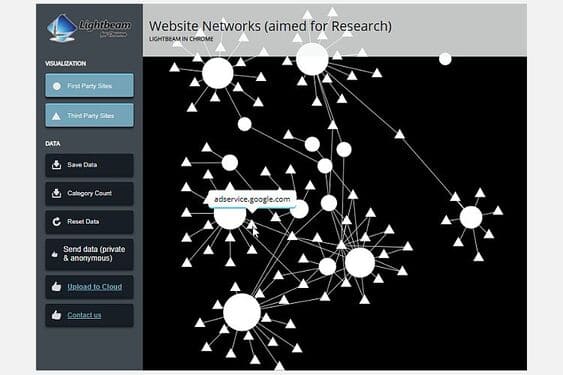
Lightbeam is a Chrome extension that analyzes online trackers, displaying extremely complex trackers among the websites you visit.
Previously it was a Firefox-only security tool. Unfortunately, the Firefox version is no longer available, but there is now an open source version for Chrome.
How to use Lightbeam
Go to the Lightbeam extension page and add it to your browser. Open the extension by clicking the Lightbeam icon in the upper right corner of the browser.
You will be taken to a blank chart. You can fill out the chart by visiting some of your favorite websites. Each website will be added to the chart with associated trackers. As you visit more pages, the links between them grow, and quickly create a monster that is dangerous to your privacy. It lists and displays active trackers perfectly.
The only downside is that the new version lacks website logos compared to the old version. You can hover over each circle to reveal the website, but the website’s icon will make it easier to find.
5. Trackography
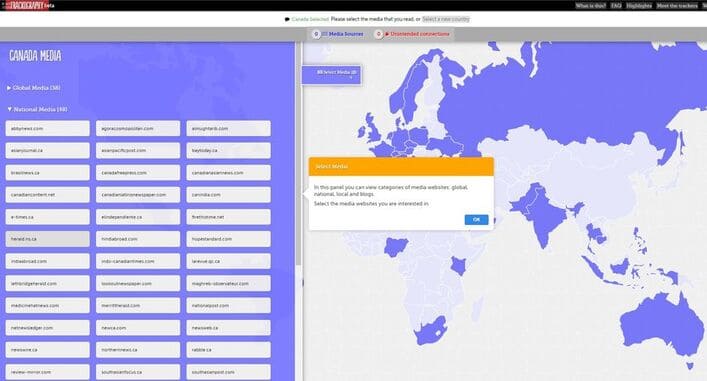
Trackograph is an open source project by Tactical Tech that aims to increase transparency about the online data industry by tracking who tracks you online and where your data goes when you visit websites.
You can use Trackography to check:
- Companies are watching you.
- Countries that host the servers of those tracking companies.
- The countries that host the servers of the website you are viewing.
- Countries contain the necessary network infrastructure to access tracking servers and companies.
- More information about how tracking companies process your data in relation to their privacy policies.
Overall, Trackography is a great visualization tool if you want to understand more about global data tracking flows.
How to use Trackography
Go to the Trackography page. Select your country. Next, choose a website you want to connect to. Connections will instantly propagate from your country, showing the path your data takes, as well as many locations you didn’t know your data was traveling through.
6. Trace My Shadow
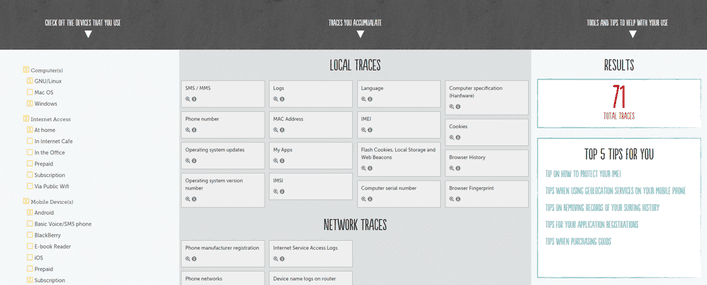
Trace My Shadow doesn’t tell you exactly who is following you. However, it does give you the best overview of where tracking can originate from a range of commonly used hardware, operating systems, mobile services and online services.
Trace My Shadow builds a picture of where stalkers are hiding and makes positive changes to block those stalkers. Unfortunately, Trace My Shadow stopped updating in 2019, so some settings may be out of date.
How to use Trace My Shadow
Go to the website and choose what interests you. Every time you add a new device, subscription, or service, the number of loopholes and tips becomes visible.
How to block online trackers
First of all, it’s Google, you need to know How Google tracks you. Then comes the other components.
Tracking code is part of the Internet. But just because they’re embedded in services doesn’t mean you can’t take steps to stop online trackers from tracking your activities.
Here are some of the best tools for blocking online trackers:
- uBlock Origin: Block trackers, malicious ad servers, malware,…
- HTTPS Everywhere: Enable HTTPS to protect your data in transit.
- NoScript: Block background scripts.
- Privacy Badger: Block unwanted trackers and cookies.
- PixelBlock: Block tracking pixels in Gmail.
- Google Activity Controls: Control what Google saves your searches for.
- deseat.me: Delete your old online accounts with just one click.
- Tor Browser: Uses onion routing protocol and built-in script blocking utilities to protect your privacy.
- DuckDuckGo: Search the internet without being tracked.
This list is not exhaustive, but it will help you avoid trackers as much as possible.
Who is following you on the Internet
In recent years, online trackers and privacy violations have repeatedly appeared in the news. There are some names that consistently violate your privacy, such as Facebook, Google and Amazon, although they are not the only tech companies tracking your online activities.
Chart of WhoTracksMe The following shows the percentage of trackers found belonging to each major tech company:
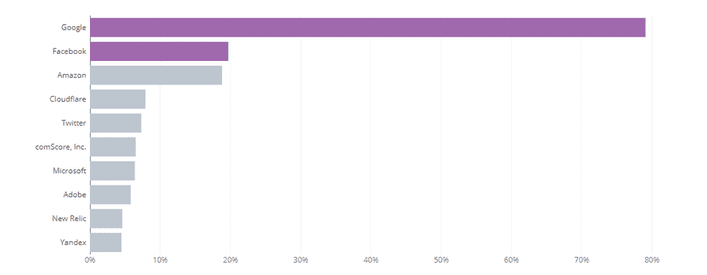
As you can see, Google is at the top. As the world’s largest advertising company whose business model relies on tracking and cataloging online activity for resale to third parties, this comes as no surprise. Sometimes tracker blocking utilities and websites are not enough to help you survive on the internet if you do not have effective prevention knowledge. So read on this article To avoid being scammed.