You are looking for a headache How to compress PDF file To send via email without any volume error? Are you tired of having to upload a document file weighing tens of MB to online platforms? The good news is, you can completely solve this problem quickly, safely and completely free thanks to Minimal PDF Compress.
|
Join the channel Telegram belong to Anonyviet 👉 Link 👈 |
Why should compress the PDF file?
- Overcoming barriers to limit the attachment capacity of most email service providers.
- Save time when submitting documents, documents on the portal, school website or company.
- Reduce the burden on your computer hard drive or cloud storage services.
- Help the recipient download your file faster, especially when they have an unstable internet connection.

Minimal PDF Compress: Free PDF file compression software
Minimal PDF Compress is an open source utility, free for Windows operating system. It is born for a single purpose: Helps you reduce the capacity PDF file As simple as possible.
The special feature of this tool is that it works completely offline (offline). This means that your sensitive document will never have to upload any server, ensuring safety and absolute security. The interface of the software is extremely minimalist, helping you perform how to compress the PDF file after just a few clicks without much complex operations.
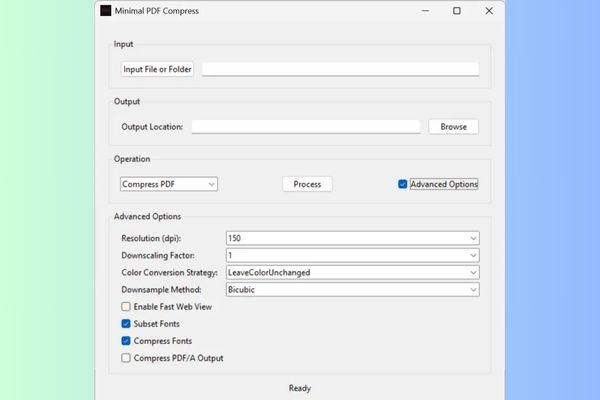
How to compress PDF files with minimal pdf compress
Step 1: Minimal PDF Compress uses the power of GhostScriptan extremely powerful open source PDF processing engine. This is the “brain” behind all compressive operations. When you run Minimal PDF Compress for the first time, if there is no GhostScript, the software will automatically display a window with the download link. You just need:
- Click the link to download GhostScript or press quickly HERE.
- Proceed to install the 64-bit version (gswin64c.exe).
After the installation is complete, you do not need to do anything more. Minimal PDF Compress will automatically identify.
Step 2: Download Minimal PDF Compress here (Link download)

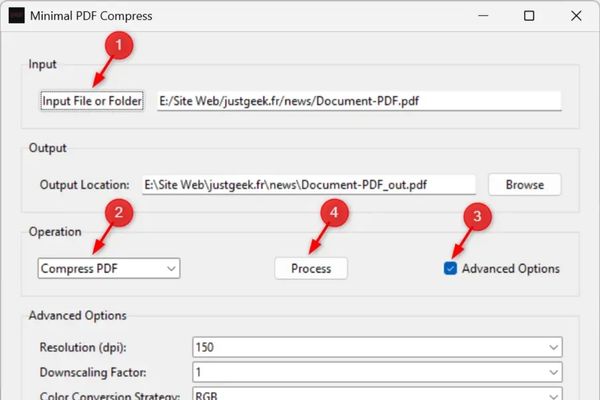
- Open Minimal PDF Compress, click the button Input file or folder. You can choose a separate PDF file or a whole folder containing multiple files to compress a series.
- At the drop -down menu OperationMake sure you have chosen “Compress PDF“.
- If you want to control the output quality, please accumulate in the umbrella Advanced Options.
- Press the button Process And wait for a moment.
The software will automatically create a new file in the same folder with the original file, with the name added “_out”(Example: baocao_out.pdf).
Discover advanced options
Resolution (DPI) – resolution: Select the quality of the output image. The common levels include 72 DPI (optimal for the web), 150 dpi (the balance between quality and capacity), and 300 dpi (high quality for printing).
DownScaling Factor: Set coefficient (1, 2, or 3) to reduce image resolution relatively, helping to reduce capacity effectively.
Color Conversion Strategy: Decide how to handle colors in the file. You can:
- Leavolorunchanged: keep the original color system.
- Gray: Switch all images to gray scale, in a great way to reduce capacity.
- RGB or CMYK: Convert to standard color systems.
Downsample method: Select algorithms to reduce image size. Bicubic gives the highest quality, while Subsample and Average are faster.
Enable Fast Web View – Turn on the fast web view: optimize the PDF file structure, allows the browser to display the first page even when the file has not been completely downloaded.
Subset Fonts: Instead of embedding an entire font, this option only embeds the actual characters used in the document, helping to reduce the file size significantly.
Compress Fonts: Apply compressed algorithm to the fonts that have been embedded in the file.

Convert PDF to PDF/A storage format
In addition to compressing the usual PDF file, Minimal PDF Compress also provides another value feature of converting to format PDF/A. This is an international standard for long -term electronic document storage, making sure your file can still be read after years.
The operation is similar: you just need to choose Convert to PDF/A In the Operation menu and press Process.
Conclude
How to compress PDF file It is no longer an obstacle after you have finished reading this article. Minimal PDF Compress is the answer to all issues about your PDF file capacity. Please share this useful method for friends and colleagues!