• Home
  • News
  • Software
  • Knowledge
  • MMO
  • Tips
  • Security
  • Network
  • Office
AnonyViet - English Version
  • Home
  • News
  • Software
  • Knowledge
  • MMO
  • Tips
  • Security
  • Network
  • Office
No Result
View All Result
  • Home
  • News
  • Software
  • Knowledge
  • MMO
  • Tips
  • Security
  • Network
  • Office
No Result
View All Result
AnonyViet - English Version
No Result
View All Result

How to block the invitation to join the simple Messenger community channel

AnonyViet by AnonyViet
July 13, 2025
in Tips
0

Messenger has long been one of the most popular messaging applications, not only for personal chat but also support for community channels. However, not everyone likes to receive invitations to participate in these channels, especially when they appear continuously and cause trouble. If you are looking for a way Block the invitation to join the community channel Messenger, this article will guide you step by step in detail, easy to understand to regain quietness for your application.

Join the channel Telegram belong to Anonyviet 👉 Link 👈

Why should you block the invitation to join the Messenger community channel?

Community channel on Messenger is a useful tool for groups, organizations or individuals to send information to many people at the same time. However, many users feel uncomfortable when they constantly receive invitations from channels they do not care.

This not only interrupts the use experience but also makes the notification box become messy. Blocking invitations to join the community channel Messenger Will help you better control what appears on the application, bringing more comfort and focus on use.

Why should you block the invitation to join the Messenger community channel?

How to block the invitation to join the Messenger community channel

Here are the specific steps for you to completely turn off the invitation to join the above community channel Messenger. Just a few simple steps, you will no longer be bothered.

Step 1: First, open the Messenger application on your phone. At the main interface, looking down to the bottom right corner, you will see the symbol Three dashes. Click on it and choose Setting.

Step 2: Next, scroll down and find the item Notice and sound.
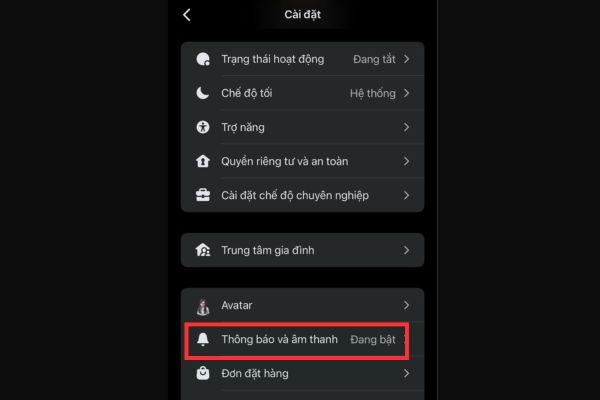
Select the notification and sound item

Step 3: Please pay attention to the item Community – This is the place to manage notifications related to community channels. By default, this feature is often turned on. To block the invitation to join the Messenger community channel, you just need to swipe the button to turn off in two items: Invitation and Suggestions for you.

When the Messenger is over, Messenger will not send an invitation notice or propose the channel to you anymore.

Step 4: Continue to pull down, you will see the item Channel. This is the place to manage the invitations to participate in specific channels. To make sure there are no invitations, click and turn off the option Invitation here.
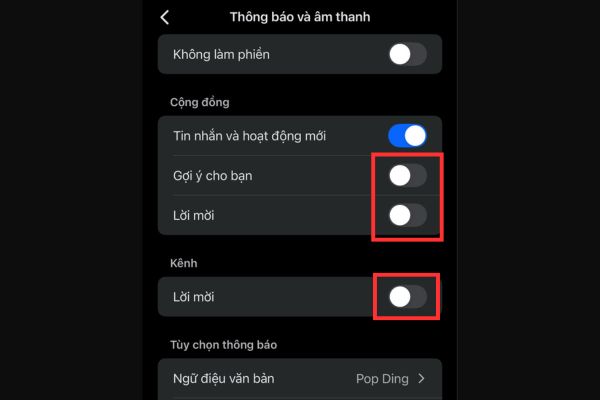
Turn off the following items

Step 5: If you want to temporarily “rest” from all Messenger notifications, not just the invitation of the community channel, try to activate the mode. Unwilling Then choose the desired period of time, such as 1 hour, 8 hours or until you turn off.
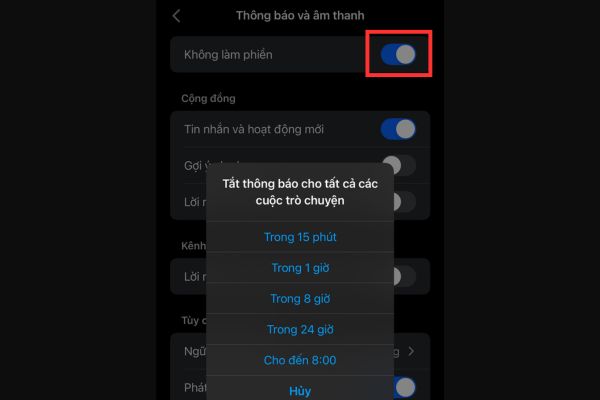
Activate the mode without disturbing

Conclude

Receiving too many invitations to join the community channel on Messenger can make you feel nuisance, but now you know how Block the invitation to join the community channel Messenger with just a few simple steps. From turning off the invitation notice, suggesting channel, to activating the mode does not disturb, all are within your reach. Try applying today!


Tags: BlockChannelcommunityinvitationJoinMessengersimple
Previous Post

Tricks with logo logo shortcuts you may not know

Next Post

How to quickly delete all garbage comments on WordPress

AnonyViet

AnonyViet

Related Posts

Don’t install leaked Windows 11
Tips

Don’t install leaked Windows 11

July 25, 2026
Microsoft announced the end of support date for Windows 10
Tips

Microsoft announced the end of support date for Windows 10

July 24, 2026
Microsoft confirms leaked Windows 11 is real
Tips

Microsoft confirms leaked Windows 11 is real

July 22, 2026
HeroSMS là gì? Cách thuê số điện thoại ảo nhận SMS OTP online không cần SIM
Tips

HeroSMS là gì? Cách thuê số điện thoại ảo nhận SMS OTP online không cần SIM

July 22, 2026
How to download documents on 123doc for free
Tips

How to download documents on 123doc for free

July 21, 2026
Instructions for Logo Design in just a few clicks with Logaster
Tips

Instructions for Logo Design in just a few clicks with Logaster

July 20, 2026
Next Post
How to quickly delete all garbage comments on WordPress

How to quickly delete all garbage comments on WordPress

0 0 votes
Article Rating
Subscribe
Login
Notify of
guest

guest

0 Comments
Oldest
Newest Most Voted

Recent News

Don’t install leaked Windows 11

Don’t install leaked Windows 11

July 25, 2026
Instructions on how to get 1 year of VIP Hidely VPN for free

Instructions on how to get 1 year of VIP Hidely VPN for free

July 25, 2026
Instructions on how to block strange devices from accessing your home Wifi

Instructions on how to block strange devices from accessing your home Wifi

July 25, 2026
Microsoft announced the end of support date for Windows 10

Microsoft announced the end of support date for Windows 10

July 24, 2026
Don’t install leaked Windows 11

Don’t install leaked Windows 11

July 25, 2026
Instructions on how to get 1 year of VIP Hidely VPN for free

Instructions on how to get 1 year of VIP Hidely VPN for free

July 25, 2026
Instructions on how to block strange devices from accessing your home Wifi

Instructions on how to block strange devices from accessing your home Wifi

July 25, 2026
AnonyViet - English Version

AnonyViet

AnonyViet is a website share knowledge that you have never learned in school!

We are ready to welcome your comments, as well as your articles sent to AnonyViet.

Follow Us

Contact:

Email: anonyviet.com[@]gmail.com

Main Website: https://anonyviet.com

Recent News

Don’t install leaked Windows 11

Don’t install leaked Windows 11

July 25, 2026
Instructions on how to get 1 year of VIP Hidely VPN for free

Instructions on how to get 1 year of VIP Hidely VPN for free

July 25, 2026
  • Home
  • Home 2
  • Home 3
  • Home 4
  • Home 5
  • Home 6
  • Next Dest Page
  • Sample Page

say88 tỷ lệ kèo nhà cái kèo nhà cái 5 febet

No Result
View All Result
  • Home
  • News
  • Software
  • Knowledge
  • MMO
  • Tips
  • Security
  • Network
  • Office

say88 tỷ lệ kèo nhà cái kèo nhà cái 5 febet

wpDiscuz
0
0
Would love your thoughts, please comment.x
()
x
| Reply