• Home
  • News
  • Software
  • Knowledge
  • MMO
  • Tips
  • Security
  • Network
  • Office
AnonyViet - English Version
  • Home
  • News
  • Software
  • Knowledge
  • MMO
  • Tips
  • Security
  • Network
  • Office
No Result
View All Result
  • Home
  • News
  • Software
  • Knowledge
  • MMO
  • Tips
  • Security
  • Network
  • Office
No Result
View All Result
AnonyViet - English Version
No Result
View All Result

Review the message that was removed on Facebook with History Remove Messenger

AnonyViet by AnonyViet
May 28, 2025
in Tips
0

History Remove Messenger is an extension to restore the message Messenger. Recently, Facebook has added the message to remove the message when it has been sent. This feature is quite interesting because it can remove the messages that you last to press Enter without wanting to let others know. However, if the opponent removes the message, you will lose evidence when buying or selling or being cheated. Therefore, removing Facebook messages also caused quite a bit of mess related to seeing these removed messages.

So today I will share with you how to review the content of the removed message. With a utility called History Remove Messenger Kb2a Team (Vietnam) develop.

Review the message that was removed on Facebook with History Remove Messenger

History Remove Messenger It is only possible to recover the message that has been removed on Messenger when it was installed earlier. Messages before installing the History Remove Messenger will not recover. So you need to install this extension as soon as possible

Step 1 : You need to download the utility file to your computer and extract it. My link below.
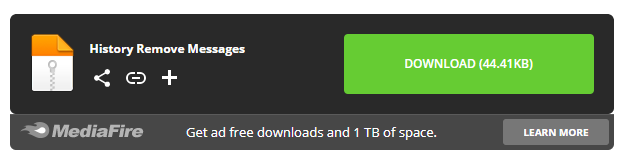
Download History Remove Messenger

After downloading and successfully extracting, there will be a folder as shown below.
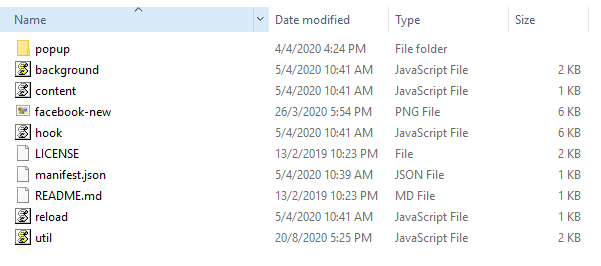
Install the History Remove Messenger to see the removed message

Step 2: You open Google Chrome up> and visit the address: chrome://extensions > Then please turn on the mode Chế độ chế độ dành cho nhà phát triển (Developer mode).
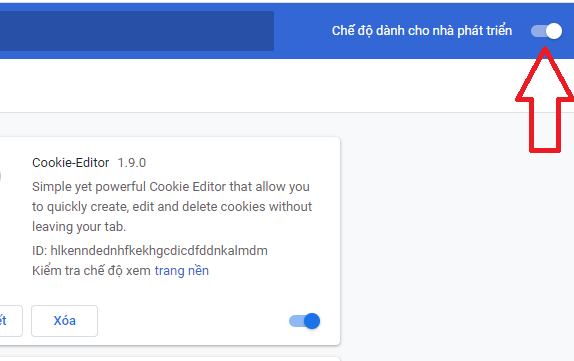
How to use Extension History Remove Messenger

Step 3: Next, click on Tải tiện ích đã giải nén > Then go to the utility folder History Remove Messages just extract and choose Select Folder To add the utility to Chrome.
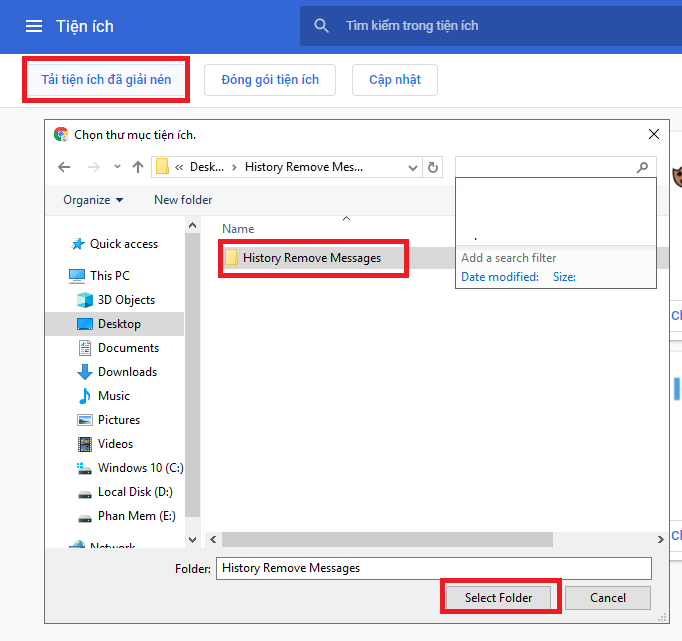
Review the message that was removed on Facebook with History Remove Messenger 10

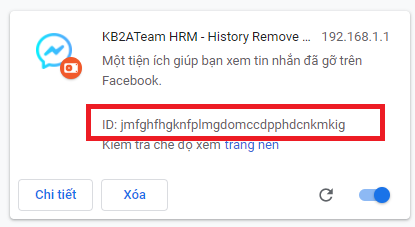
Step 4: After installing the utility successfully. Please copy the ID of the utility as shown below.
Review the message that was removed on Facebook with History Remove Messenger 11

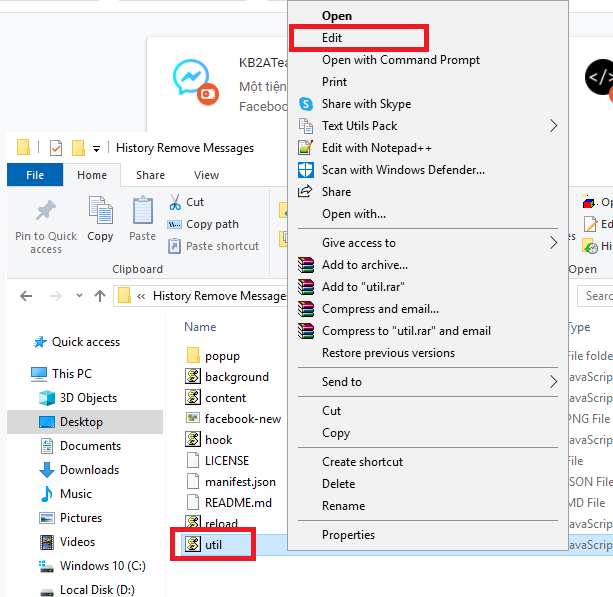
Step 5: You go to the file util.js In the utility folder History Remove Messages Expressed clicking it and right mouse Edit.
Review the message that was removed on Facebook with History Remove Messenger 12

Step 6: Please paste ID that you just copied in the extended utility part into the item Util As shown below. Remember to save this newly changed file.

Review the message that was removed on Facebook with History Remove Messenger 13

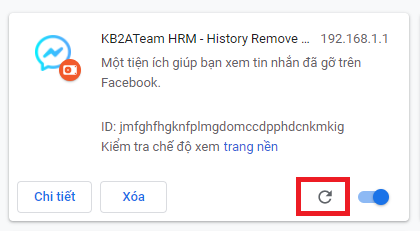
Step 7: Back to the utility management and click on the circle Refresh To restart the utility.
Review the message that was removed on Facebook with History Remove Messenger 14

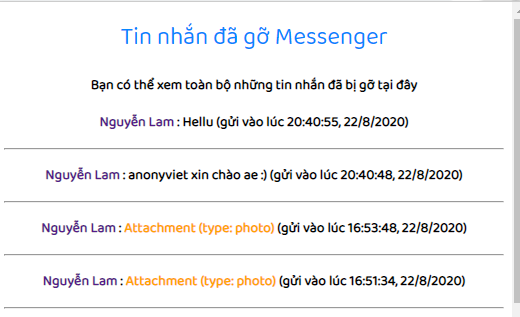
Now I have access to the utility installed as shown below and see a message that I have removed earlier.
Review the message that was removed on Facebook with History Remove Messenger

So I have finished instructions for you how to Review the Facebook message 100% success.

I wish you success
TMQ.

Previous Post

Fix image opening errors on Windows 10 is slow

Next Post

Edge Surf: hidden surfing game in the Microsoft Edge browser

AnonyViet

AnonyViet

Related Posts

Windows 7/8.1/10 users will be upgraded to Windows 11 for free
Tips

Windows 7/8.1/10 users will be upgraded to Windows 11 for free

July 30, 2026
Instructions for receiving ChatGPT Plus for 1 month for free in 2026
Tips

Instructions for receiving ChatGPT Plus for 1 month for free in 2026

July 28, 2026
Some reasons I don’t like Windows 11
Tips

Some reasons I don’t like Windows 11

July 27, 2026
Instructions on how to get free Facebook white ticks
Tips

Instructions on how to get free Facebook white ticks

July 27, 2026
Collection of Windows 11 wallpapers for computers and phones
Tips

Collection of Windows 11 wallpapers for computers and phones

July 26, 2026
Don’t install leaked Windows 11
Tips

Don’t install leaked Windows 11

July 25, 2026
Next Post
Edge Surf: hidden surfing game in the Microsoft Edge browser

Edge Surf: hidden surfing game in the Microsoft Edge browser

0 0 votes
Article Rating
Subscribe
Login
Notify of
guest

guest

0 Comments
Oldest
Newest Most Voted

Recent News

Hướng dẫn dùng Uneed.vn để đánh giá kiến thức Online miễn phí cho học sinh

Hướng dẫn dùng Uneed.vn để đánh giá kiến thức Online miễn phí cho học sinh

September 22, 2026
Windows 7/8.1/10 users will be upgraded to Windows 11 for free

Windows 7/8.1/10 users will be upgraded to Windows 11 for free

July 30, 2026
Instructions for receiving the free Certified LLM Security Expert certificate

Instructions for receiving the free Certified LLM Security Expert certificate

July 30, 2026
MSI laptops are not just for gamers: Which line is suitable for students, office workers and creative people?

MSI laptops are not just for gamers: Which line is suitable for students, office workers and creative people?

July 29, 2026
Hướng dẫn dùng Uneed.vn để đánh giá kiến thức Online miễn phí cho học sinh

Hướng dẫn dùng Uneed.vn để đánh giá kiến thức Online miễn phí cho học sinh

September 22, 2026
Windows 7/8.1/10 users will be upgraded to Windows 11 for free

Windows 7/8.1/10 users will be upgraded to Windows 11 for free

July 30, 2026
Instructions for receiving the free Certified LLM Security Expert certificate

Instructions for receiving the free Certified LLM Security Expert certificate

July 30, 2026
AnonyViet - English Version

AnonyViet

AnonyViet is a website share knowledge that you have never learned in school!

We are ready to welcome your comments, as well as your articles sent to AnonyViet.

Follow Us

Contact:

Email: anonyviet.com[@]gmail.com

Main Website: https://anonyviet.com

Recent News

Hướng dẫn dùng Uneed.vn để đánh giá kiến thức Online miễn phí cho học sinh

Hướng dẫn dùng Uneed.vn để đánh giá kiến thức Online miễn phí cho học sinh

September 22, 2026
Windows 7/8.1/10 users will be upgraded to Windows 11 for free

Windows 7/8.1/10 users will be upgraded to Windows 11 for free

July 30, 2026
  • Home
  • Home 2
  • Home 3
  • Home 4
  • Home 5
  • Home 6
  • Next Dest Page
  • Sample Page

say88 tỷ lệ kèo nhà cái kèo nhà cái 5 febet

No Result
View All Result
  • Home
  • News
  • Software
  • Knowledge
  • MMO
  • Tips
  • Security
  • Network
  • Office

say88 tỷ lệ kèo nhà cái kèo nhà cái 5 febet

wpDiscuz
0
0
Would love your thoughts, please comment.x
()
x
| Reply