• Home
  • News
  • Software
  • Knowledge
  • MMO
  • Tips
  • Security
  • Network
  • Office
AnonyViet - English Version
  • Home
  • News
  • Software
  • Knowledge
  • MMO
  • Tips
  • Security
  • Network
  • Office
No Result
View All Result
  • Home
  • News
  • Software
  • Knowledge
  • MMO
  • Tips
  • Security
  • Network
  • Office
No Result
View All Result
AnonyViet - English Version
No Result
View All Result

How to download livestream video on Facebook to avoid being deleted

AnonyViet by AnonyViet
March 14, 2025
in Tips
0

Facebook has just announced a major change that surprised many users: live videos will be automatically deleted after 30 days from the broadcast. Previously, livestream videos were stored indefinitely, but now you need to act quickly so as not to lose valuable memories. So how to Download livestream video on Facebook Easy way? This article will guide you in detail!


Join the channel Telegram belong to Anonyviet 👉 Link 👈

Why do you need to know how to download livestream video on Facebook?

According to Meta, the parent company of Facebookmost of the live video views are concentrated in the first few weeks after the broadcast. Therefore, the elimination of old videos is said to help optimize the platform, save resources and bring a better experience for users. However, for those who regularly livestream to preserve memories, sales or share important content, this change can cause many troubles.

Fortunately, Facebook offers many options for you to store videos before they disappear. From downloading personal devices, switching to cloud memory, to turn them into REEELS – you have enough tools to protect your content. Let's explore how to do it right below!
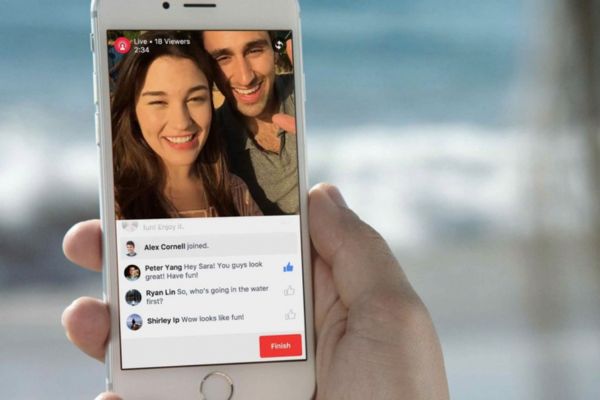
Why do you need to know how to download livestream video on Facebook?

How to download livestream video on Facebook one by one

If you just want to download a few important videos, the simplest way is to perform manually via your personal page. These are specific steps:

  1. Open Facebook, go to your personal page> click on the icon of three dots (…) in the right corner, then select “Activity log”.
  2. In the item “Live Videos”(Your live video), find the video to download> click the icon three dots Beside the video, select “Download”(Download). The video will be saved to the computer or phone depending on the device you are using.

This method is suitable if you only need to save a few specific videos. However, if you have dozens of videos to download, see the next way.
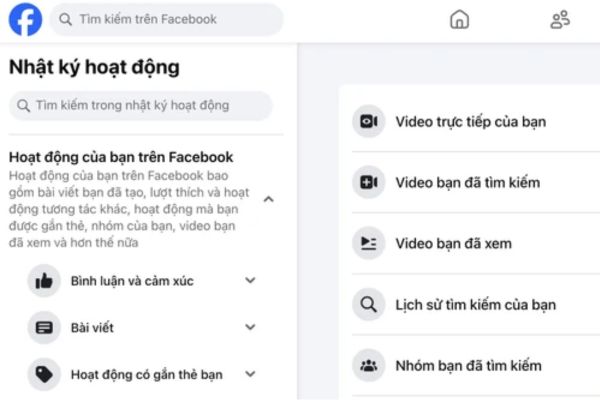
How to download livestream video on Facebook one by one

How to download livestream video on facebook

For those who have many live videos that need to be stored, Facebook supports the extremely convenient download to download. When you receive a notice of the upcoming video (30 days before 30 days), you can do the following:

  1. Open notifications from Facebook (via email or application) to download the download page> Determine the time of the videos you want to download.
  2. Choose to save on computers, phones or links to cloud memory such as Google Drive, Dropbox.
  3. Press “Create file“Let Facebook synthesize and provide download links.

This process saves you time and makes sure you don't miss any video. After downloading, you can rest assured to keep them forever.

How to download livestream video on facebook

How to convert livestream videos to cloud memory

If you do not want to occupy the device capacity, you can transfer live video to cloud memory. The implementation is very simple:

  1. Go to the download page via notification> select “Transfer live videos“Instead of downloading.
  2. Account link Google Drive Or Dropbox, then select the storage place.

Facebook will automatically transfer data safely and quickly. This is the ideal solution for those who want to store for a long time without worrying about memory.
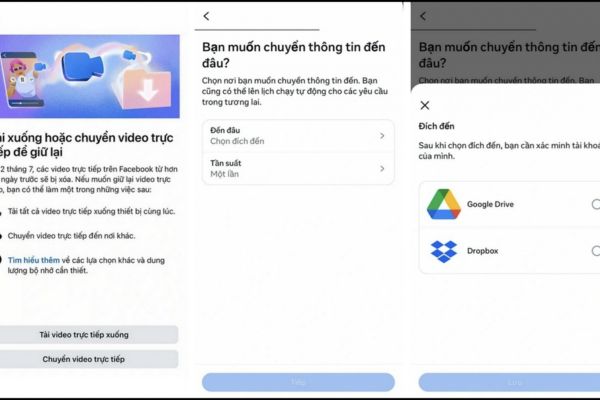
How to convert livestream videos to cloud memory

Turn livestream videos into REEELS to continue displaying

Do you want your video to appear on Facebook after 30 days? Try converting them into REEELS – a very hot video format. How to do the following:

  • Select live videos to be converted> Cut the important content (less than 90 seconds is the most ideal)> posted on your personal page or fanpage in the form of REEELS.

Reels not only helps you retain content but also attracts more viewers thanks to the strong spread of this format.

Renewal of storage time if you need more time

If 30 days is not enough for you to decide, Facebook allows delaying more videos 6 months. When receiving notifications, select “Learn more“And press”Delay”. After the extension, if not acting, the video will be permanently erased, so be careful!

Conclusion

Facebook's policy changes can surprise many people, but with support tools, you can actively keep your content. Even though it is Download livestream video on Facebook Back to the device, switch to the cloud or turn into Reels, each has its own advantages. Have you tried any way yet? Please share your experience!


Tags: avoiddeletedDownloadFacebookLivestreamvideo
Previous Post

Delete cache on Smart TV to watch TV faster

Next Post

5 best soundboard software for Windows (updated by 2025!)

AnonyViet

AnonyViet

Related Posts

Windows 7/8.1/10 users will be upgraded to Windows 11 for free
Tips

Windows 7/8.1/10 users will be upgraded to Windows 11 for free

July 30, 2026
Instructions for receiving ChatGPT Plus for 1 month for free in 2026
Tips

Instructions for receiving ChatGPT Plus for 1 month for free in 2026

July 28, 2026
Some reasons I don’t like Windows 11
Tips

Some reasons I don’t like Windows 11

July 27, 2026
Instructions on how to get free Facebook white ticks
Tips

Instructions on how to get free Facebook white ticks

July 27, 2026
Collection of Windows 11 wallpapers for computers and phones
Tips

Collection of Windows 11 wallpapers for computers and phones

July 26, 2026
Don’t install leaked Windows 11
Tips

Don’t install leaked Windows 11

July 25, 2026
Next Post
5 best soundboard software for Windows (updated by 2025!)

5 best soundboard software for Windows (updated by 2025!)

0 0 votes
Article Rating
Subscribe
Login
Notify of
guest

guest

0 Comments
Oldest
Newest Most Voted

Recent News

Windows 7/8.1/10 users will be upgraded to Windows 11 for free

Windows 7/8.1/10 users will be upgraded to Windows 11 for free

July 30, 2026
Instructions for receiving the free Certified LLM Security Expert certificate

Instructions for receiving the free Certified LLM Security Expert certificate

July 30, 2026
MSI laptops are not just for gamers: Which line is suitable for students, office workers and creative people?

MSI laptops are not just for gamers: Which line is suitable for students, office workers and creative people?

July 29, 2026
What is quantum resistant cryptography? Why must the Internet change?

What is quantum resistant cryptography? Why must the Internet change?

July 29, 2026
Windows 7/8.1/10 users will be upgraded to Windows 11 for free

Windows 7/8.1/10 users will be upgraded to Windows 11 for free

July 30, 2026
Instructions for receiving the free Certified LLM Security Expert certificate

Instructions for receiving the free Certified LLM Security Expert certificate

July 30, 2026
MSI laptops are not just for gamers: Which line is suitable for students, office workers and creative people?

MSI laptops are not just for gamers: Which line is suitable for students, office workers and creative people?

July 29, 2026
AnonyViet - English Version

AnonyViet

AnonyViet is a website share knowledge that you have never learned in school!

We are ready to welcome your comments, as well as your articles sent to AnonyViet.

Follow Us

Contact:

Email: anonyviet.com[@]gmail.com

Main Website: https://anonyviet.com

Recent News

Windows 7/8.1/10 users will be upgraded to Windows 11 for free

Windows 7/8.1/10 users will be upgraded to Windows 11 for free

July 30, 2026
Instructions for receiving the free Certified LLM Security Expert certificate

Instructions for receiving the free Certified LLM Security Expert certificate

July 30, 2026
  • Home
  • Home 2
  • Home 3
  • Home 4
  • Home 5
  • Home 6
  • Next Dest Page
  • Sample Page

say88 tỷ lệ kèo nhà cái kèo nhà cái 5 febet

No Result
View All Result
  • Home
  • News
  • Software
  • Knowledge
  • MMO
  • Tips
  • Security
  • Network
  • Office

say88 tỷ lệ kèo nhà cái kèo nhà cái 5 febet

wpDiscuz
0
0
Would love your thoughts, please comment.x
()
x
| Reply