• Home
  • News
  • Software
  • Knowledge
  • MMO
  • Tips
  • Security
  • Network
  • Office
AnonyViet - English Version
  • Home
  • News
  • Software
  • Knowledge
  • MMO
  • Tips
  • Security
  • Network
  • Office
No Result
View All Result
  • Home
  • News
  • Software
  • Knowledge
  • MMO
  • Tips
  • Security
  • Network
  • Office
No Result
View All Result
AnonyViet - English Version
No Result
View All Result

Can't turn off Find My iPhone? Here's how to handle it

AnonyViet by AnonyViet
December 5, 2024
in Tips
0

Apple's “Find My” network is a useful tool that allows you to locate Apple devices such as iPhone, iPad, Mac, Apple Watch, AirTag and AirPods, as well as track the location of family members. . However, sometimes you may have difficulty turning off Find My, especially when the “Stolen Device Protection” feature is enabled. This article will guide you how to fix the error Find My iPhone cannot be turned off in a detailed and easy to understand way.

Join the channel Telegram belong to AnonyViet 👉 Link 👈

Why does the error of not being able to turn off Find My iPhone appear?

The most common reason why you cannot turn off the “Find My iPhone” option in iCloud settings is because the “Stolen Device Protection” feature is turned on. This feature is designed to protect your device from unauthorized access, even if someone knows your password. It prevents others from making changes to your iPhone or Apple account, such as accessing or changing your password.

Because “Stolen Device Protection” requires Find My to be active, you need to disable this feature before you can turn off Find My.
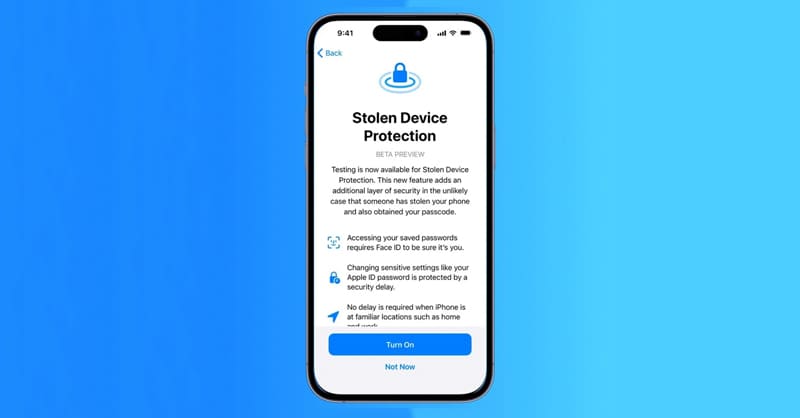
Why does the error of not being able to turn off Find My iPhone appear?

See more: Instructions for installing TrollStore on iOS 17 using TrollRestore

Steps to turn off Stolen Device Protection and Find My

Step 1: Go to Settings > select Face ID & Passcode and enter the device passcode.

Step 2: Select Stolen Device Protection. Turn off the button next to the Stolen Device Protection option and authenticate with Face ID.
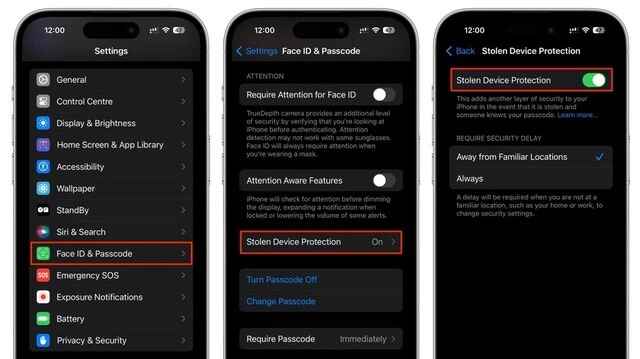
Steps to turn off Stolen Device Protection

Step 3: After turning off Stolen Device Protection, return to Settings > Select the username displayed at the top of the interface

Step 4: Select Find My > at Find My iPhone, toggle the button off. Enter your Apple ID password and confirm shutdown.

When completed, Find My will be disabled and your iPhone will no longer show up on the Find My map.

When should Find My be turned off?

There are some cases where you should turn off Find My, like:

When transferring iPhone to someone else (selling, exchanging or giving away)

If you plan to sell, trade, or give your iPhone to someone else, turning off Find My is a must. This ensures that the new owner can set up and use the device without any issues related to your iCloud.
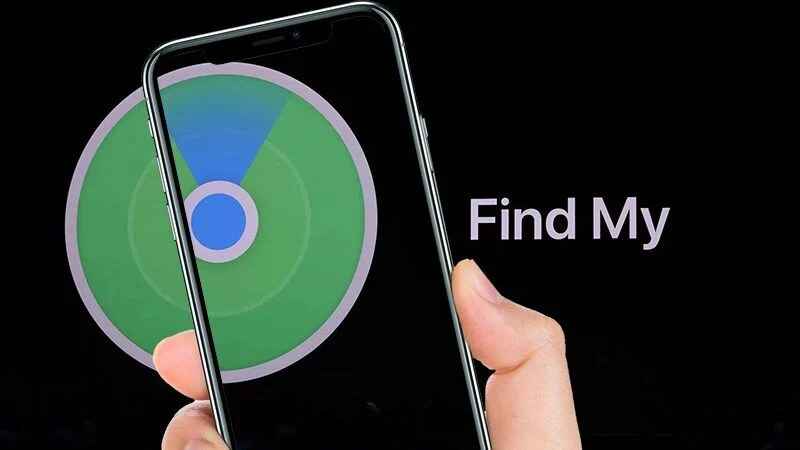
You should turn off Find My iPhone when transferring it to someone else

When bringing iPhone for repair

Apple also requires you to turn off Find My if you take your iPhone for repair at an authorized service center. This helps verify your ownership and prevent unauthorized repairs.

See more: Create your own “unique” Zalo stickers with zSticker AI

Conclusion

Job Find My iPhone cannot be turned off There can be many reasons, but most of them can be easily handled with the steps above. Hope this article has provided you with useful information to solve this problem. If you still have difficulty, contact Apple support for more specific advice!

Tags: Can39tFindhandleHere39siPhoneturn
Previous Post

Instructions for Bypass hCaptcha without clicking the verification image

Next Post

Instructions for installing Facebook Dark Mode for Jailbroken iPhone

AnonyViet

AnonyViet

Related Posts

Instructions for registering for free Google AI Ultra + Youtube Premium
Tips

Instructions for registering for free Google AI Ultra + Youtube Premium

November 18, 2026
How to create a virtual Android phone with US IP for free forever
Tips

How to create a virtual Android phone with US IP for free forever

November 17, 2026
Instructions for buying a free .com domain name on Checkdomain
Tips

Instructions for buying a free .com domain name on Checkdomain

November 16, 2026
Test how well ChatGPT understands you with the box
Tips

Test how well ChatGPT understands you with the box

November 15, 2026
Grand Valley – Website to watch trains run, listen to relaxing lofi music
Tips

Grand Valley – Website to watch trains run, listen to relaxing lofi music

November 14, 2026
Instructions on how to turn off the blue dot on the MacBook screen
Tips

Instructions on how to turn off the blue dot on the MacBook screen

November 13, 2026
Next Post
Instructions for installing Facebook Dark Mode for Jailbroken iPhone

Instructions for installing Facebook Dark Mode for Jailbroken iPhone

0 0 votes
Article Rating
Subscribe
Login
Notify of
guest

guest

0 Comments
Oldest
Newest Most Voted

Recent News

SubPeek – Extension to find vietsub on Youtube right on the thumbnail

SubPeek – Extension to find vietsub on Youtube right on the thumbnail

November 19, 2026
Fun Learning for Children: Great app for learning letters and math for grade 1 for children

Fun Learning for Children: Great app for learning letters and math for grade 1 for children

November 18, 2026
Instructions for registering for free Google AI Ultra + Youtube Premium

Instructions for registering for free Google AI Ultra + Youtube Premium

November 18, 2026
How to create a virtual Android phone with US IP for free forever

How to create a virtual Android phone with US IP for free forever

November 17, 2026
SubPeek – Extension to find vietsub on Youtube right on the thumbnail

SubPeek – Extension to find vietsub on Youtube right on the thumbnail

November 19, 2026
Fun Learning for Children: Great app for learning letters and math for grade 1 for children

Fun Learning for Children: Great app for learning letters and math for grade 1 for children

November 18, 2026
Instructions for registering for free Google AI Ultra + Youtube Premium

Instructions for registering for free Google AI Ultra + Youtube Premium

November 18, 2026
AnonyViet - English Version

AnonyViet

AnonyViet is a website share knowledge that you have never learned in school!

We are ready to welcome your comments, as well as your articles sent to AnonyViet.

Follow Us

Contact:

Email: anonyviet.com[@]gmail.com

Main Website: https://anonyviet.com

Recent News

SubPeek – Extension to find vietsub on Youtube right on the thumbnail

SubPeek – Extension to find vietsub on Youtube right on the thumbnail

November 19, 2026
Fun Learning for Children: Great app for learning letters and math for grade 1 for children

Fun Learning for Children: Great app for learning letters and math for grade 1 for children

November 18, 2026
  • Home
  • Home 2
  • Home 3
  • Home 4
  • Home 5
  • Home 6
  • Next Dest Page
  • Sample Page

say88 tỷ lệ kèo nhà cái kèo nhà cái 5 febet

No Result
View All Result
  • Home
  • News
  • Software
  • Knowledge
  • MMO
  • Tips
  • Security
  • Network
  • Office

say88 tỷ lệ kèo nhà cái kèo nhà cái 5 febet

wpDiscuz
0
0
Would love your thoughts, please comment.x
()
x
| Reply