Apple has always been a pioneer in integrating accessibility technology into its products. With iOS 18, they continue to affirm this with the feature Music touch (Music Haptics), a breakthrough that helps the hearing impaired, especially the deaf, to “feel” music in a completely new way.
| Join the channel Telegram belong to AnonyViet 👉 Link 👈 |
What is Music Haptics?
Music Touch is a new accessibility feature in iOS 18 that uses the iPhone's Taptic Engine to create subtle vibrations that sync with the beat of the song. This allows users to feel the rhythm, pitch, and even melody of the music through touch.
Simply put, instead of listening with their ears, users will “listen” to music by feeling vibrations in their hands when holding the iPhone.
Prerequisites for using this feature
This feature will be available on iPhone 12 and later when iOS 18 is officially released. However, if you can't wait, you can try it out early by installing the developer beta of iOS 18.
How to enable Music Touch on iOS 18
Activating Music Touch is simple, just follow these steps:
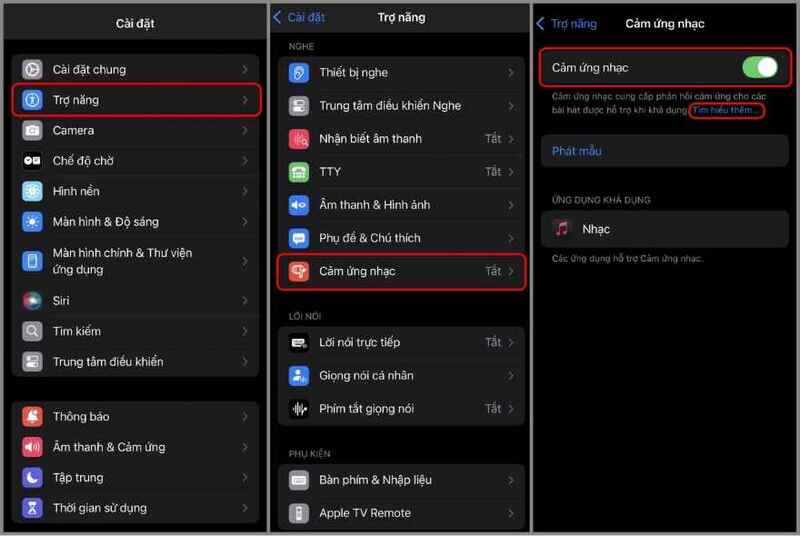
- Open Settings app > Accessibility > Music Haptics > Tap to activate
You can also test this feature before enabling it by tapping the “Play Sample” button on the same settings page.
See also: How to adjust the width of the iPhone flashlight beam iOS 18
How to customize and use Music Touch
When turned on Music Touch On iPhone, you can easily enable or disable it from the music app, Control Center, Lock Screen, etc. You can refer to the implementation process below.
Integrate Music Haptics into Control Center
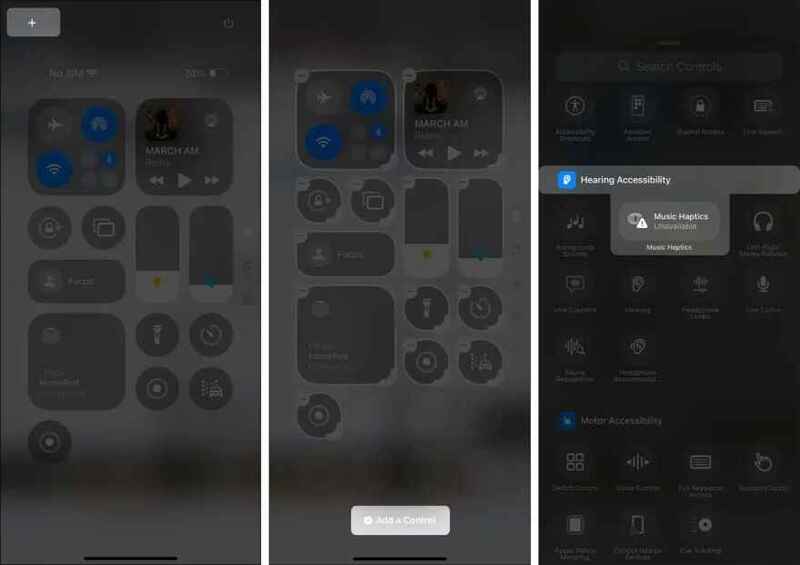
For quick and easy access, you can add the Music Touch toggle to Control Center:
- Access Control Center by swiping down from the top-right corner of the screen.
- Tap the plus (+) icon in the upper left corner to enter edit mode.
- Scroll down and find “Music Touch” in the “Add Controls” list.
- Tap “Music Touch” to add it to Control Center.
Advice: You should zoom in on the Music Touch icon in Control Center to easily monitor its activity status.
Using Music Touch in Apple Music
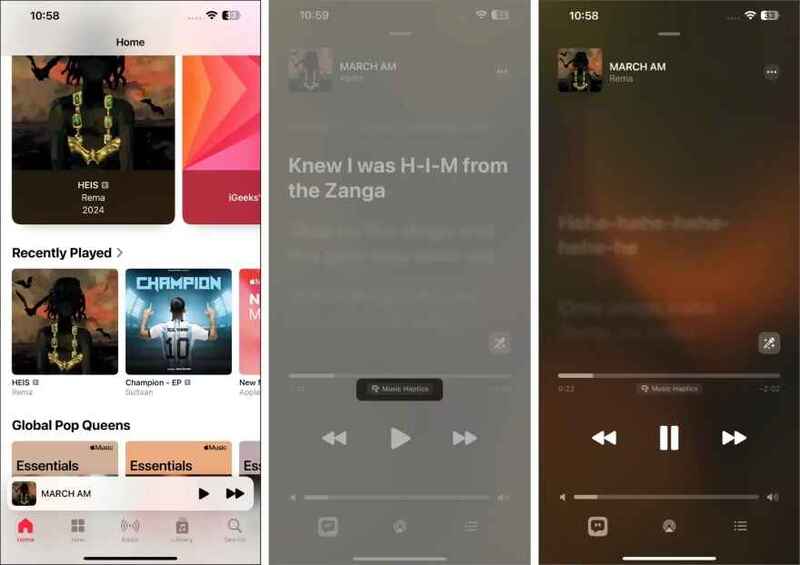
Music Haptics is an innovative feature available on millions of songs in Apple Music. However, not all songs support it. To enjoy Music Haptics, follow these steps:
- Open the Apple Music app (subscription required).
- Select and play a song. If the song supports Music Haptics, you'll feel the beat and melody through vibrations. The progress bar will display the label Music Haptics.
- If you don't see a label or there's no response, try selecting a different song.
Note: This feature works best with Dolby Atmos music.
Music Haptics will continue to work even when you switch to other apps or turn the volume down. For convenience, you can turn this feature on/off directly from Dynamic Island by long-pressing and selecting the Music Haptics icon.
How to turn off Music Haptics on iPhone
There are several ways to turn off or pause Music Haptics:
- In Apple Music: Go to the “Now Playing” screen and tap the Music Touch option.
- Via Control Center: Tap the Music Touch icon (if added) or press and hold the “Now Playing” control and select the Music Touch icon.
- On the Lock screen: Tap the Music Touch icon in the music player.
- Via Dynamic Island: This is the fastest and most convenient way.
How to completely turn off Music Haptics
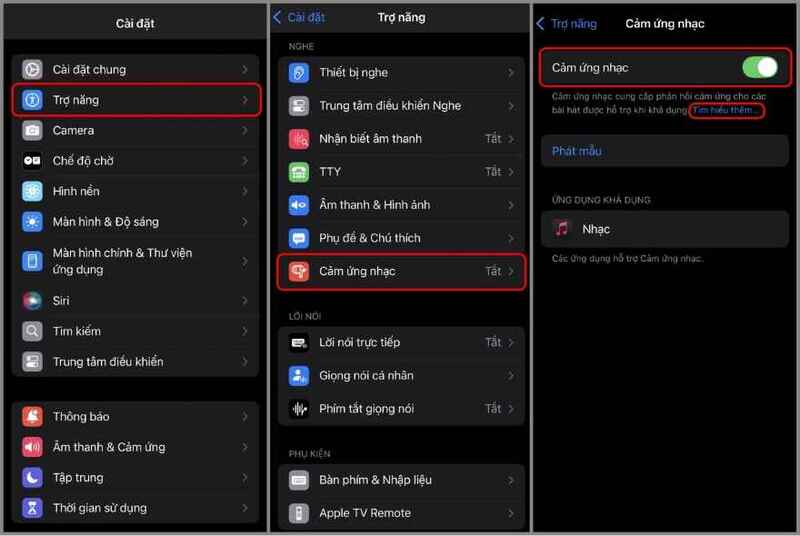
Open Settings > Accessibility > Select Music Touch under Hearing > Turn off the switch
Which headphones are compatible with Music Haptics?
Music Haptics is compatible with a wide range of headphones, allowing you to enjoy this unique music experience anytime, anywhere. It is compatible with:
- AirPods and AirPods Pro
- Beats Wireless Headphones
- Wired headphones with built-in haptic feedback.
Apple has created a new way to experience music, especially useful for people with hearing loss or those who want to experience music through another sense.
See also: Instructions for recording calls on iOS 18.1 Beta
Conclusion
Music Touch is a testament to Apple in bringing technology closer to everyone, regardless of their ability. This feature not only helps people with hearing loss experience music, but also opens up a new way to enjoy music for everyone.