• Home
  • News
  • Software
  • Knowledge
  • MMO
  • Tips
  • Security
  • Network
  • Office
AnonyViet - English Version
  • Home
  • News
  • Software
  • Knowledge
  • MMO
  • Tips
  • Security
  • Network
  • Office
No Result
View All Result
  • Home
  • News
  • Software
  • Knowledge
  • MMO
  • Tips
  • Security
  • Network
  • Office
No Result
View All Result
AnonyViet - English Version
No Result
View All Result

Hidden Game on Discord: Did You Know?

AnonyViet by AnonyViet
August 24, 2024
in Software
0

Discord is a chat application loved by the gaming community around the world, not only famous for its ability to create a comfortable and flexible chat space, but also has interesting secrets that not everyone knows. One of those secrets is hidden games on DiscordHow to play that hidden game, let's find out with AnonyViet through the following article!

Join the channel Telegram belong to AnonyViet 👉 Link 👈

About Discord

Discord is a chat app designed specifically for gamers. It provides a comfortable and flexible chat space, allowing users to create private or public chat channels, send voice and text messages, share images, videos and files.

About Discord
About Discord

Discord Not only popular in the gaming community, but also widely used in many different online community groups, from study groups, work groups, or groups sharing common interests.

The app works on multiple platforms, including Windows, macOS, Linux, iOS, Android, and even on web browsers, allowing users to easily chat and connect with each other anytime, anywhere.

See also: How to Install Discord for Linux

How to access hidden games on Discord

Step 1: The first step to playing this game is to access a non-existent Discord link. It may sound strange, but that’s how you unlock this hidden game. For example, you can use the following link:

https://discord.com/anonyviet

Step 2: Kwhen you access this link, an error page will appear, but don't let this confuse you. look closely and you will see a small snake image in one corner of the page.

Click on the snake image

Click on the snake image, a snake hunting game will appear on the screen and you can start playing the game.

How to play hidden games on Discord

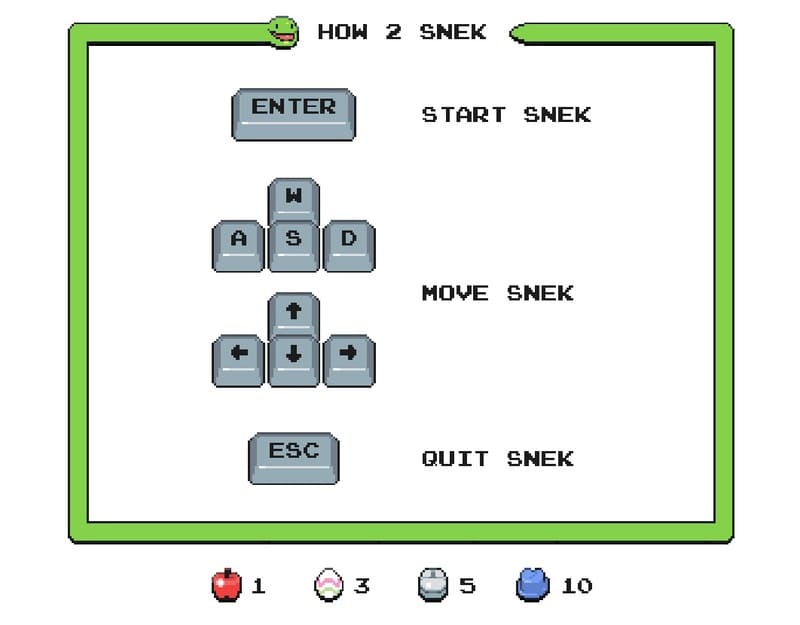
The snake game on Discord works similar to the traditional version we used to play.
How to play hidden games on Discord
  1. First, you press Enter to start playing. Your snake will appear on the screen with some items around it.
  2. To control the snake, you use the W, A, S, D keys or the arrow keys on your keyboard.
  3. During the game, your goal is to eat as many items as possible to make your snake longer. Each item the snake eats will give you between 1 and 10 points, depending on the type of item.
  4. If you want to exit the game, just press the ESC key. Your score will be displayed at the top of the screen.

Snake Game on Discord

See also: How to Change Status on Discord Continuously Using Node.js

Conclusion

The legendary Snake game is now back with us via an unexpected platform: Discord. It’s not just a game to entertain you, but also a bridge between the modern generation of gamers and their fond childhood memories. Try it out hidden games on Discord and see how many points you can get!


Tags: DiscordGamehidden
Previous Post

How to use AR technology to try on lipstick, glasses on Facebook

Next Post

Tips for using uBlock Origin on Chrome, despite Manifest V3

AnonyViet

AnonyViet

Related Posts

Detailed review of realme C01: Breaking the stereotype of cheap smartphones with 6,500 mAh battery and 120Hz screen
Software

Detailed review of realme C01: Breaking the stereotype of cheap smartphones with 6,500 mAh battery and 120Hz screen

November 23, 2026
SubPeek – Extension to find vietsub on Youtube right on the thumbnail
Software

SubPeek – Extension to find vietsub on Youtube right on the thumbnail

November 19, 2026
Fun Learning for Children: Great app for learning letters and math for grade 1 for children
Software

Fun Learning for Children: Great app for learning letters and math for grade 1 for children

November 18, 2026
Tool to get transcript of entire YouTube channel extremely fast and free
Software

Tool to get transcript of entire YouTube channel extremely fast and free

November 10, 2026
How to create an Android App using Google AI Studio without code
Software

How to create an Android App using Google AI Studio without code

November 9, 2026
Holding OPPO Find X10 to watch movies all night: Real experience
Software

Holding OPPO Find X10 to watch movies all night: Real experience

November 9, 2026
Next Post
Tips for using uBlock Origin on Chrome, despite Manifest V3

Tips for using uBlock Origin on Chrome, despite Manifest V3

0 0 votes
Article Rating
Subscribe
Login
Notify of
guest

guest

0 Comments
Oldest
Newest Most Voted

Recent News

How to cancel Facebook Plus package to avoid automatic renewal

How to cancel Facebook Plus package to avoid automatic renewal

November 23, 2026
SSHWATCH: Dashboard to see realtime VPS attacks using Honeypot

SSHWATCH: Dashboard to see realtime VPS attacks using Honeypot

November 23, 2026
Detailed review of realme C01: Breaking the stereotype of cheap smartphones with 6,500 mAh battery and 120Hz screen

Detailed review of realme C01: Breaking the stereotype of cheap smartphones with 6,500 mAh battery and 120Hz screen

November 23, 2026
Purple Team: How to verify that the monitoring system can actually detect attacks

Purple Team: How to verify that the monitoring system can actually detect attacks

November 23, 2026
How to cancel Facebook Plus package to avoid automatic renewal

How to cancel Facebook Plus package to avoid automatic renewal

November 23, 2026
SSHWATCH: Dashboard to see realtime VPS attacks using Honeypot

SSHWATCH: Dashboard to see realtime VPS attacks using Honeypot

November 23, 2026
Detailed review of realme C01: Breaking the stereotype of cheap smartphones with 6,500 mAh battery and 120Hz screen

Detailed review of realme C01: Breaking the stereotype of cheap smartphones with 6,500 mAh battery and 120Hz screen

November 23, 2026
AnonyViet - English Version

AnonyViet

AnonyViet is a website share knowledge that you have never learned in school!

We are ready to welcome your comments, as well as your articles sent to AnonyViet.

Follow Us

Contact:

Email: anonyviet.com[@]gmail.com

Main Website: https://anonyviet.com

Recent News

How to cancel Facebook Plus package to avoid automatic renewal

How to cancel Facebook Plus package to avoid automatic renewal

November 23, 2026
SSHWATCH: Dashboard to see realtime VPS attacks using Honeypot

SSHWATCH: Dashboard to see realtime VPS attacks using Honeypot

November 23, 2026
  • Home
  • Home 2
  • Home 3
  • Home 4
  • Home 5
  • Home 6
  • Next Dest Page
  • Sample Page

say88 tỷ lệ kèo nhà cái kèo nhà cái 5 febet

No Result
View All Result
  • Home
  • News
  • Software
  • Knowledge
  • MMO
  • Tips
  • Security
  • Network
  • Office

say88 tỷ lệ kèo nhà cái kèo nhà cái 5 febet

wpDiscuz
0
0
Would love your thoughts, please comment.x
()
x
| Reply