• Home
  • News
  • Software
  • Knowledge
  • MMO
  • Tips
  • Security
  • Network
  • Office
AnonyViet - English Version
  • Home
  • News
  • Software
  • Knowledge
  • MMO
  • Tips
  • Security
  • Network
  • Office
No Result
View All Result
  • Home
  • News
  • Software
  • Knowledge
  • MMO
  • Tips
  • Security
  • Network
  • Office
No Result
View All Result
AnonyViet - English Version
No Result
View All Result

How to turn off ads on Windows 11 Start Menu

AnonyViet by AnonyViet
July 8, 2024
in Tips
0

Windows 11 user experience has recently been affected by ads appearing right on the Start Menu. This is not only inconvenient, but also hinders the work process. However, Microsoft has provided a solution to solve this problem. Let's find out how turn off ads on Start Menu Windows 11 to get back a clean and distraction-free workspace.

Join the channel Telegram belong to AnonyViet 👉 Link 👈

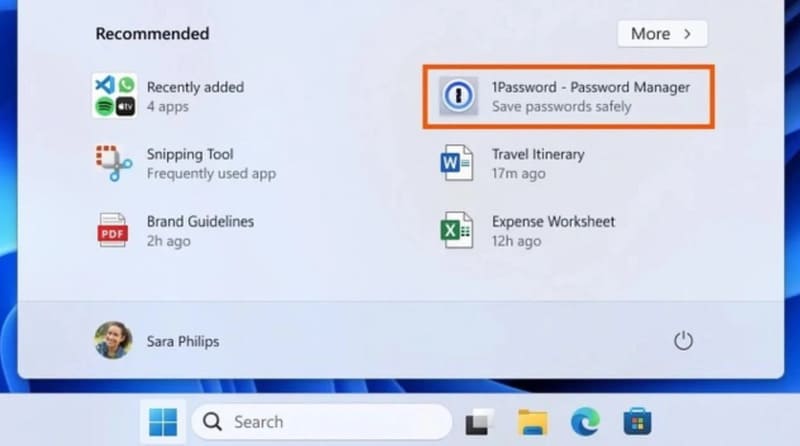
After evaluating the inclusion of ads in the Windows 11 Start menu, Microsoft has decided to expand this feature to all users. Specifically, the latest update KB5036980 (not a security update) for Windows 11 versions 22H2 and 23H2 will introduce 'suggestions' of applications right on the Start menu.
turn off ads on Start Menu
Microsoft rolls out ads on Start Menu

The ads will be displayed in the Recommended section of the Start Menu, the area that usually shows recently accessed files and apps. Now, every time users open the Start menu, they will not only be suggested recently installed files and apps, along with helpful tips, but they will also see ads. However, Microsoft still allows users to choose to turn this feature off if they want.

Windows Ads Plugged In – Not the First Time

This isn't the first time Microsoft has included ads in its Windows operating system. Ads have previously appeared on Windows 10's lock screen and Start Menu, and even in the File Explorer app. Windows 11.

Build 22635.3500 (currently in Beta Channel) brings Account Manager, a new feature that replaces the usual controls with ads for Microsoft 365. Users need to view a Microsoft 365 subscription ad before they can sign out of their account.

If users do not like suggested ads, they can turn them off by following these steps:

Step 1: Tap Start > Open Settings > Tap 'Personalization' > Select 'Start'.
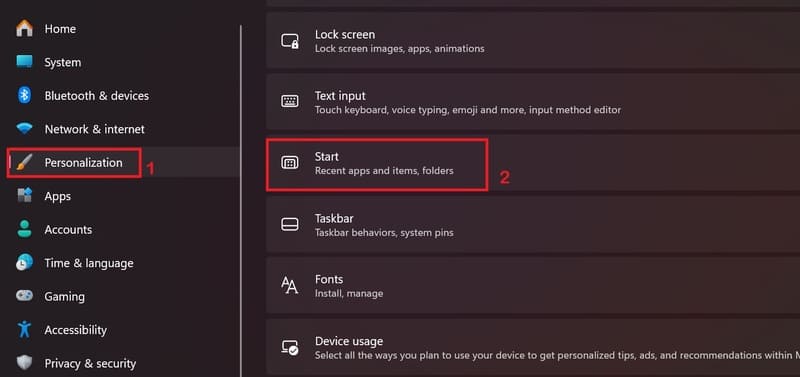
turn off ads on Start Menu
Click on 'Personalization' > Select 'Start'.

Step 2: Disable the option “Show recommendations for tips, app promotions, and more”.'
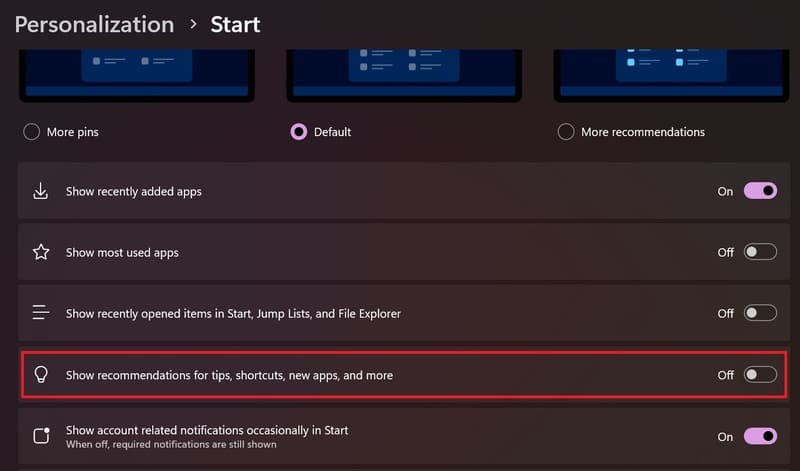
turn off ads on Start Menu
Turn off “Show recommendations for tips, app promotions, and more”.'

User Response

The Windows 11 user community could not hide their “annoyance” when Microsoft decided to integrate advertising into the Start menu. This action is considered to affect the quality of user experience and go against the company's previous promise of a “clean” operating system.

Epilogue

Ultimately, removing ads from the Windows 11 Start Menu not only improves the experience, but also reflects a commitment to respecting users' privacy and personal space. By following the simple steps above, you can easily turn off ads on Start Menu Windows 11 and enjoy an uninterrupted work environment.


Tags: AdsmenuStartturnWindows
Previous Post

Aesthetic Notes: Create cute, AI-powered notes for Windows

Next Post

How to register for an ID card for children under 14 years old online at home

AnonyViet

AnonyViet

Related Posts

Cách Đăng ký Nhận Code ChatGPT Business
Tips

Cách Đăng ký Nhận Code ChatGPT Business

November 2, 2026
Instructions for cleaning LG TV with Antigravity to help it run faster
Tips

Instructions for cleaning LG TV with Antigravity to help it run faster

October 30, 2026
Quét lỗ hổng bảo mật cho Vide Coding bằng Security Audit Skill
Tips

Quét lỗ hổng bảo mật cho Vide Coding bằng Security Audit Skill

October 27, 2026
Instructions for registering for OxionAI Pro for 1 year with many powerful AI models
Tips

Instructions for registering for OxionAI Pro for 1 year with many powerful AI models

October 24, 2026
How are Windows 11 Pro and Windows 10 Pro different?
Tips

How are Windows 11 Pro and Windows 10 Pro different?

October 23, 2026
Instructions for using CleanYourTV: Remove ads on Android TV, Google TV
Tips

Instructions for using CleanYourTV: Remove ads on Android TV, Google TV

October 23, 2026
Next Post
How to register for an ID card for children under 14 years old online at home

How to register for an ID card for children under 14 years old online at home

0 0 votes
Article Rating
Subscribe
Login
Notify of
guest

guest

0 Comments
Oldest
Newest Most Voted

Recent News

HuiPai AI Pro Camera: App that automatically aligns photo angles for free on iPhone

HuiPai AI Pro Camera: App that automatically aligns photo angles for free on iPhone

November 7, 2026
Instructions on how to buy super bargain 1k Bach Hoa Xanh products

Instructions on how to buy super bargain 1k Bach Hoa Xanh products

November 6, 2026
Besides the 7500 mAh battery and 6.9 inch screen, what else does the POCO C95 Pro 4G have to make it a secondary device worth buying?

Besides the 7500 mAh battery and 6.9 inch screen, what else does the POCO C95 Pro 4G have to make it a secondary device worth buying?

November 5, 2026
App fixes printer errors automatically, effective immediately with 1 click

App fixes printer errors automatically, effective immediately with 1 click

November 5, 2026
HuiPai AI Pro Camera: App that automatically aligns photo angles for free on iPhone

HuiPai AI Pro Camera: App that automatically aligns photo angles for free on iPhone

November 7, 2026
Instructions on how to buy super bargain 1k Bach Hoa Xanh products

Instructions on how to buy super bargain 1k Bach Hoa Xanh products

November 6, 2026
Besides the 7500 mAh battery and 6.9 inch screen, what else does the POCO C95 Pro 4G have to make it a secondary device worth buying?

Besides the 7500 mAh battery and 6.9 inch screen, what else does the POCO C95 Pro 4G have to make it a secondary device worth buying?

November 5, 2026
AnonyViet - English Version

AnonyViet

AnonyViet is a website share knowledge that you have never learned in school!

We are ready to welcome your comments, as well as your articles sent to AnonyViet.

Follow Us

Contact:

Email: anonyviet.com[@]gmail.com

Main Website: https://anonyviet.com

Recent News

HuiPai AI Pro Camera: App that automatically aligns photo angles for free on iPhone

HuiPai AI Pro Camera: App that automatically aligns photo angles for free on iPhone

November 7, 2026
Instructions on how to buy super bargain 1k Bach Hoa Xanh products

Instructions on how to buy super bargain 1k Bach Hoa Xanh products

November 6, 2026
  • Home
  • Home 2
  • Home 3
  • Home 4
  • Home 5
  • Home 6
  • Next Dest Page
  • Sample Page

say88 tỷ lệ kèo nhà cái kèo nhà cái 5 febet

No Result
View All Result
  • Home
  • News
  • Software
  • Knowledge
  • MMO
  • Tips
  • Security
  • Network
  • Office

say88 tỷ lệ kèo nhà cái kèo nhà cái 5 febet

wpDiscuz
0
0
Would love your thoughts, please comment.x
()
x
| Reply