• Home
  • News
  • Software
  • Knowledge
  • MMO
  • Tips
  • Security
  • Network
  • Office
AnonyViet - English Version
  • Home
  • News
  • Software
  • Knowledge
  • MMO
  • Tips
  • Security
  • Network
  • Office
No Result
View All Result
  • Home
  • News
  • Software
  • Knowledge
  • MMO
  • Tips
  • Security
  • Network
  • Office
No Result
View All Result
AnonyViet - English Version
No Result
View All Result

Fake My History – Feature to fake your browsing history when you… die

AnonyViet by AnonyViet
December 26, 2023
in Tips
0

Feature Fake My History of Opera GX is a unique and useful feature for those who want to protect their privacy on the internet. This feature allows you to create a fake browsing history, including websites, access times, and number of visits, to fool anyone who might view your browsing history. In this article, AnonyViet We will introduce this feature in detail and how to use it effectively!

Join the channel Telegram belong to AnonyViet 👉 Link 👈

What is Opera GX?

Opera GX is a special browser designed for gaming lovers. It has many unique and attractive features, such as allowing you to adjust the amount of RAM, CPU, and bandwidth used by the browser, integrating gaming platforms like Twitch, Discord, Steam, and more.

You can customize the browser's interface to your own style, with various color themes and sound effects.

What is Opera GX's Fake My History feature?

Fake My History is a new feature launched in April 2023, on the occasion of Opera GX's 2nd anniversary. This is a feature that helps you wipe out your embarrassing browsing history and replace it with a more fake but proud version.
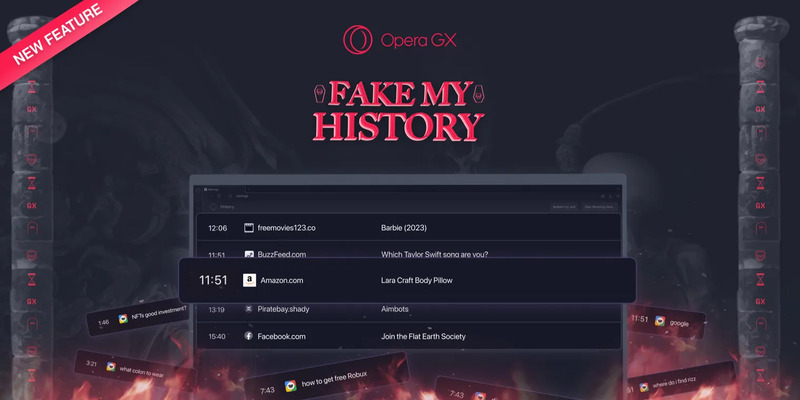
Fake My History
Fake My History feature of Opera GX

This feature will become active when you are dead or inactive on the browser for 14 consecutive days.

Why should you use Fake My History?

Because it will protect your reputation after you are no longer here. You don't want others to know that you've seen porn videos, silly memes, scam websites, or stupid questions on Google, right?

You want them to remember you as someone who is knowledgeable, socially conscious, and has a passion for learning and exploring, right? Then let the Fake My History feature help you do that.

How to activate the Fake My History feature

Step 1: Download Opera GX browser here

Step 2: Open Opera GX, access this page > Press “Hell Yeah”
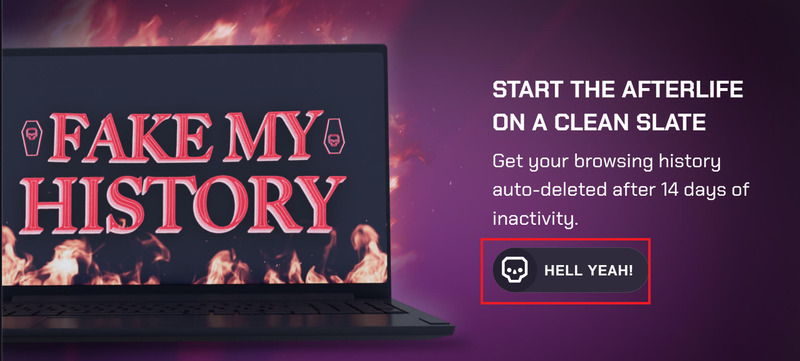
Fake My History
Press “Hell Yeah”

Step 3: Click “Activate” to activate the Fake My History feature
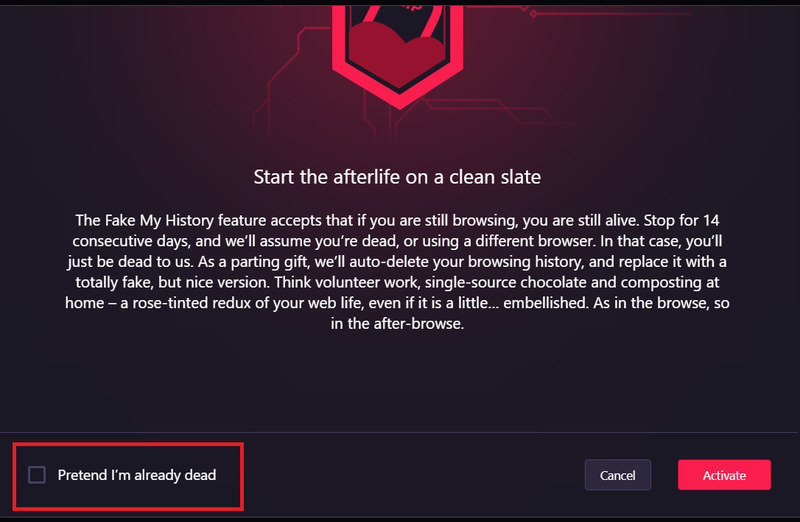
Fake My History
Click “Active” or “Pretend I'm already dead”

Feature “Fake My History” will be automatically activated on the Opera GX browser after the user has not used it for 14 days. If users want to experience it now, you can select the “Pretend I'm Already Dead” option to activate this feature immediately.

Included in the fake browsing history will be:

  • Local charity and volunteer work
  • Useful and free online courses
  • Content related to encouraging participation in activities and elections in the community
  • Content related to organizing fun activities

Epilogue

In short, Fake My History is a unique and useful feature of Opera GX. It helps you wipe out your browsing history and replace it with a more “perfect” fake version. You can use this feature to protect your reputation after you're gone, and leave a good impression on others when they “accidentally” view your browsing history.


The article scored: 5/5 – (100 votes)

Tags: browsingDiefakefeaturehistoryyou..
Previous Post

How to analyze Excel data with AI is extremely convenient

Next Post

The most detailed business restructuring consulting process

AnonyViet

AnonyViet

Related Posts

How to record reaction videos with Android phones, no app needed
Tips

How to record reaction videos with Android phones, no app needed

June 1, 2026
Instructions on how to get Google AI Pro 1 year for free for new accounts
Tips

Instructions on how to get Google AI Pro 1 year for free for new accounts

June 1, 2026
Top free AI tools to help write, test and optimize content
Tips

Top free AI tools to help write, test and optimize content

June 1, 2026
Instructions for receiving Lovable Pro 12 months for free
Tips

Instructions for receiving Lovable Pro 12 months for free

May 29, 2026
Instructions for receiving 1 month of ElevenLabs Creator for free worth
Tips

Instructions for receiving 1 month of ElevenLabs Creator for free worth $22

May 25, 2026
How to create beautiful studio-like preschool graduation photos for your child
Tips

How to create beautiful studio-like preschool graduation photos for your child

May 21, 2026
Next Post
The most detailed business restructuring consulting process

The most detailed business restructuring consulting process

0 0 votes
Article Rating
Subscribe
Login
Notify of
guest

guest

0 Comments
Oldest
Newest Most Voted
Inline Feedbacks
View all comments

Recent News

How to check network speed on Apple TV when the image is jerky or lagging

How to check network speed on Apple TV when the image is jerky or lagging

June 3, 2026
Instructions on how to prevent acquaintances from seeing your Tiktok

Instructions on how to prevent acquaintances from seeing your Tiktok

June 2, 2026
How to record reaction videos with Android phones, no app needed

How to record reaction videos with Android phones, no app needed

June 1, 2026
Instructions on how to get Google AI Pro 1 year for free for new accounts

Instructions on how to get Google AI Pro 1 year for free for new accounts

June 1, 2026
How to check network speed on Apple TV when the image is jerky or lagging

How to check network speed on Apple TV when the image is jerky or lagging

June 3, 2026
Instructions on how to prevent acquaintances from seeing your Tiktok

Instructions on how to prevent acquaintances from seeing your Tiktok

June 2, 2026
How to record reaction videos with Android phones, no app needed

How to record reaction videos with Android phones, no app needed

June 1, 2026
AnonyViet - English Version

AnonyViet

AnonyViet is a website share knowledge that you have never learned in school!

We are ready to welcome your comments, as well as your articles sent to AnonyViet.

Follow Us

Contact:

Email: anonyviet.com[@]gmail.com

Main Website: https://anonyviet.com

Recent News

How to check network speed on Apple TV when the image is jerky or lagging

How to check network speed on Apple TV when the image is jerky or lagging

June 3, 2026
Instructions on how to prevent acquaintances from seeing your Tiktok

Instructions on how to prevent acquaintances from seeing your Tiktok

June 2, 2026
No Result
View All Result
  • Home
  • News
  • Software
  • Knowledge
  • MMO
  • Tips
  • Security
  • Network
  • Office

wpDiscuz
0
0
Would love your thoughts, please comment.x
()
x
| Reply