Discount code, Shopee Vouchers there are many types. Each type will have its own way of saving. There are codes you need to save in advance to use, but there are codes you should not save in advance. Specifically, which code do you need to save first? What code should you not save first? Read the entire article below to find the answer to the question: Should I save Shopee discount codes first?
| Join the channel Telegram belong to AnonyViet 👉 Link 👈 |
What types of Shopee discount codes are there?
Based on how to hunt for codes, Shopee discount codes are divided into 4 popular types. Specifically, the 4 types of codes are:
Character vouchers:
- These are vouchers with special characters. If you want to hunt for this voucher, you should not save the code in advance in the voucher store. Just prepare the order, copy the code characters before the code time until the code takes effect, then apply and quickly pay for the order.. For this type of code, you should not save the code in advance to the Voucher Store.
Voucher to save banner:
- These are the vouchers released on the banner. To apply this voucher, you need to save the voucher in advance to the voucher store. Once the code is valid, you can proceed to pay for the order.
Gift vouchers are available in the voucher warehouse:
- These are vouchers that have already been given away by the system in your voucher warehouse. You don't need to search for these vouchers or save them. Just wait until the code takes effect and quickly pay for your order.
Shopee Live Vouchers:
- These are vouchers released on Livestream, these vouchers can only be applied to products with the “Shopee Live” tag. To apply the Shopee Live Voucher, you just need to purchase the product during the Livestream session. Shopee Live codes can be given in the Voucher Store or you need to save the code on Live to use it.
How to get/how to save Shopee discount codes
How to get Shopee discount code thanks to MagiamgiaShopee.vn
Magiamgiashopee.vn is a reputable address specializing in synthesizing and sharing Shopee vouchers and discount codes for free! Visiting this page you will have the opportunity to find all Shopee discount codes. Specifically, to get a Shopee discount code thanks to Magiamgiashopee.vn, you just need to follow these simple steps:
Step 1: Visit Magiamgiashopee.vn
- First you need to access this link: https://magiamgiashopee.vn/
Step 2: Get the discount code according to the industry you want
- Drag the screen down and you will see it immediately Voucher Category. Here, vouchers have been compiled and classified according to each category. You can scroll horizontally to see more available categories.

Should I save Shopee discount codes first?
Each type of voucher will have different ways to hunt and save. Some types you need to save first, some types you don't need to save first. When getting a Shopee discount code at MagiamgiaShopee.vn, save the code as follows:
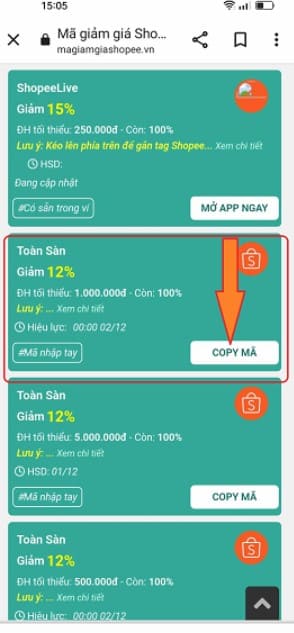
- If the code is in character form (hand-entered code): The character code will be displayed as shown below. Seeing this code, you just need to click on the item Copy the code The code has been automatically saved to the device's temporary memory. Character codes are not saved in advance to the Voucher Store. So please wait until the code takes effect and then paste the code letter into the Enter shopee voucher code box in the Payment step to apply the code.
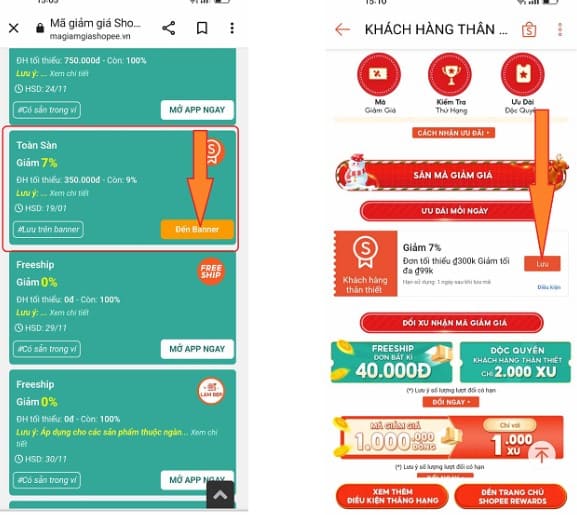
- Banner save code. To see the code displayed as shown below, just click the button Go to the banner to be redirected to the page containing the banner to save the code. Once you see the code, click it save put the code in the Voucher Store. Then wait until the code takes effect to make payment to use the code.
- Code available in Voucher Store (Available in wallet): The code available in the voucher store will be displayed as shown below. Seeing this code you just need to click the button Open the App Now To open the Shopee App and proceed to close the order when the code is valid, it's ok.

In short, the discount code you should save before that is Voucher saved on Banner, Shopee Live code launched live(There is a code that must be saved and the code is already available in the voucher store). As for Vouchers are available in the voucher warehouse Then you just need to wait until the code takes effect to pay for the order and you can easily apply the code. With Voucher in character format Just copy the code until it becomes effective, then paste the code and apply.
During the purchasing process on Shopee, if you have any difficulties that you cannot resolve yourself, you can contact us immediately Shopee switchboard for your support. Wishing you a good experience when shopping on Shopee!