• Home
  • News
  • Software
  • Knowledge
  • MMO
  • Tips
  • Security
  • Network
  • Office
AnonyViet - English Version
  • Home
  • News
  • Software
  • Knowledge
  • MMO
  • Tips
  • Security
  • Network
  • Office
No Result
View All Result
  • Home
  • News
  • Software
  • Knowledge
  • MMO
  • Tips
  • Security
  • Network
  • Office
No Result
View All Result
AnonyViet - English Version
No Result
View All Result

Record all Google Meet and Zoom content with tl;dv

AnonyViet by AnonyViet
May 11, 2023
in Tips
0

tl;dv is an application that allows you to efficiently record, review, and share Google Meet and Zoom meetings. With tl;dv, you can save time, increase productivity, and improve team collaboration. So how to use tl;dv, please follow through the following article!

Join the channel Telegram belong to AnonyViet ???? Link ????

What is tl;dv?

tl;dv is an acronym for “too long; didn’t view”, means a meeting recording, or any video that is too long, and people using the phrase don’t watch it for that reason.

For example, if you receive an email with a demo video of a new product, but the video is longer than 10 minutes, you can reply to that email with “tl;dv” to say you don’t have the time or interest to watch the video.

tl;dv is also the name of an online meeting recording application that uses artificial intelligence (AI) to record, transfer documents and summarize meetings with customers, partners and colleagues.

Record all Google Meet and Zoom content with tl;dv
Application tl;dv

Features of tl;dv

tl;dv has many outstanding features, such as:

  • Create automatic video and audio recordings for Google Meet and Zoom with high quality
  • Review audio recordings accurately with speaker labels
  • Text-to-speech in over 20 languages
  • Highlight and highlight important points in the meeting
  • Using artificial intelligence to create notes
  • Send links to automatic recordings to Slack and E-Mail
  • Search for keywords in any meeting
  • Import meeting information into CRMs like Salesforce or Hubspot
  • Edit audio recordings and create short videos

How to use tl;dv

Install an extension for Google Meet or Zoom

  • Step 1: Visit the homepage tl;dv HERE
  • Step 2: Click “Get tl;dv for Google Meet” or “Get tl;dv for Zoom” > Click “download” > Select “Add extension”
  • Step 3: Sign up for an account with Google

Record the meeting

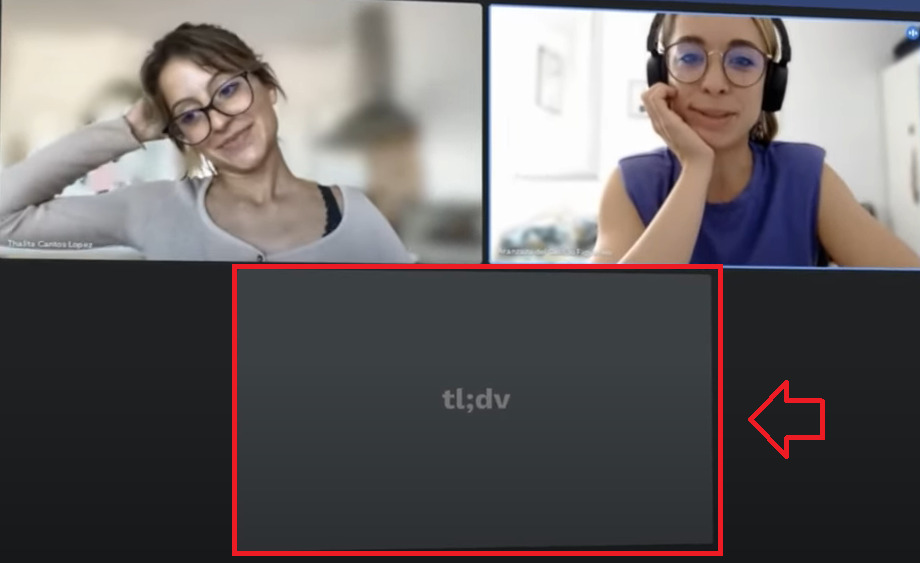
When you join a Google Meet or Zoom meeting, you’ll see a “Start Recording” button at the bottom left of the screen. Simply tap the “Start Recording” button to start recording your meeting with quality video and audio.

At this moment, tl;dv will appear on the screen
Record all Google Meet and Zoom content with tl;dv
Record meeting with tl;dv

Highlight the important ideas of the meeting

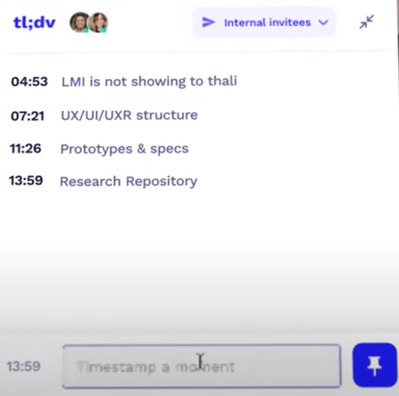
While recording a meeting, you can tap the “Timestamp” button to mark important moments in the meeting, such as a decision, an opinion, or a response. You can also use the keyboard shortcut Ctrl+T to do this.
Record all Google Meet and Zoom content with tl;dv
Note down the main idea

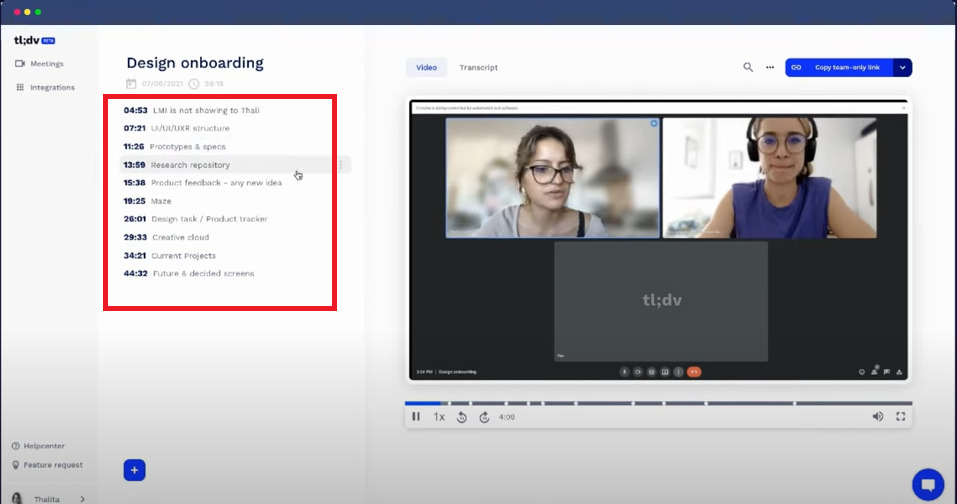
After the meeting is over, you can review all the recorded ideas
Record all Google Meet and Zoom content with tl;dv
You can review all recorded ideas

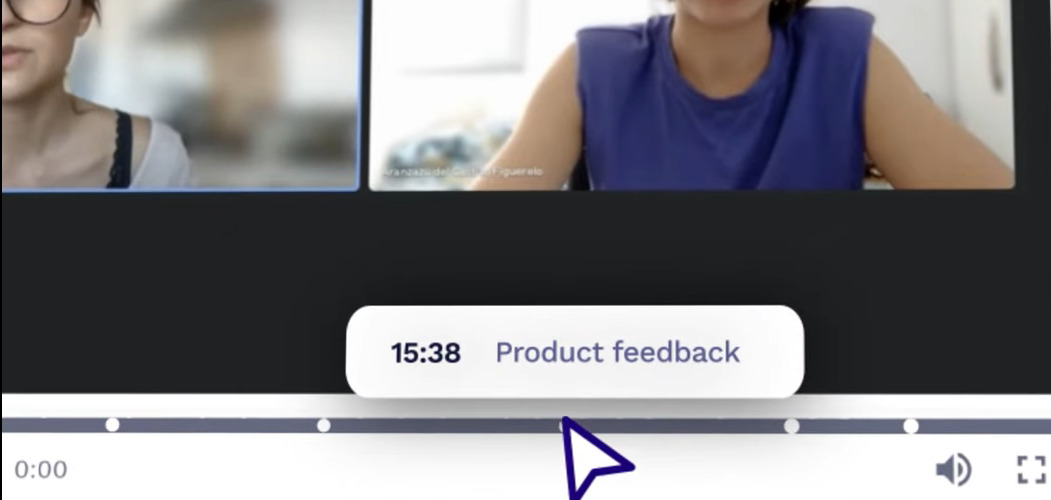
The application will divide the video length into segments corresponding to the main idea that you have noted. When you want to watch a clip again, just click on it.
Record all Google Meet and Zoom content with tl;dv
The application automatically separates videos by main ideas

Automatically generate meeting script

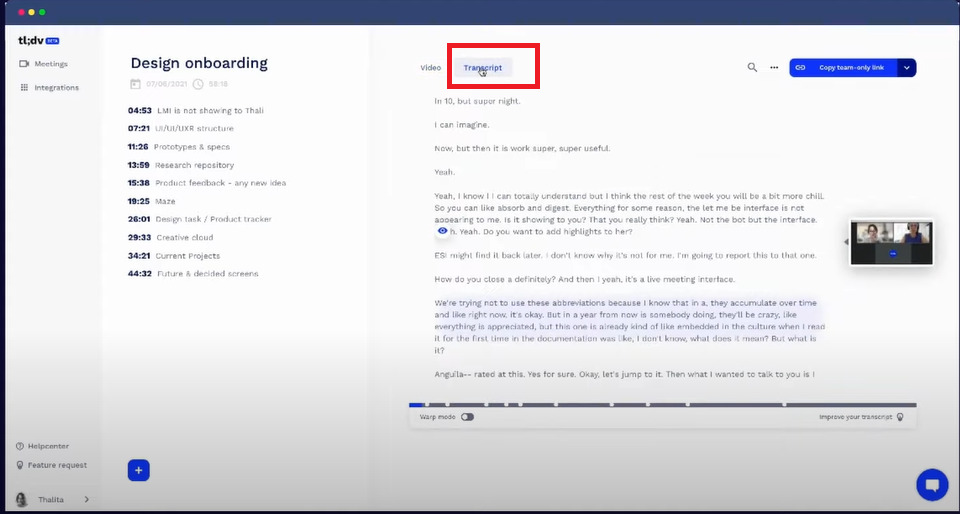
Clicking on the “Transcript” section will display the entire meeting content. Tl;dv with the application of AI technology has automatically turned voice into text extremely convenient.
Record all Google Meet and Zoom content with tl;dv
Automatically generate meeting script

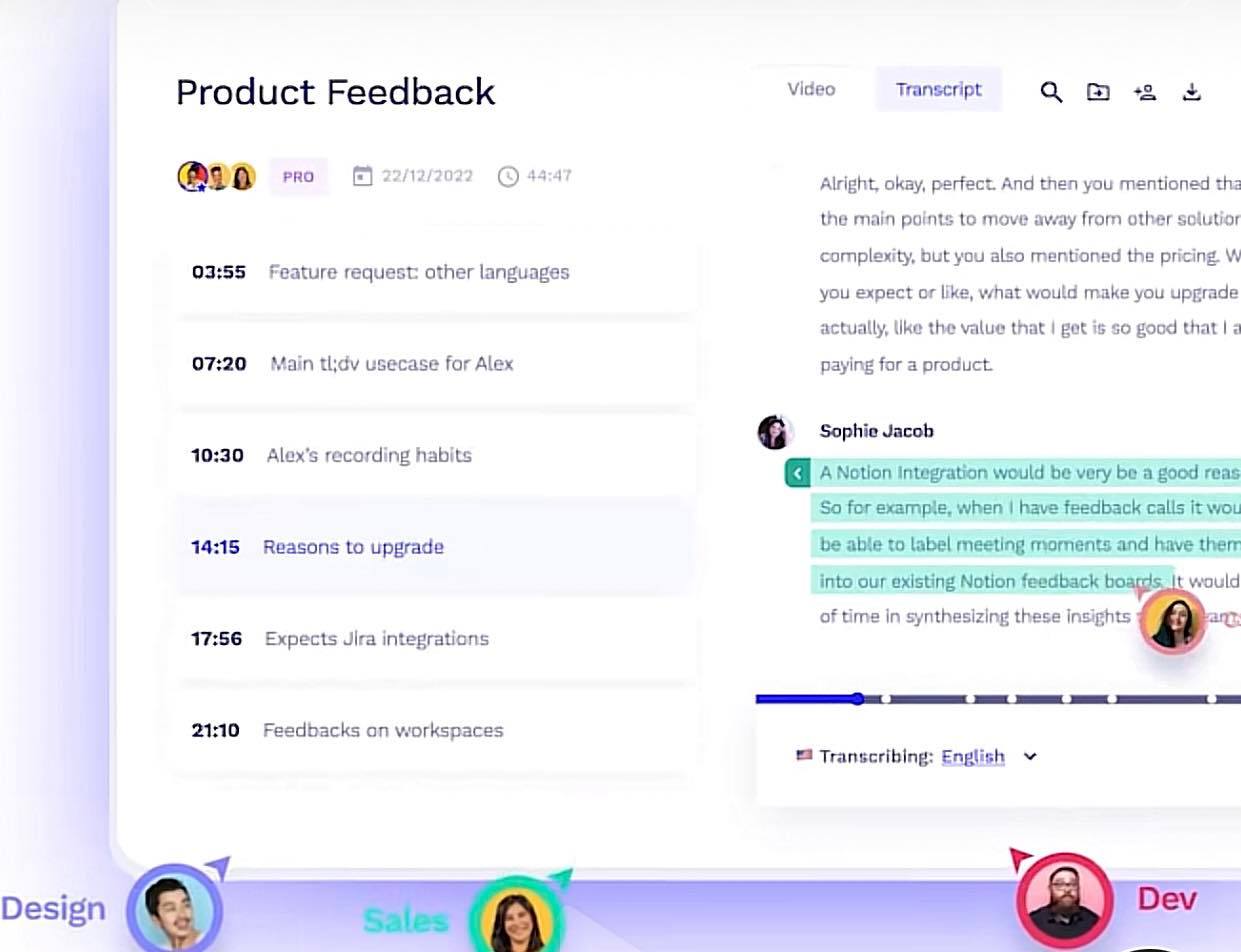
You can click on any main idea (highlight) and the application will redirect you to the corresponding script
Record all Google Meet and Zoom content with tl;dv
The application will redirect you to the corresponding script

Translate meeting content into another language

You can choose the language you want to transfer in more than 20 different languages, including Vietnamese.

Create any short video

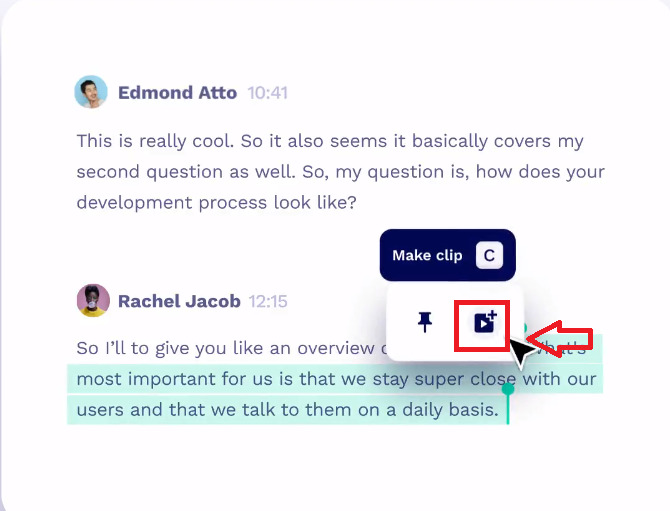
You want to save a certain main idea in the meeting, just highlight the script> Select the video icon> Select “Copy link” and share it with others.
Record all Google Meet and Zoom content with tl;dv
Create any short video

Search and summarize the meeting

You can use keywords to search for topics discussed in meetings and summarize any relevant conversations. This helps you update content that you missed when leaving work, or reiterate what you discussed with customers, colleagues, etc.

Easy to share

Click “Copy team link + highlights” to easily share this meeting recording on other platforms like Notion, Google Docs, Slack, Salesforce or HubSpot

Record all Google Meet and Zoom content with tl;dv
Click “Copy team link + highlights” to share the meeting recording

Epilogue

So thanks to tl;dv where you can leverage the power of AI to jot down important ideas, review meeting content, and find and share them more easily, thereby improving optimal work performance. This is really a useful tool for those of you who often work via Google Meet or Zoom. Good luck with your application!

Rate this post

Tags: contentGoogleMeetrecordtldvZoom
Previous Post

Instructions for backing up Facebook data

Next Post

Download CEH v12 Manual Lab – Latest White Hat Hacker Textbook

AnonyViet

AnonyViet

Related Posts

11 reasons you should buy a Windows Laptop instead of a Macbook
Tips

11 reasons you should buy a Windows Laptop instead of a Macbook

July 7, 2026
The easiest way to convert Word File to PowerPoint – Convert DOCX File to PTTX
Tips

The easiest way to convert Word File to PowerPoint – Convert DOCX File to PTTX

July 6, 2026
What is TPM 2.0 CHIP? Why is it required to have a TPM chip when installing Windows 11?
Tips

What is TPM 2.0 CHIP? Why is it required to have a TPM chip when installing Windows 11?

July 5, 2026
Windows 11 Download link and new interface appear
Tips

Windows 11 Download link and new interface appear

July 3, 2026
Tips

How to know if strangers are viewing your Story on Facebook

July 2, 2026
Tips

How to block any website on your computer and phone to avoid distraction

July 1, 2026
Next Post
Download CEH v12 Manual Lab – Latest White Hat Hacker Textbook

Download CEH v12 Manual Lab - Latest White Hat Hacker Textbook

0 0 votes
Article Rating
Subscribe
Login
Notify of
guest

guest

0 Comments
Oldest
Newest Most Voted
Inline Feedbacks
View all comments

Recent News

Tool to look up 2026 high school exam score rankings, confidently choose a university

Tool to look up 2026 high school exam score rankings, confidently choose a university

July 7, 2026
11 reasons you should buy a Windows Laptop instead of a Macbook

11 reasons you should buy a Windows Laptop instead of a Macbook

July 7, 2026
Get Notion Business 30 days free of Claude Opus 4.7 and GPT-5.5

Get Notion Business 30 days free of Claude Opus 4.7 and GPT-5.5

July 6, 2026
The easiest way to convert Word File to PowerPoint – Convert DOCX File to PTTX

The easiest way to convert Word File to PowerPoint – Convert DOCX File to PTTX

July 6, 2026
Tool to look up 2026 high school exam score rankings, confidently choose a university

Tool to look up 2026 high school exam score rankings, confidently choose a university

July 7, 2026
11 reasons you should buy a Windows Laptop instead of a Macbook

11 reasons you should buy a Windows Laptop instead of a Macbook

July 7, 2026
Get Notion Business 30 days free of Claude Opus 4.7 and GPT-5.5

Get Notion Business 30 days free of Claude Opus 4.7 and GPT-5.5

July 6, 2026
AnonyViet - English Version

AnonyViet

AnonyViet is a website share knowledge that you have never learned in school!

We are ready to welcome your comments, as well as your articles sent to AnonyViet.

Follow Us

Contact:

Email: anonyviet.com[@]gmail.com

Main Website: https://anonyviet.com

Recent News

Tool to look up 2026 high school exam score rankings, confidently choose a university

Tool to look up 2026 high school exam score rankings, confidently choose a university

July 7, 2026
11 reasons you should buy a Windows Laptop instead of a Macbook

11 reasons you should buy a Windows Laptop instead of a Macbook

July 7, 2026
  • Home
  • Home 2
  • Home 3
  • Home 4
  • Home 5
  • Home 6
  • Next Dest Page
  • Sample Page

No Result
View All Result
  • Home
  • News
  • Software
  • Knowledge
  • MMO
  • Tips
  • Security
  • Network
  • Office

wpDiscuz
0
0
Would love your thoughts, please comment.x
()
x
| Reply