• Home
  • News
  • Software
  • Knowledge
  • MMO
  • Tips
  • Security
  • Network
  • Office
AnonyViet - English Version
  • Home
  • News
  • Software
  • Knowledge
  • MMO
  • Tips
  • Security
  • Network
  • Office
No Result
View All Result
  • Home
  • News
  • Software
  • Knowledge
  • MMO
  • Tips
  • Security
  • Network
  • Office
No Result
View All Result
AnonyViet - English Version
No Result
View All Result

Instructions on how to delete search history on Facebook

AnonyViet by AnonyViet
April 14, 2023
in Tips
0

You want to know how to delete search history on facebook to secure personal information or delete “sensitive” searches that you do not want others to know. Then please follow the very simple tutorial below, you can do it on your computer or phone!

Join the channel Telegram belong to AnonyViet ???? Link ????

Reasons to delete Facebook search history

In today’s digital age, the use of social networks has become an indispensable part of life. When using Facebook, we often use the search feature to look up information, images, videos and more. However, many people do not know that storing search history can put themselves at risk, here are the reasons why you should delete your search history on Facebook:

Privacy of personal information

Facebook search history may contain sensitive personal information such as interests, thoughts, opinions, etc. If not deleted, others can access this information and use it to cause harm or infiltration. into your account.

How to delete search history on Facebook
Help keep your personal information secure

Get rid of ads

Facebook uses your search history to deliver ads tailored to your interests and needs. If you don’t want to receive annoying ads, you should remove them.

Account Cleanup

Perform how to delete search history on facebook It also helps to clean up your account, reduce the amount of data stored on the server, and help you find information faster.

Protect your identity

If you must share a computer or device with more than one person, clearing your search history will help protect your identity, avoiding the exposure of personal information that can lead to many scams.

Reduce pressure on yourself

If you’ve been looking for some sensitive information or want to keep it hidden from others, deleting it will help you feel more comfortable and confident when using Facebook.

Instructions on how to delete search history on Facebook using a computer

Method 1: Do it on the search bar

Step 1: Open the Facebook page and log in to your account.
Step 2: Click on the search box, now you simply click the x to delete the content you want.

How to delete search history on Facebook
Press x to delete

Or you can click “Edit” to take you to the Activity Log page, where:

  • To clear the entire history, click “Clear Searches”
  • To delete each specific history, click on the “…” and then select “Delete”.

Method 2: Do it on your personal page

Step 1: Access your profile on Facebook by clicking on your avatar

Step 2: Click on the 3-dot icon “…” and then select “Activity Log”

How to delete search history on Facebook
Click on the 3-dot icon “…” and then select “Activity Log”

Step 3: Now the window displays a very detailed classification of your activities on Facebook, not only what you search for, which videos you watch, but which pictures you like, where to comment, etc. will all appear. here.

How to delete search history on Facebook
The window displays a very detailed classification of your activities on Facebook

Step 4: Click on the item you want to delete. To proceed with the entire “disposal”, you also click on the line “Delete searches”. Or click on the “…” , select “Delete” to “purge” some sensitive content that the wife/lover can click to check will not raise suspicion.

Instructions to delete search history on Facebook by phone

You can also “discard evidence” right on your phone easily in the following ways:

Method 1: Manipulate the search bar

Step 1: Log in to your Facebook account on your phone, click on the magnifying glass icon to access the search bar

Step 2: The screen will appear the things you have searched for recently. If you want to delete any information, just click on the “x” next to it.
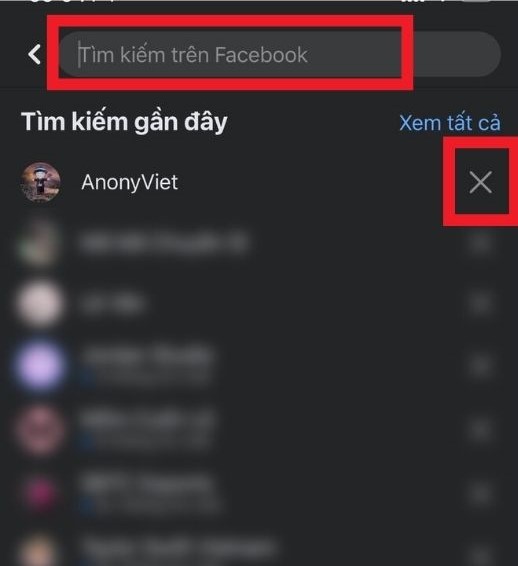
How to delete search history on Facebook
Click on the “x” to delete

To access older search histories, click “See all”, to delete all, select “Delete all” or press x to delete specific ones.

How to delete search history on Facebook
How to delete search history on Facebook by phone

Method 2: Do it on your personal Facebook page

Step 1: Access your profile by clicking your profile picture icon.

Step 2: Click on the 3 dots “…”, then select “Activity Log”

How to delete search history on Facebook
Click on the 3 dots “…”, then select “Activity Log”

Step 3: Scroll down, select “Recorded actions and other actions”, select the item you want to delete

How to delete search history on Facebook
Select “Recorded actions and other actions”

Step 4: Click “Clear searches” to clear all, or click x on each content you want to delete.

With this guide, you won’t have to worry about your crush or crush finding out what searches are on your account.

If you feel the need to clear your search history in order to keep a “shady affair” a secret so you don’t have to worry about being discovered, this is only a temporary fix. Ask yourself: “How long will I keep lying and hiding this?” Appreciate your relationship with others, always treat them with sincerity, because that is the core element of a solid and long-lasting relationship.

Epilogue

So I just guided you how to delete search history on facebook quickly and simply, you can perform operations on computers and phones, extremely convenient. Good luck with your application!


Rate this post

Tags: deleteFacebookhistoryInstructionssearch
Previous Post

TẠI SAO BẠN DÍNH BẪY TỰ ĐỘNG TAG BẠN BÈ TRÊN FACEBOOK?

Next Post

WHEN YOU CANNOT RUN A FACEBOOK Friend Invitation

AnonyViet

AnonyViet

Related Posts

How to create funny selfies with pets for your pets
Tips

How to create funny selfies with pets for your pets

June 19, 2026
Chrome extension not working error and the fastest way to fix it
Tips

Chrome extension not working error and the fastest way to fix it

June 19, 2026
Instructions to receive Claude Fable 5 for free for 30 days
Tips

Instructions to receive Claude Fable 5 for free for 30 days

June 15, 2026
Delete all Event Logs on Windows to remove traces of activity
Tips

Delete all Event Logs on Windows to remove traces of activity

June 15, 2026
Instructions for creating Minecraft-style food photos
Tips

Instructions for creating Minecraft-style food photos

June 9, 2026
Get free Cambridge courses to prepare for IELTS, Starters, Movers
Tips

Get free Cambridge courses to prepare for IELTS, Starters, Movers

June 4, 2026
Next Post
WHEN YOU CANNOT RUN A FACEBOOK Friend Invitation

WHEN YOU CANNOT RUN A FACEBOOK Friend Invitation

0 0 votes
Article Rating
Subscribe
Login
Notify of
guest

guest

0 Comments
Oldest
Newest Most Voted
Inline Feedbacks
View all comments

Recent News

Instructions for creating Adam’s voice for million-view TikTok videos

Instructions for creating Adam’s voice for million-view TikTok videos

June 21, 2026
Cloud Infrastructure Resilience: Mitigating Advanced Layer 7 Vulnerabilities and Securing High-Throughput Database Handshakes

Cloud Infrastructure Resilience: Mitigating Advanced Layer 7 Vulnerabilities and Securing High-Throughput Database Handshakes

June 20, 2026
Cách hạ cấp iOS 27 xuống iOS 26 an toàn, không lo mất dữ liệu

Cách hạ cấp iOS 27 xuống iOS 26 an toàn, không lo mất dữ liệu

June 20, 2026
How to create funny selfies with pets for your pets

How to create funny selfies with pets for your pets

June 19, 2026
Instructions for creating Adam’s voice for million-view TikTok videos

Instructions for creating Adam’s voice for million-view TikTok videos

June 21, 2026
Cloud Infrastructure Resilience: Mitigating Advanced Layer 7 Vulnerabilities and Securing High-Throughput Database Handshakes

Cloud Infrastructure Resilience: Mitigating Advanced Layer 7 Vulnerabilities and Securing High-Throughput Database Handshakes

June 20, 2026
Cách hạ cấp iOS 27 xuống iOS 26 an toàn, không lo mất dữ liệu

Cách hạ cấp iOS 27 xuống iOS 26 an toàn, không lo mất dữ liệu

June 20, 2026
AnonyViet - English Version

AnonyViet

AnonyViet is a website share knowledge that you have never learned in school!

We are ready to welcome your comments, as well as your articles sent to AnonyViet.

Follow Us

Contact:

Email: anonyviet.com[@]gmail.com

Main Website: https://anonyviet.com

Recent News

Instructions for creating Adam’s voice for million-view TikTok videos

Instructions for creating Adam’s voice for million-view TikTok videos

June 21, 2026
Cloud Infrastructure Resilience: Mitigating Advanced Layer 7 Vulnerabilities and Securing High-Throughput Database Handshakes

Cloud Infrastructure Resilience: Mitigating Advanced Layer 7 Vulnerabilities and Securing High-Throughput Database Handshakes

June 20, 2026
  • Home
  • Home 2
  • Home 3
  • Home 4
  • Home 5
  • Home 6
  • Next Dest Page
  • Sample Page

6789 kv999

No Result
View All Result
  • Home
  • News
  • Software
  • Knowledge
  • MMO
  • Tips
  • Security
  • Network
  • Office

6789 kv999

wpDiscuz
0
0
Would love your thoughts, please comment.x
()
x
| Reply