With so many potential weaknesses in the internet, it’s hard to know if things are properly secured. Is your connection secure and how do you know where the error lies? So, in this article, I will show you 5 ways to check internet security at home.
| Join the channel Telegram belong to AnonyViet 👉 Link 👈 |
1. Check the firewall
The first internet security check port on a PC is the firewall, also known as Firewall. The main job of a firewall is to protect your computer’s internet input/output ports from unauthorized access. Therefore, you should check these ports to ensure unauthorized connections cannot appear on your PC.
You don’t need to hire a hacker to attack your firewall to find vulnerabilities. Services such as ShieldUp! will test the security for you and report back if that port is less secure. If your firewall cannot protect you, you should try some other, more secure firewall. Firewalls are often integrated into the program Paid antivirusyou can refer to and install.
2. Check the strength of anti-virus software
Antivirus software will scan downloaded files to make sure nothing malicious has entered your system. Therefore, you should ensure that the software is working and performing its functions properly. A poor antivirus software will not see threats as they appear and will let them infect your computer.
To check antivirus software safety, you can download EICAR files. EICAR files themselves are harmless, but antivirus programs are trained to detect it as a virus. EICAR files can be downloaded separately or compressed in layers of ZIP files in an attempt to hide them from antivirus programs. This makes EICAR files the ultimate way to test your antivirus without exposing your PC to real threats.
3. Check the connection protocol on the browser
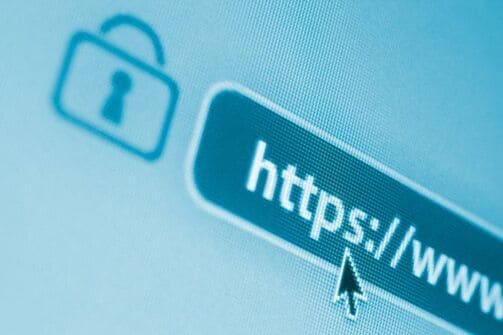
When you send data to a website using the HTTP protocol, that data is sent in “plain text.” This means your data and the server’s will not be encrypted. People can monitor what you are sending to the server and log that information. This makes HTTP dangerous to use on public wifi networks, as you can never know if someone is spying on your data.
On the other hand, HTTPS encrypts your data. HTTPS is typically used when you log into a website, so your information is hidden. You can tell whether a site uses HTTPS by looking at the URL; it will start with “HTTPS” if your connection is secure. The browser may also display an icon next to the address bar to let you know your data has been encrypted. For example, Google Chrome will display a small padlock to let you know that the trusted website is using HTTPS.
When you log into a website, remember to check its connection protocol first. If it uses HTTPS, you can log in securely. If you don’t see the lock icon, the site is using HTTP and is not secure. If this happens when you visit a popular website, it’s likely that malware has redirected you to a fake website that looks identical to the real one. Hackers do this to get your login information on the real website.
If you are worried about whether the website has HTTPS enabled or not, you can use the extension HTTPS Everywhere Compatible across most browsers making your communications with many major websites encrypted, even more secure.
4. Protect your Wifi Router from Hackers
Router is the central processor for your home’s internet connection. It decides who can and cannot use your connection, which makes it a prime target for hackers. Therefore, you should secure your router to avoid any future threats.
Make sure you are using WPA2 or WPA3 security standards for wifi. Recent newer routers are equipped with the WPA2 security standard, so you don’t need to worry. Older models will use WPA or worse, WEP. There are many reasons why you should not use WEP, so make sure the router you plan to buy is equipped with the WPA2 security standard.
Whether or not your wifi network is vulnerable to hacking depends on your wifi password and the modem’s admin password. Nowadays, routers use random passwords for every device to prevent hacks. However, older or cheaper devices will likely use default usernames and passwords, such as “username: admin, password: admin”. If this is your case then change it immediately.
If you still feel worried, you can change or hidden always the router’s SSID. By default, your router will display the SSID based on the product name. So hackers will rely on SSID to find out the router you are using and find vulnerabilities in that device line.
Giving your router a funny SSID name will hide the device name and make it harder for hackers to crack the wifi router.
5. Check your VPN connection for any leaks
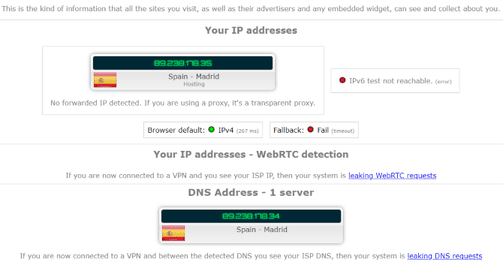
Is your internet connection leaking DNS? If you use a VPN, you should double-check that it isn’t leaking information about your true whereabouts. If you use a VPN, you can double check to see if the service is hiding your information using an IP Leak. This will ensure traffic connected to the VPN is safe and does not “leak” your real information. If you visit a website without a VPN, the website can find out all of your information.
When you visit a website again after activating the VPN, the website will now connect to the VPN’s servers instead of connecting to your own computer. If you see your details, it means the VPN is not protecting your connection properly. You can refer to how to use vpn here.
Frequently asked questions
What can I do to check that my firewall is working effectively?
You can use online services like ShieldUp to test your firewall. This service will scan ports and report if there are any security vulnerabilities.
How do I check if my antivirus software is working effectively?
You can download (harmless) EICAR files to test your antivirus software’s ability to detect viruses. If your antivirus software detects and quarantines the EICAR file, it means it is working fine.
What should I do to protect my wifi router from being hacked?
Make sure to use WPA2 or WPA3 security standards, change the router’s default password, and consider hiding your SSID (wifi network name).