In this day and age, data is very important and most people store their data on their computer and protect it with a password. But sometimes the user can’t even remember the generated password. So, if you forget your Windows 10 password and get stuck at the login screen, don’t panic, because a handsome admin has shown you 4 extremely useful and useful ways to crack Windows 10 password.
| Join the channel Telegram of the AnonyViet 👉 Link 👈 |
Method 1: Command Prompt
Command Prompt, also known as CMD, is an important tool to help you crack Windows operating system passwords very effectively. However, before catching, you must have a Windows installation USB or a System Recovery USB. If you don’t have one, you can create one with Microsoft’s Media Creation Tool using your friend’s computer or going to the net, for example.
Plug the Windows 10 installation usb into your computer. Restart the computer and boot into the usb. Also, you need to disable UEFI and Secure Boot. Your computer will display Windows Setup on the screen. Here you need to press the key combination Shift + F10 to open cmd.
Your job in cmd is to replace file utman.exe is equal to cmd.exe, but before you do that, you must make a copy of Utility Manager. Type the command below to copy and move the utman.exe file.
move C:\windows\system32\utilman.exe C:\windows\system32\utilman.exe.bak
copy C:\windows\system32\cmd.exe C:\windows\system32\utilman.exe
Now, restart your computer by typing below command and then pressing Enter key.
wpeutil reboot
After restarting Window you will be back to the login screen, but this time you have some more options and one of them is the Utility Manager located at the bottom of the screen, click it and choose Command Prompt.
In cmd you just need to type below two commands. The first command will help you create a new user account and the second will give you control over the admin account.
net user XYZ/add
net localgroup administrators XYZ /add
Note: XYZ is the local user account name and you can also change it to whatever you like.
Close the command prompt and restart the computer. After that, your computer will boot into the Windows 10 installation usb and you have to press the . key Shift + F10 to enter cmd.
Now you need to restore the Utility Manager by entering the command below.
copy C:\utilman.exe C:\windows\system32\utilman.exe
Overwrite confirmation message will appear, press the . key Y To confirm. Next, restart your computer by typing the command below and make sure to remove the Windows installation usb from the machine.
wpeutil reboot
After restarting your computer, you will return to the login screen, but this time you will get a new account. Click on the created account to access Windows 10.
This method is quite long and you must have a little knowledge to do it. Otherwise, it will be very easy to get errors when entering commands, the same error depends on which version of Windows.
Method 2: Use PassGeeker for Windows
The above method seems a bit difficult and also a bit long, so I will introduce you to an easier method, which is PassGeeker Windows Password Recovery 7. This is the best tool to help break Windows 10 password in a short time without much effort. PassGeeker supports many Windows operating systems, starting from Windows XP and up to Windows 10.
Step 1: Prepare a secondary computer to install PassGeeker. After the installation is complete, plug the USB into the machine and open PassGeeker.
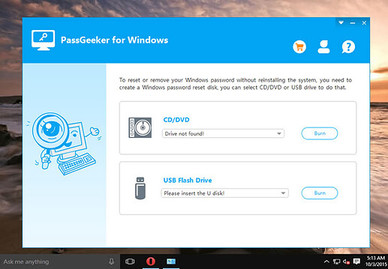
Step 2: You will have two options: CD/DVD and USB Flash Drive. Select the location of the USB drive and then click the . button Burn. Do the same if you use CD/DVD.
Step 3: The recording will take a few minutes, and once it’s done, close the app and remove the USB drive.
Step 4: Now, plug in the USB on the locked computer and then reboot. Boot to the usb, you will see the PassGeeker window on the screen along with the list of user accounts.
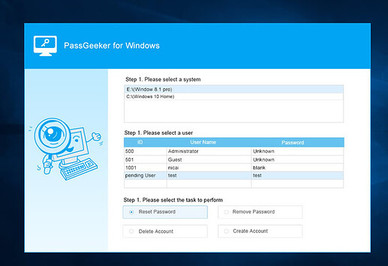
Step 5: Select locked account and click button Remove Password. You will receive a success message if your password has been removed. Finally, press the . button Reboot.
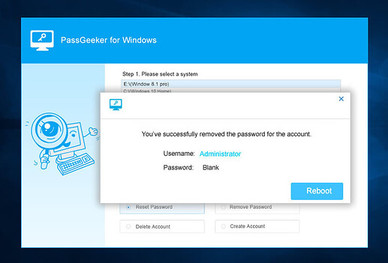
It’s done. PassGeeker is a very efficient, fast and fairly smooth interface that helps users get the job done without too much effort.
Method 3: Offline NT Password & Registry Editor
Offline NT Password & Registry Editor is a recovery tool that helps you to break Windows 10 password. Its features are great but the algorithm is a bit different from other password recovery tools. To access the outstanding features of Offline NT password, you need to follow the steps listed below.
Access the website Offline NT Password & Registry Editor and download the USB version (Bootdisk). Extract the downloaded file in zip format and then copy all the files in the extracted folder to the USB. Next, type the command below:
X:syslinux.exe -ma X:
Replace X with the letter of the USB drive, for example: E. Then unplug the usb and plug it into the locked computer.
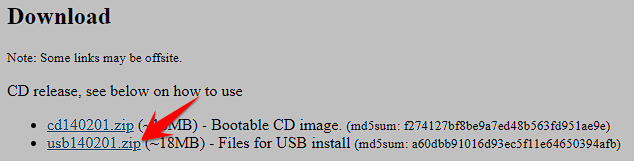
Now, restart the locked computer and boot into the usb. After making the changes, the boot process will continue and load the Offline NT Password. Here you will have to press the Enter key to start the process.
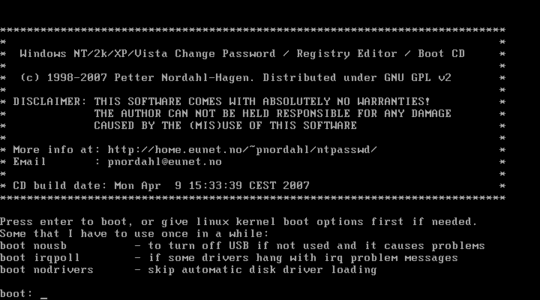
Now select the partition on which Windows is installed and for that partition you can enter the corresponding numbers. However, if you are installing only one operating system, use the default installation and press the Enter key. Then select option password reset by entering the corresponding number or else you can press the . key Enter to switch to default settings.
After the Windows registry finishes loading, the tool will find and load additional options, select Edit user data and passwords. Then you will get a list of user accounts, select the locked account by entering the number then press the . key Enter.
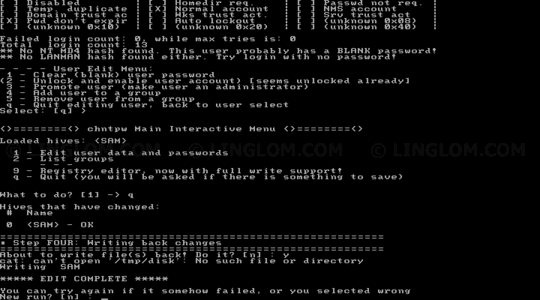
You will find additional options at the bottom of the screen, type first to clear the user password, then press the Enter key. A message that the password has been removed will appear on the screen and you need to enter **!** and press the . key Enter. Your work is done, now type q to close the Edit user data and password section.
Now, type Y and press the . key Enter to confirm password reset. Close the application and remove the CD/USB when you’re done.
Offline NT Password & Registry Editor is easy to use for users with command knowledge. If you are not sure about the command, then you can skip this and can switch to PassGeeker.
Method 4: break Windows 10 password with Hiren’s Boot CD
Hiren’s Boot CD PE is an old but still powerful tool, it can crack Windows 10 password easily. Hiren’s Boot CD is very simple and easy to use.
Create a bootable USB with Hiren’s Boot CD ISO from another computer. Now, plug the USB boot into the locked computer and then boot the USB drive. Restart your computer, Hiren’s Boot CD PE will start to boot the device, you need to press any key to continue.
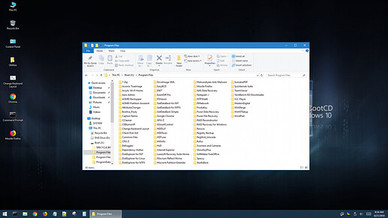
You will then be taken to Windows PE and at the Desktop you will see the Utilities folder, click on it. In the Utilities section you will see the folder Security , click it. Select folder Password in the Security folder. Then choose NT Password Edit.
In section Path to SAM File, you need to point to your system’s SAM directory. Then you will get a list of users, select the folderAdministrator and click the button Change Password.
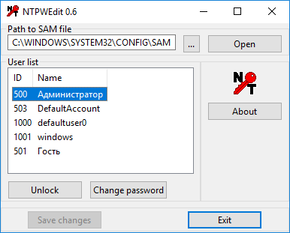
You will be asked for a new password, you can create a new password or else you can leave it blank. To reset the password, leave it blank and click the . button OK. Now click the button Save changes.
After completing the above operations, unplug Hiren’s bootable USB and boot into Windows without having to use a password anymore.
Hiren’s Boot CD is a universal way and works well with all versions of Windows OS. However, you need to create a bootable USB.