• Home
  • News
  • Software
  • Knowledge
  • MMO
  • Tips
  • Security
  • Network
  • Office
AnonyViet - English Version
  • Home
  • News
  • Software
  • Knowledge
  • MMO
  • Tips
  • Security
  • Network
  • Office
No Result
View All Result
  • Home
  • News
  • Software
  • Knowledge
  • MMO
  • Tips
  • Security
  • Network
  • Office
No Result
View All Result
AnonyViet - English Version
No Result
View All Result

3 ways to check if your laptop has a discrete graphics card or not

AnonyViet by AnonyViet
April 16, 2024
in Tips
0

A discrete graphics card is a component that helps increase computer performance for high-graphics tasks such as gaming or design. So how to Check if your laptop has a discrete graphics card or not? This article will guide you through it in a simple and easy way.

Join the channel Telegram belong to AnonyViet 👉 Link 👈

What are laptop graphics cards used for?

Graphics card (GPU) is a specialized device to process image information on the computer such as brightness, sharpness, contrast, etc. of photos and videos so that they display more clearly and smoothly. According to design, graphics cards are divided into two types: discrete graphics cards and onboard cards that are attached to the main computer.
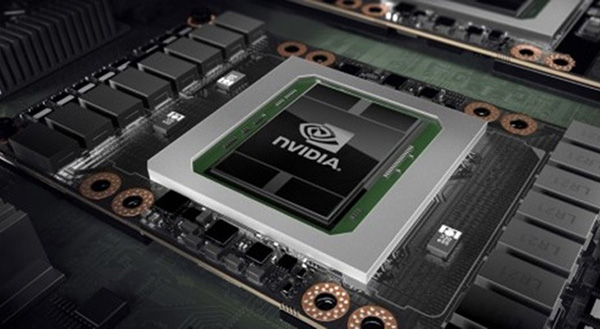
Check if your laptop has a discrete graphics card
What are laptop graphics cards used for?

The graphics card is the device that connects the mainboard and the computer screen, helping to encode image and video information. The components of a graphics card include two main parts: graphics memory and GPU graphics processor, in which GPU is the most important part.

In general, this is the component that determines the quality of activities such as playing games, viewing images, videos, studying online or creating graphics on laptops and computers. Therefore, checking the laptop graphics card is as necessary as checking the computer's CPU configuration.

Instructions for checking whether a laptop has a discrete graphics card or not

Method 1: Check with the naked eye

Before checking the graphics card on your laptop, you need to know clearly what the difference is between the two types of onboard video cards and discrete video cards:

  • Onboard video card: This is a type of graphics card that is attached to the computer's mainboard, allowing graphics tasks to be performed at moderate resolution.
  • Discrete graphics card: This is a type of graphics card that can meet the visual needs of high resolution, and supports smoother gaming and more realistic color display for designers.

To recognize and classify these two types of cards, you can use your eyes. Check to see if the laptop body has logos of video card manufacturers such as Nvidia, AMD – ATI… or graphics card images. If not, your laptop probably only uses onboard video cards.
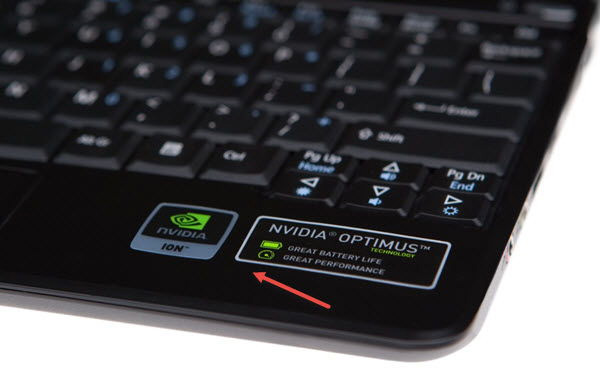
Check if your laptop has a discrete graphics card
You can check if your laptop has a discrete graphics card or not with the naked eye

Method 2: Use the Run dialog box

Step 1: Press the Windows + R key combination to open the Run window and type the command line Dxdiag. Then, press Enter or OK to run the command.
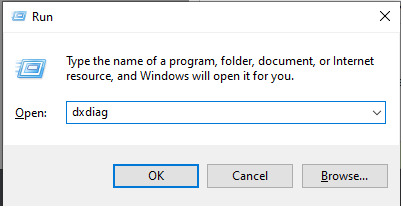
Check if your laptop has a discrete graphics card
Type the command line Dxdiag

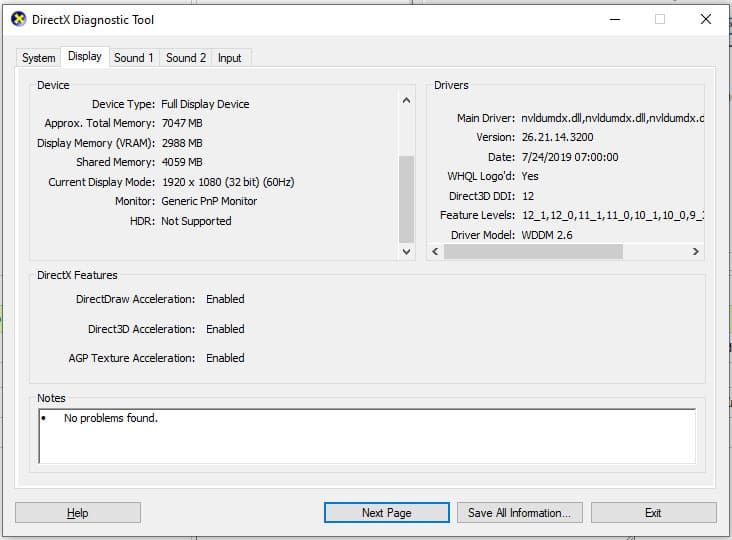
Step 2: Select the Display tab to view information about your device's graphics card.
Check if your laptop has a discrete graphics card
You select the Display tab

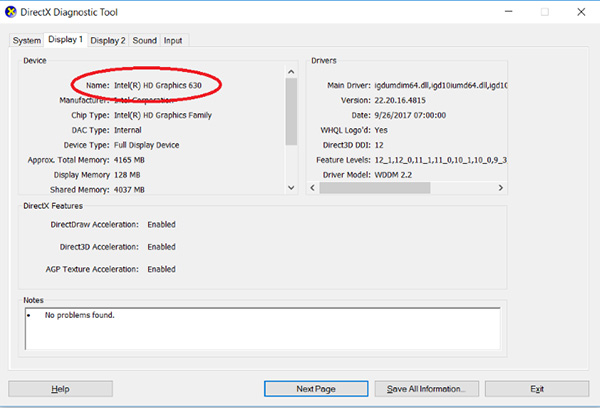
If the device only displays one Display item, it means the device only has an integrated graphics core inside the CPU. If the device displays two Display items, it means the device has a discrete graphics card. You can see the name, manufacturer, type and capacity of the discrete graphics card in Display 2.
Check if your laptop has a discrete graphics card
Select the Display 2 tab to check discrete graphics card information

Method 3: Use Device Manager

In addition to using the Dxdiag command, you can also check if your laptop has it graphics card leave or not via Device Manager. This is a way to manage devices connected to the computer, including graphics cards. You do the following steps:

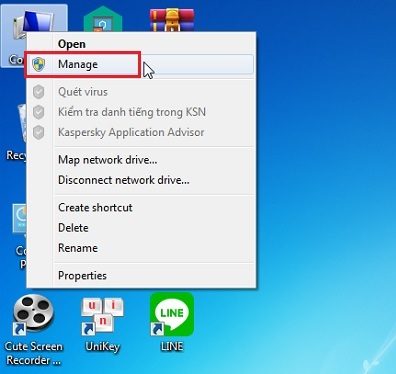
Step 1: Right-click This PC > Select Manage.
Check if your laptop has a discrete graphics card
Right-click This PC > Select Manage

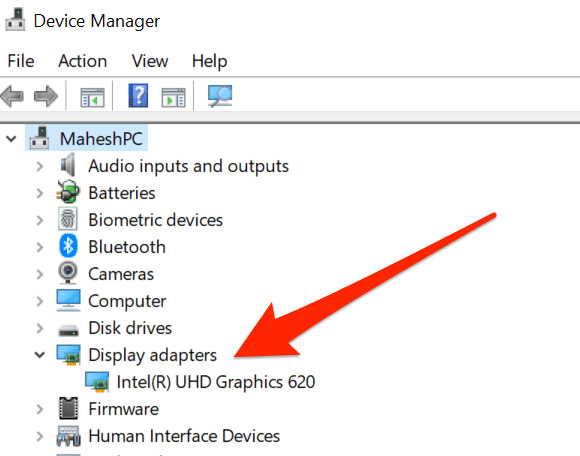
Step 2: Next, select Devices Manager > Display Adapter.
Check if your laptop has a discrete graphics card
Select Devices Manager > Display Adapter.

If this section only displays one graphics card, it means the device does not have a separate card. If this section displays two graphics cards, it means the device has a separate card. You can see the name and status of the discrete graphics card here.

Epilogue

So you know how Check if your laptop has a discrete graphics card or not through two simple ways: using the Dxdiag and Device Manager commands. You can apply any method, depending on your preferences and convenience. Good luck!


The article scored: 5/5 – (100 votes)

Tags: cardcheckdiscreteGraphicsLaptopways
Previous Post

Top 5 best District 1 offices, reasonable prices

Next Post

Hướng dẫn tải app MU9 đơn giản, nhanh chóng

AnonyViet

AnonyViet

Related Posts

3 OCR Tools Extract Text from Images without Retyping
Tips

3 OCR Tools Extract Text from Images without Retyping

November 8, 2025
Ways hackers use to hack your Facebook and how to fix it
Tips

Ways hackers use to hack your Facebook and how to fix it

November 7, 2025
Create your own Font using your Handwriting
Tips

Create your own Font using your Handwriting

November 6, 2025
Share White Hat Hacker Course – The Complete Ethical Hacking Course
Tips

Share White Hat Hacker Course – The Complete Ethical Hacking Course

November 5, 2025
Instructions on how to get 1 year of ChatGPT Go for free
Tips

Instructions on how to get 1 year of ChatGPT Go for free

November 4, 2025
Instructions for creating your own Chrome Extension using Scratch
Tips

Instructions for creating your own Chrome Extension using Scratch

November 4, 2025
Next Post

Hướng dẫn tải app MU9 đơn giản, nhanh chóng

0 0 votes
Article Rating
Subscribe
Login
Notify of
guest

guest

0 Comments
Oldest
Newest Most Voted
Inline Feedbacks
View all comments

Recent News

Instructions for downloading Anh Hai’s Pho Shop game on Android

Instructions for downloading Anh Hai’s Pho Shop game on Android

November 8, 2025
Download training materials on Applying AI in teaching and learning in 2025

Download training materials on Applying AI in teaching and learning in 2025

November 8, 2025
How to pay health insurance on Momo online right at home

How to pay health insurance on Momo online right at home

November 8, 2025
How to create Flycam videos from photos to sell real estate

How to create Flycam videos from photos to sell real estate

November 8, 2025
Instructions for downloading Anh Hai’s Pho Shop game on Android

Instructions for downloading Anh Hai’s Pho Shop game on Android

November 8, 2025
Download training materials on Applying AI in teaching and learning in 2025

Download training materials on Applying AI in teaching and learning in 2025

November 8, 2025
How to pay health insurance on Momo online right at home

How to pay health insurance on Momo online right at home

November 8, 2025
AnonyViet - English Version

AnonyViet

AnonyViet is a website share knowledge that you have never learned in school!

We are ready to welcome your comments, as well as your articles sent to AnonyViet.

Follow Us

Contact:

Email: anonyviet.com[@]gmail.com

Main Website: https://anonyviet.com

Recent News

Instructions for downloading Anh Hai’s Pho Shop game on Android

Instructions for downloading Anh Hai’s Pho Shop game on Android

November 8, 2025
Download training materials on Applying AI in teaching and learning in 2025

Download training materials on Applying AI in teaching and learning in 2025

November 8, 2025
  • Home
  • Home 2
  • Home 3
  • Home 4
  • Home 5
  • Home 6
  • Next Dest Page
  • Sample Page

new88 trang chủ shbet trang chủ f168 trang chủ qq88 nhà cái 78win

No Result
View All Result
  • Home
  • News
  • Software
  • Knowledge
  • MMO
  • Tips
  • Security
  • Network
  • Office

new88 trang chủ shbet trang chủ f168 trang chủ qq88 nhà cái 78win

wpDiscuz
0
0
Would love your thoughts, please comment.x
()
x
| Reply