• Home
  • News
  • Software
  • Knowledge
  • MMO
  • Tips
  • Security
  • Network
  • Office
AnonyViet - English Version
  • Home
  • News
  • Software
  • Knowledge
  • MMO
  • Tips
  • Security
  • Network
  • Office
No Result
View All Result
  • Home
  • News
  • Software
  • Knowledge
  • MMO
  • Tips
  • Security
  • Network
  • Office
No Result
View All Result
AnonyViet - English Version
No Result
View All Result

3 tips to restore open tabs when restarting Chrome

AnonyViet by AnonyViet
April 11, 2024
in Tips
0

Chrome is the most popular web browser today, with many useful and highly customizable features. The browser also provides a few ways you can restore open tabs when restarting Chrome. Because sometimes you may encounter a situation where you need to restart for some reasons such as errors, crashes, updates, etc. At that time, you may worry that you will lose all open tabs, especially those Important tabs related to your work or study.

Join the channel Telegram belong to AnonyViet 👉 Link 👈

How to restore open tabs when restarting Chrome

Method 1: Restore recently closed tabs

The first and simplest way to restart Chrome without losing open tabs is to use the restore recently closed tabs function. This function allows you to review and reopen tabs that you closed in your last session, even if you have turned off or restarted Chrome.

If you want to use this function, follow the steps below:

Step 1: Open Chrome, click the three vertical dots menu icon in the top right corner of the screen. Next, click on “History,” and then look under “Recently closed tags.”
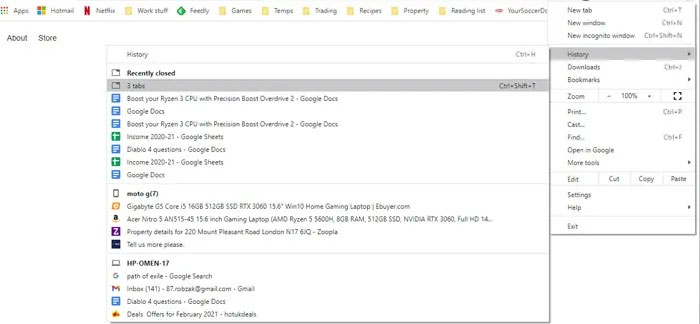
restore open tabs
Click on the “History” section

Step 2: You'll see a list of Chrome tabs you've recently closed. If you accidentally close Chrome with multiple tabs open, you will see entries like “4 tabs” or “12 tabs,” (depending on how many tabs you have open). You just need to click on it, all the tabs you closed last time will be restored intact.

Method 2: Set up Chrome to always start with previous tabs

The second way to restart Chrome without losing open tabs is to set Chrome to always start with the same tabs you opened in the previous session. This is a feature available in Chrome's settings that allows you to continue from where you left off each time you open the browser.

If you want to enable this function, follow the steps below:

Step 1: Open Chrome, click the three vertical dots menu icon in the top right corner of the screen click Settings.
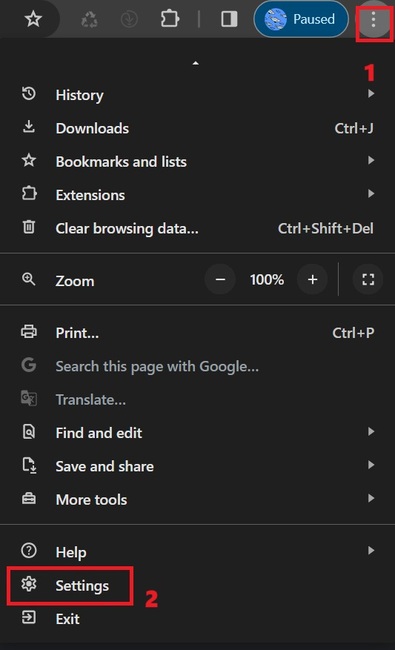
restore open tabs
Click the three-dot menu > Settings.

Step 2: In the settings menu, scroll down to the “On startup” section. Here, you click on the “Continue where you left off” option.

From now on, every time you open the browser, Chrome will automatically reopen all the tabs you opened the last time you worked.
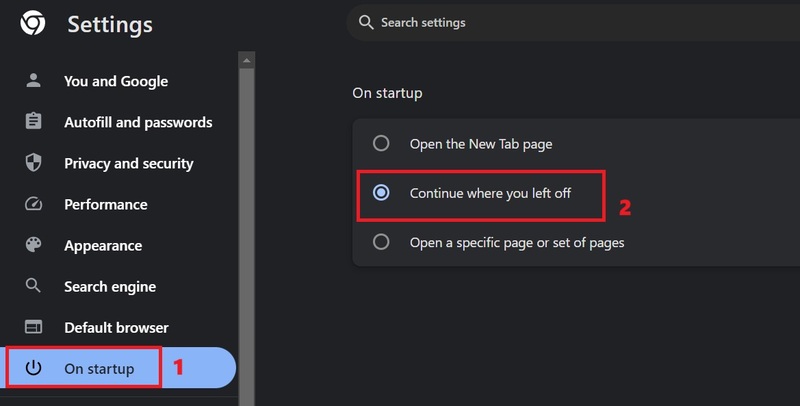
restore open tabs
Click Continue where you left off

Method 3: Use Onetab extension

With this extension, you will have a visual list of all your open tabs.

You can download this utility HERE

restore open tabs
Use the Onetab extension

Even if you turn Chrome off and on again, OneTab will still show you a list of tabs that you have previously opened. You can choose to restore all tabs (Restore All), delete all tabs (Delete All), convert tabs into web pages for sharing and more.
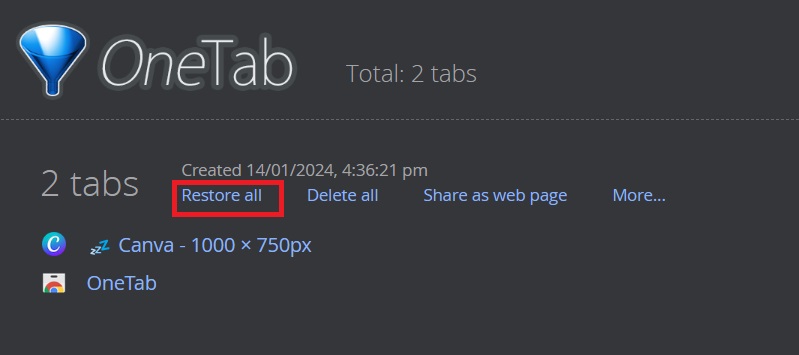
restore open tabs
Click Restore All to restore all tabs

Epilogue

Above are the 3 simplest ways for you to do restore open tabs when restarting Chrome. Hope you can choose a satisfactory solution for yourself and apply it successfully!


The article scored: 5/5 – (100 votes)

Tags: ChromeopenrestartingrestoreTabstips
Previous Post

What benefits does Traffic user Traffic download service bring to businesses?

Next Post

Learn about SSDs – Part 2

AnonyViet

AnonyViet

Related Posts

Windows 7/8.1/10 users will be upgraded to Windows 11 for free
Tips

Windows 7/8.1/10 users will be upgraded to Windows 11 for free

July 30, 2026
Instructions for receiving ChatGPT Plus for 1 month for free in 2026
Tips

Instructions for receiving ChatGPT Plus for 1 month for free in 2026

July 28, 2026
Some reasons I don’t like Windows 11
Tips

Some reasons I don’t like Windows 11

July 27, 2026
Instructions on how to get free Facebook white ticks
Tips

Instructions on how to get free Facebook white ticks

July 27, 2026
Collection of Windows 11 wallpapers for computers and phones
Tips

Collection of Windows 11 wallpapers for computers and phones

July 26, 2026
Don’t install leaked Windows 11
Tips

Don’t install leaked Windows 11

July 25, 2026
Next Post
Learn about SSDs – Part 2

Learn about SSDs - Part 2

0 0 votes
Article Rating
Subscribe
Login
Notify of
guest

guest

0 Comments
Oldest
Newest Most Voted

Recent News

Windows 7/8.1/10 users will be upgraded to Windows 11 for free

Windows 7/8.1/10 users will be upgraded to Windows 11 for free

July 30, 2026
Instructions for receiving the free Certified LLM Security Expert certificate

Instructions for receiving the free Certified LLM Security Expert certificate

July 30, 2026
MSI laptops are not just for gamers: Which line is suitable for students, office workers and creative people?

MSI laptops are not just for gamers: Which line is suitable for students, office workers and creative people?

July 29, 2026
What is quantum resistant cryptography? Why must the Internet change?

What is quantum resistant cryptography? Why must the Internet change?

July 29, 2026
Windows 7/8.1/10 users will be upgraded to Windows 11 for free

Windows 7/8.1/10 users will be upgraded to Windows 11 for free

July 30, 2026
Instructions for receiving the free Certified LLM Security Expert certificate

Instructions for receiving the free Certified LLM Security Expert certificate

July 30, 2026
MSI laptops are not just for gamers: Which line is suitable for students, office workers and creative people?

MSI laptops are not just for gamers: Which line is suitable for students, office workers and creative people?

July 29, 2026
AnonyViet - English Version

AnonyViet

AnonyViet is a website share knowledge that you have never learned in school!

We are ready to welcome your comments, as well as your articles sent to AnonyViet.

Follow Us

Contact:

Email: anonyviet.com[@]gmail.com

Main Website: https://anonyviet.com

Recent News

Windows 7/8.1/10 users will be upgraded to Windows 11 for free

Windows 7/8.1/10 users will be upgraded to Windows 11 for free

July 30, 2026
Instructions for receiving the free Certified LLM Security Expert certificate

Instructions for receiving the free Certified LLM Security Expert certificate

July 30, 2026
  • Home
  • Home 2
  • Home 3
  • Home 4
  • Home 5
  • Home 6
  • Next Dest Page
  • Sample Page

say88 tỷ lệ kèo nhà cái kèo nhà cái 5 febet

No Result
View All Result
  • Home
  • News
  • Software
  • Knowledge
  • MMO
  • Tips
  • Security
  • Network
  • Office

say88 tỷ lệ kèo nhà cái kèo nhà cái 5 febet

wpDiscuz
0
0
Would love your thoughts, please comment.x
()
x
| Reply