How to change Zalo number when sim is revoked This is a mandatory action if you don’t want strangers to read your private messages. In fact, when the old number is sold to others, they can accidentally log in to your account. Let’s go together AnonyViet Discover now the tips to thoroughly handle this awkward situation.
📢 Join the channel Telegram belong to AnonyViet
Update new articles, cool tools and IT tips fastest
Why is there a need to rush to update a new phone number?
Lately, Zalo and network operators are joining hands to work very hard to check for junk SIM cards and SIM cards that have not been recharged for a long time. In fact, if the phone number you used to create an account in the past is revoked, you will be in big trouble. Why? Because when the old SIM is locked, you will forever be unable to receive the OTP code if you accidentally log out or change to a new phone. Therefore, updating information is a must to maintain contact.
Instructions on how to change Zalo number when sim is revoked
Depending on whether your account has been “targeted” by the system or not, we will have slightly different ways of handling it. Here’s how to change Zalo number when your sim is revoked in the most detailed and understandable way for you.
Case 1: The application automatically sends reminder notifications
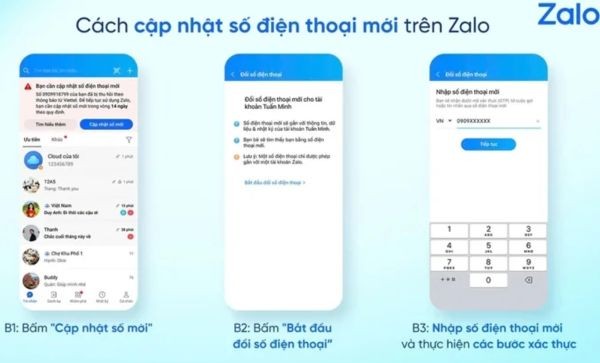
If the network has reported your number to the system, as soon as you open the app, you will see a large notice board asking for authentication. At this time, just calmly follow these steps:
Step 1: Right on that notification screen, click on the item Update new number.
Step 2: The system will automatically transfer you to a setup page. Here, you just need to click the button Start changing phone numbers.
Step 3: Please carefully type the new phone number you are using into the blank box. Then, the system will send an OTP code to the new SIM (or request identification authentication). Enter this code to complete the process!
Case 2: You want to proactively change before being reminded
Instead of waiting for the system to call your name, you can completely take action yourself first.
- Just go to the section Setting of the application, navigate to the section Account and security.
- Next, select features Change phone number and do exactly the steps above. Thanks to that, you will always take the initiative.
Handle the error of the new phone number being registered by someone else
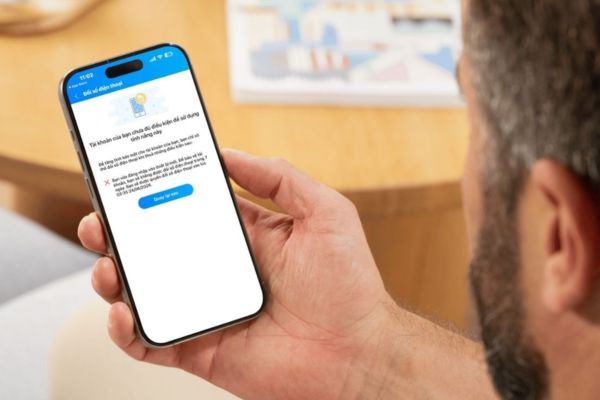
In the process of changing your Zalo number when your sim is revoked, some of you will encounter a funny and sad situation: The app reports that the new number has already been used! Actually, the reason is because the new SIM you just bought at the store was originally someone else’s old SIM that was revoked and in the past people used it to create an account.
To troubleshoot, just take that new number and log directly into the application (with the OTP code sent to the sim you are holding). Once you have access to the stranger’s account, you proceed to complete the procedure delete permanently That account goes to “clear” the land. When you’re done, go back to your main account and update the new number as usual. Very easy, right?
Notes for a smooth transition
To successfully apply the method of changing Zalo number when your SIM is revoked without errors or data conflicts, you need to immediately pin down the following core principles.
- Your new SIM card must be the owner’s SIM card and be working normally in both directions. If your SIM is locked to receive messages, the system cannot send you the authentication code.
- Please be patient and complete all steps to verify your identity. These days the app’s security is very high, maybe they will force you to scan your face or enter the correct code. Just comply and complete so that the system recognizes your legal ownership.
- As soon as you receive the warning, apply the method to change your Zalo number immediately when your sim is revoked. Delay only creates an opportunity for the new owner of the old sim to take over your account.
- After completing the change, remember to browse around and check to see if your contacts and important messages are still intact. Normally, all data will be synchronized safely, but be careful.
Conclusion
Hopefully through this article, you have a clear understanding How to change Zalo number when sim is revoked to save your account. Don’t wait until you lose your account before trying to find a way to restore it, because by then it will be too late.
Frequently Asked Questions (Q&A)
1. Will changing my Zalo phone number result in losing messages and contacts?
Nope. All of your data, contacts and messages will be transferred to the new phone number intact by the system.
2. I have not received a notification from Zalo, can I change my number myself?
Absolutely. You just need to go to Settings > Account and security > Change phone number to proactively do it before the system scans.
3. What should I do if I just bought a SIM card but it says I have registered with Zalo?
Please use that new sim to log in to Zalo to receive the OTP code, then permanently delete the old account. Finally, go back to your main account and change your number as usual.