Ubuntu 20.10 “Groovy Gorilla” was released on October 22, 2020, Gorilla only tweaked some minor changes instead of having groundbreaking new features. As a temporary release, it is also not supported permanently. So is Groovy Gorilla worth the upgrade?
| Join the channel Telegram of the AnonyViet 👉 Link 👈 |

Developing but not breaking through
Groovy Gorilla has been officially released and again, this is a temporary release only. Every two years, Canonical releases a long-term support (LTS) version of Ubuntu for 5 years.
However, Canonical releases a new version of Ubuntu every six months. Each LTS release will consist of three interim releases before the next LTS release is officially launched. They collect changes and improvements before releasing the next LTS version.
These interim builds allow Canonical developers to gather feedback and conduct testing of their features. Interim builds also give everyone exposure to the latest, greatest version of the software.
April 2020 release (20.04 “Focal Fossa”) is the most recent LTS release, so six months later Groovy Gorilla is out and it doesn’t deliver any surprises or breakthroughs. Gorilla has also made minor changes in Ubuntu.
Install: ZFS no longer experimental
The Ubuntu Unity installer doesn’t change anything significantly. The installation process is almost the same as on Ubuntu 20.04 and so is the black disk check screen.
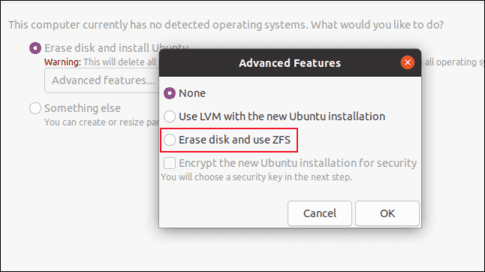
But there is a noticeable change in the “Advanced Features” dialog box. The ZFS file system installation option no longer has the word “Experimental” in capital letters next to it. Canonical is confident about the durability and they have afforded to implement ZFS as the file system driver.
After installing Ubuntu 20.10 and logging in, you will see Groovy Gorilla, which has Ubuntu’s familiar purple color scheme.
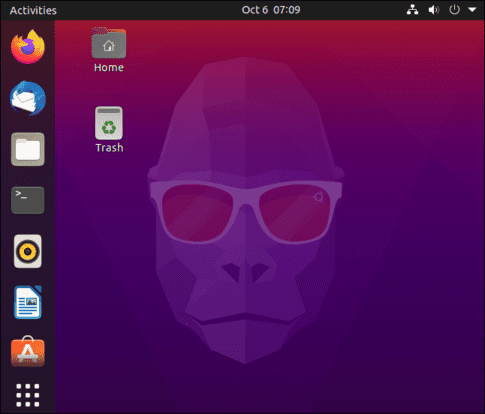
Upgrading GNOME Desktop
Groovy Gorilla uses GNOME 3.38.0, the latest default version of the desktop environment on Ubuntu. Ubuntu has made tweaks, as well as efforts to make applications look like part of a linkable.
Move shortcuts in the application group
The “Apps” group used to have two views: “Frequent,” which shows your most popular apps, and “All,” which lists all apps. With GNOME 3.38.0, you are left with only one customizable view.
You can drag and rearrange the order of the app icons however you want. The alphabetized list is no longer available. If you want the Firefox icon to be in the first place, just click and drag it to the position you want.
Grids (application pools) are also more screen- and resolution-aware. It can adjust to reasonable icon ratio and group layout according to screen resolution and mode.
Dragging one icon on top of another will form a group, just like on your smartphone. For example, you can drag all LibreOffice icons into a group.
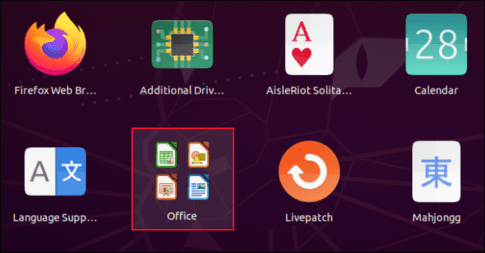
If you drop more than nine icons into a group, they will be paginated for you to scroll or slide.
However, removing a group is not as easy as creating a group. To drag an icon out of a group, you have to open the group, click and drag it out, then “wave” it around the screen until the group closes.
You can then drop the icon into the app grid. Sometimes, we have to “wag” the icon around the screen for four or five seconds before the group closes. However, this may work more easily in the official release of Ubuntu 20.10.
Calendar announcement
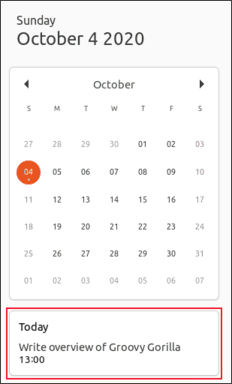
The calendar tool has also been updated. You can now see notifications about your calendar entries at the bottom of the window.
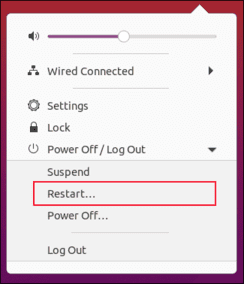
The system menu now has a “Restart” option. Previously, you could only access the “Restart” option by selecting “Power Off”.
Edit settings dialog
This is not a big change, but the following options in the “Settings” dialog have been renamed:
- “Universal Access” changed to “Access.”
- “Screen Displays” changed to “Displays.”
- “Device Color profiles” changed to “Color.”
- “Language and Region” changed to “Region and Language.”
Easy Wi-Fi hotspot configuration
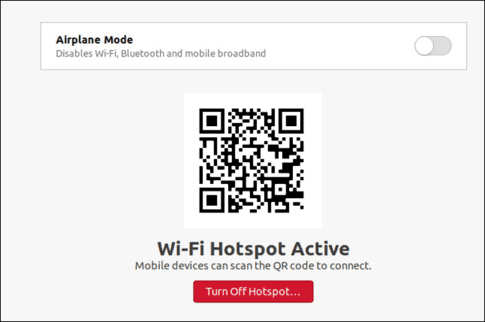
The Wi-Fi tab in “Settings” allows you to use your computer as a Wi-Fi hotspot. If you scan the QR code with a mobile device, such as a smartphone or tablet, it will connect to your hotspot.
Software version
Many software have been updated to newer versions. Here are the version numbers of some major software:
- Thunderbird: 78.3.1
- LibreOffice: 7.0.1.2
- Firefox: 81.0.1
- Files: 3.38.0-stable
- gcc: 10.2.0
- OpenSSL: 1.1.1f
Some applications have also improved the interface to be more intuitive. For example, the Screenshot program is now an integral part of Ubuntu’s experience.
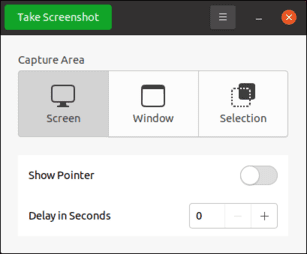
Unfortunately, the software interface still closes after each screenshot, but the layout is cleaner and much easier to use.
Kernel 5.8
Ubuntu 20.10 is released with Linux kernel version 5.8.0-20-generic. As usual, there are a bunch of new features in the Linux kernel, including better support for modern hardware devices.
Here is a short list of improvements:
Should you upgrade to Ubuntu 20.10?
I recommend most people to use Ubuntu 20.04 LTS for stability. Ubuntu 20.10 does not offer any major improvements. Instead, it just shows that Ubuntu is still a solid platform, and that good progress is being made towards the next LTS release in 2022.
Canonical estimates that 95% of Ubuntu installations are LTS versions. If that’s true, temporary builds will obviously not appeal to many Ubuntu users. Even if Canonical’s numbers are a bit misleading, it’s clear that the vast majority of users prefer stability and guaranteed long-term support over the short-term benefits of temporary updates.
If you’re happy with Focal Fossa 20.04, would you accept the hassle (and potential risk) of upgrading just to get this update? Sure is not.