Hacking a system never requires a laptop and some software. Sometimes, we even need some extra things to support the hacking process. So, in this article, I will talk about the things in the hacker backpack. Hackers don’t know what kind of situation will happen, so they are always ready for any case and carry everything a hacker needs in their backpack. So we will find out what should be in the Hacker Backpack?
| Join the channel Telegram of the AnonyViet 👉 Link 👈 |
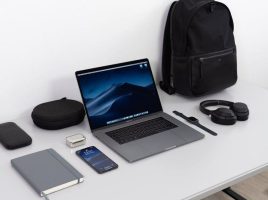
Here is a list of things in a hacker backpack. In my opinion, it is not necessary to follow the framework of the items to carry in the list below, but these are the items you should have to support you if you follow the security route.
1. Laptop – Necessary item in Hacker Backpack
In the Hacker Backpack, of course, there must be a Laptop. Honestly, I don’t like desktops. The desktop has good customizability. Deliver more performance on a low budget. But there is an inherent disadvantage of portability. You can not carry a nearly 4 kg pc running around to hack. That’s the gym.
I am very careful when choosing a laptop. Normally, I use a 13-inch Macbook Pro. Because it is flexible and stable. It is always in the laptop compartment in the backpack. I also have a 14-inch laptop Lenovo ThinkPad E490. Lenovo ThinkPads (with Intel processors) are really great when you use Linux as your primary operating system. I have run Debian, Kali Linux, Parrot Security, Black Arch, Elementary OS and Manjaro on my ThinkPad. Everything works fine. Currently, I am using Kali Linux 2020.4 on a ThinkPad.
2. Raspberry Pi
The number 2 thing that a hacker must have in a backpack is Raspberry Pi, a mini computer about the size of a credit card. I use Kali Linux on it and control it from my laptop. Normally, I don’t take it out of my backpack. I use an ssh connection and control it from my laptop whenever I need it.
I use Raspberry Pi4 with 2GB RAM. I don’t use the graphical interface, so 2GB of RAM is more than enough for me. Basically, I use pi4 to steal other WiFi’s credentials. Use pi4 to phish that wifi.
3. WiFi Adapter
When it comes to WiFi hacking, not all Wi-Fi USBs are easy to eat. Most laptops have built-in Wifi chips or use separate USB Wifi.
This is a list of Wifi USBs that support Hack Wifi on Kali Linux and ParrotOS. Then connect USB Wifi to Raspberry Pi, put it in your backpack and start playing with other people’s wireless networks.
| STT | WiFi Adapter | Chipset |
| first | Alfa AWUS036 SMALL | AR9271 |
| 2 | Alfa AWUS036NHA | RT 3070 |
| 3 | Alfa AWUS036NEH | RT 3070 |
| 4 | Panda PAU09 N600 | RT 5572 |
| 5 | Alfa AWUS036ACH | RTL8812AU |
| 6 | Alfa AC1900 | RTL8814AU |
4. USB Rubber Ducky
USB Rubber Ducky is a miracle for those who don’t know what this is. This is a USB storage without an enclosure, but don’t judge this USB by looks alone. In fact, it can run any malicious program on the computer system. And it is developed by Hak5.
When Rubber Ducky plugs into the computer, it will hide itself as a Driver and activate malicious code according to Hacker’s intentions
Therefore, it is very easy to hack physically accessed computers. I always have these 2 USBs available in my backpack.
5. WiFi Pineapple
Although I keep my Raspberry Pi in my backpack, I also recently bought a pretty cool WiFi Pineapple, developed by Hak5.
With the help of this device, I can test the wireless network automatically. We can create fake access points for scammers. I call it the “Evil-twin” attack: v.
6. Secondary phone
I also have an extra phone, and use it as a hacking device. Sometimes in a corporate environment, we can’t just use the laptop alone, it will look very suspicious.
So I chose a Nexus 5. The reason is because this device officially supports Kali NetHunter. I have been using it for the past 3 years. And do HID (like rubber ducky) attacks. In addition, I can perform wireless attacks.
I bought this old machine from a non-technical guy at a very cheap price. Recently I am thinking of migrating to Nokia 6.1 (which also officially supports NetHunter).
7. USB Killer
I don’t usually use this device, but in case of emergencies I will always carry a USB killer in my backpack. USB killer is a USB device that looks like a normal USB. But whenever it plugs into the computer, it transmits a high voltage current through the USB port to the motherboard.
The computer doesn’t check for power coming from the USB, so the USB killer draws power from the PC like other USB devices but it amplifies the current up and transfers back 4 or 5 times more power to the PC. Then the PC hardware, especially the motherboard, won’t be able to tolerate that current.
As a result, the motherboard and related components such as the processor are also damaged. They can’t be repaired, quite a kidney attack isn’t it?
I don’t know where I’m going to use it, but if I need to completely wreck a PC within 2 seconds, I’ll definitely use a USB killer.
8. Backup battery
I always carry a large capacity power bank with me. This helped me a lot. From charging phones to powering other devices like Raspberry Pi. After a few months, the capacity of the backup battery will decrease, so I usually only use the backup battery for 6 to 7 months. I usually use a power bank that has a USB Type C port and supports fast charging.
9. Portable SSD
I always carry a portable SSD with me. My requirements are fast speed, small and versatile. SSD is durable and 10 times faster than HDD. Using it as a storage device is very convenient. I am currently using Transcend SSD (Model “ESD240C”). Both my laptop and main phone have USB type C. So this is the best choice for me.
Here are the most important things that I always carry with me. There are a few more things that I carry in my backpack, but they are not so important, so I just made a list for your reference.
10. 65W charger to charge laptops and main phones
11. USB type A to micro USB cable
12. USB A to USB Cable
13. USB C to USB Cable
14. Versatile memory card reader
15. A small box (contains several MicroSD cards and SIM cards)
16. Two USBs (One for storage, the other for Tails OS live or Kali, Parrot OS Live )
17. notebook and writing
18. Mini Flashlight
19. Toothbrush and duct tape
20. Bluetooth Headphones and AirPods
These are the things in the hacker backpack. I use a backpack called “Arctic Fox Gamer”. As for why, it’s because my friend gave it to me, but it’s still good to use, especially for technology users like me.